Access Configuration and Log Details from the Service Manager and Microservices
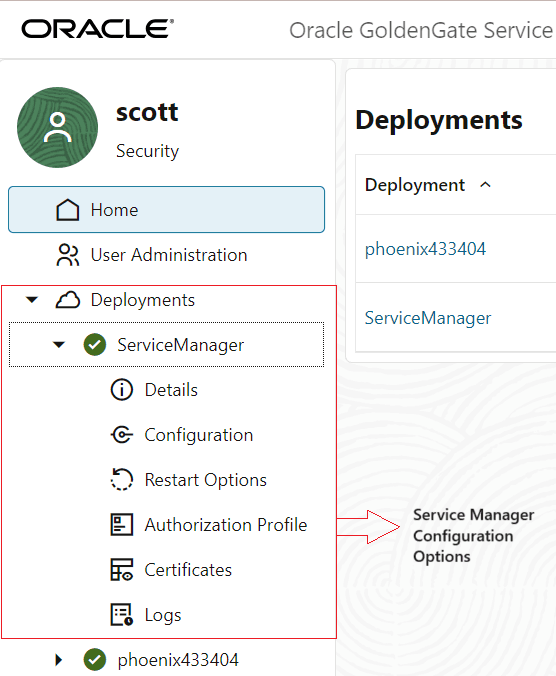
In the left-pane of the Service Manager web page, the Deployment section has two sub-sections, Service Manager and deployment. Both these sub-sections contain the options, which allow configuring the Service Manager or deployment.
The following images show the configuration options for Service Manager and the deployment.
| Service Manger Configuration Options | Deployment Configuration Options |
|---|---|
 |
 |
| Click the Service Manager option to expand the Service Manager configuration options. | Click the deployment name to expand the deployment configuration options. |
The following table describes the configuration options for Service Manager and deployment.
| Configuration Option | Service Manager | Deployment |
|---|---|---|
| Details | Click the Details option under Service Manager. It displays information regarding the following:
|
Click the Details option under deployment name. It displays information regarding the following:
|
| Configuration | Displays the list of environment variables configured for the Service Manager and deployment. You can add, edit, or delete environment variables from this page. |
Displays the list of environment variables configured for the Service Manager and deployment. You can add, edit, or delete environment variables from this page. |
| Restart Options | Click this option to view the restart parameters for the Service Manager. The restart options for the Service Manager cannot be edited. The table in the right-pane shows the following values:
|
See Manage Auto Start and Auto Restart for Extract and Replicat Processes. |
| Authorization Profile | See Create an Authorization Profile | See Create an Authorization Profile |
| Certificates | See Manage Certificates for Deployments | See Manage Certificates for Deployments |
| Logs | Displays the log activity for the Service Manager. | Displays the log activity for the Oracle GoldenGate Microservices. You can select the service from the drop down list to view the activities associated with a particular service. |