Failover Support for Oracle GoldenGate with PostgreSQL 17 and higher
Learn about configuring failover for Oracle GoldenGate with PostgreSQL 17 and higher.
PostgreSQL 17 has introduced support for automatic synchronization of logical replication slots between primary and standby servers. When used with Oracle GoldenGate, this capability enables seamless failover of Extract processes without requiring manual recreation of replication slots.
This feature ensures continuous data replication with minimal interruption during failover events.
Prerequisites for Enabling Failover Support for Oracle GoldenGate for PostgreSQL 17 and higher
Before enabling failover support, ensure the following:
-
PostgreSQL version 17 or later is deployed.
-
A primary and standby (replica) configuration is already set up.
-
Oracle GoldenGate is installed and configured.
-
Required database permissions are available.
Configure the Failover Support
Configure the failover support by performing the following tasks on the PostgreSQL primary and standby servers and then on the Oracle GoldenGate Extract side.
-
Configure PostgreSQL primary and standby servers.
On the Primary Server: Update the PostgreSQL configuration parameters:
wal_level = logical
max_replication_slots = *sufficient_value*
sync_replication_slots = on
synchronized_standby_slots = '*standby_slot_name*'
On the Standby Server
Update the configuration parameters:
hot_standby_feedback = on primary_slot_name = '*primary_physical_slot*' -
After updating the configuration, restart PostgreSQL on both the primary and standby servers.
-
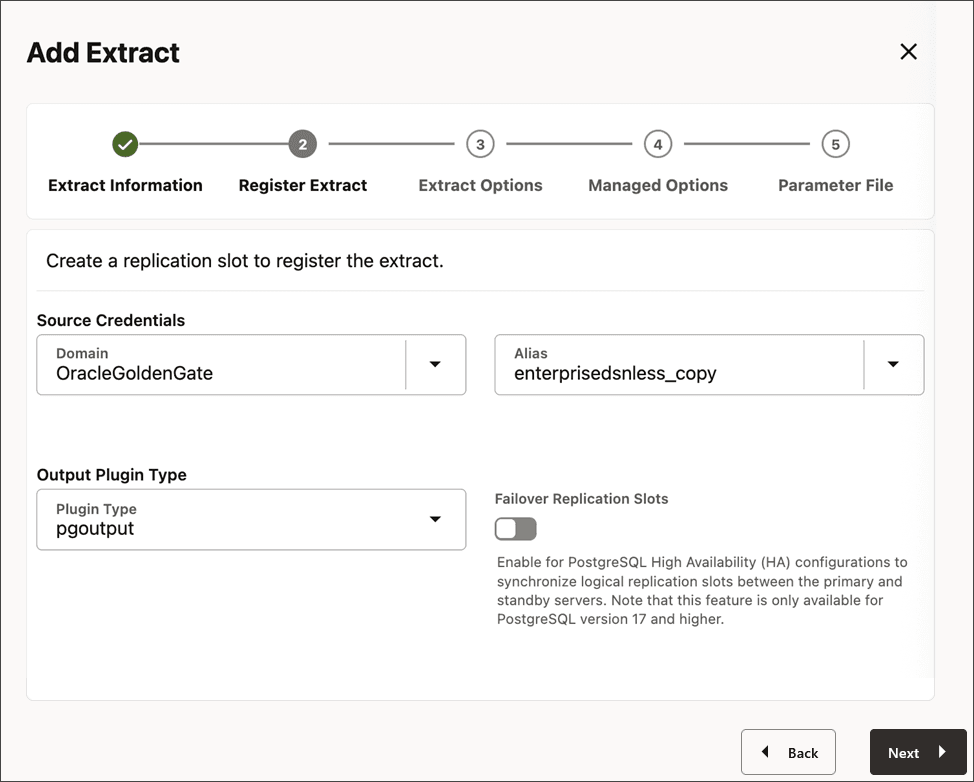
Enable failover slot support while registering the Extract process.
Using Oracle GoldenGate web interface
While creating the Extract for PostgreSQL, enable the Failover Replication Slots toggle switch:
Using AdminClient
REGISTER EXTRACT *extract_name* FAILOVERSLOT;Using REST API
POST /services/v2/extracts/AT { "credentials": { "alias": "fail1" }, "registration": "default", "failoverSlot": true } -
Verify the configuration on the PostgreSQL primary and standby servers:
On the Primary Server: Run the following query:
SELECT slot_name, slot_type, failover
FROM pg_replication_slots;
The output should show:
-
Slot type is
logical -
failoveris set totrue
On the Standby Server: Run the following query:
SELECT slot_name, restart_lsn
FROM pg_replication_slots;
The output should show:
-
The same slot exists on the standby
-
LSN values are progressing
-
-
Perform the failover by performing the following steps:
-
Promote the standby server to primary using the configured high availability mechanism.
-
Update the Extract configuration to connect to the new primary database.
-
Start or resume the Extract process.
Replication continues from the last processed position without requiring reinitialization.
-
-
Monitor replication slot status:
SELECT slot_name, active, restart_lsn
FROM pg_replication_slots;
Verify the following:
-
Slot is active
-
Restart LSN is advancing
-
No excessive WAL accumulation
-
-
Removing unused replication slots helps prevent excessive
WALretention and disk usage.SELECT pg_drop_replication_slot('*slot_name*');
Best Practices for Failover Support Configuration
For configuring failover support with Oracle GoldenGate Extract for PostgreSQL, consider the following best practices:
-
Enable failover slots during Extract creation
-
Regularly monitor replication slot status
-
Perform periodic failover testing
-
Ensure adequate disk space for WAL files
Limitations
Yugabyte Database Limitation
Failover slots are not supported by Yugabyte Database as it still uses older PostgreSQL version, which does not support failover slot.
Oracle GoldenGate Limitation with MIGRATE command
Failover slot does not work with Migrate because the newly created slot is not a failover slot with the failover = true setting.
Cloud-Specific Considerations
Amazon RDS for PostgreSQL
Set the following parameter:
rds.logical_slot_sync_dbname = '*database_name*'For details, see: https://docs.aws.amazon.com/AmazonRDS/latest/UserGuide/Appendix.PostgreSQL.CommonDBATasks.pglogical.slot.synchronization.html
Azure Database for PostgreSQL
-
Failover is managed automatically
-
Ensure logical replication is enabled
To know more, see https://learn.microsoft.com/en-us/azure/postgresql/high-availability/concepts-high-availability#failover-support
PostgreSQL Logical Decoding Details
For details on PostgreSQL logical decoding, see https://www.postgresql.org/docs/17/logicaldecoding-explanation.html.