Run Agent Builder Workflows with DB Agent Engine
Configure a database target, validate readiness, and run compatible Agent Builder workflows inside Oracle AI Database.
DB Agent Engine compiles a compatible visual workflow to Open Agent Spec and runs it in an authorized Oracle AI Database PDB. Near-DB remains the default execution mode for existing workflows and workflows that cannot run in the selected database.
When to Use DB Agent Engine
Use DB Agent Engine when the complete workflow is supported by the selected database runtime and the target PDB passes its readiness check.
| Use case | How DB Agent Engine helps |
|---|---|
| Governed database assistant | Runs a compatible workflow in the PDB approved for the business domain. |
| Department-specific execution | Lets teams use an authorized Oracle AI Database data source as their execution target. |
| Data-adjacent workflow processing | Runs database-supported workflow components where approved data services are available. |
| Sequential batch processing | Uses Map to run one saved custom flow for each JSON-array item in sequence. |
| Parallel batch processing | Uses Parallel Map to run one saved custom flow concurrently for each JSON-array item. |
| Multi-flow fan-out | Uses Parallel Flow to run multiple independent saved custom flows concurrently and return each result. |
| Gradual adoption | Keeps existing workflows in Near-DB mode while teams enable DB Agent Engine only for ready, compatible workflows. |
Prerequisites
Before you configure DB Agent Engine, make sure that:
- Agent Factory is release 26.10 or later.
- The target PDB provides a valid
DBMS_AI_AGENTpackage and the required DBMS Cloud capabilities for DB Agent Engine. - A compatible OCI Generative AI model is configured and accessible to the user. See Configure LLM.
- The model is enabled in its OCI tenancy and region, and the target PDB can reach its endpoint.
- The user has access to the execution database and model. Administrators can select the Agent Factory application database. Other eligible users can select authorized Oracle AI Database data sources that they own or can use.
- A database administrator has configured the required packages, grants, network ACL, proxy when used, and TLS trust in the target PDB.
Agent Factory checks these requirements but does not install database packages or change database privileges, network ACLs, proxy settings, or TLS configuration.
Configure DB Agent Engine
Configure and validate each database and model combination before you use it with DB Agent Engine.
- Sign in to Agent Factory as an administrator or an authorized editor.
- Open Configuration and select DB Agent Engine.
-
Select an Execution database.
- Administrators can select the Agent Factory application database.
- Other eligible users can select authorized Oracle AI Database data sources.
- Applied AI Datasets cannot be used as an execution database.
-
Select a compatible OCI Generative AI model.
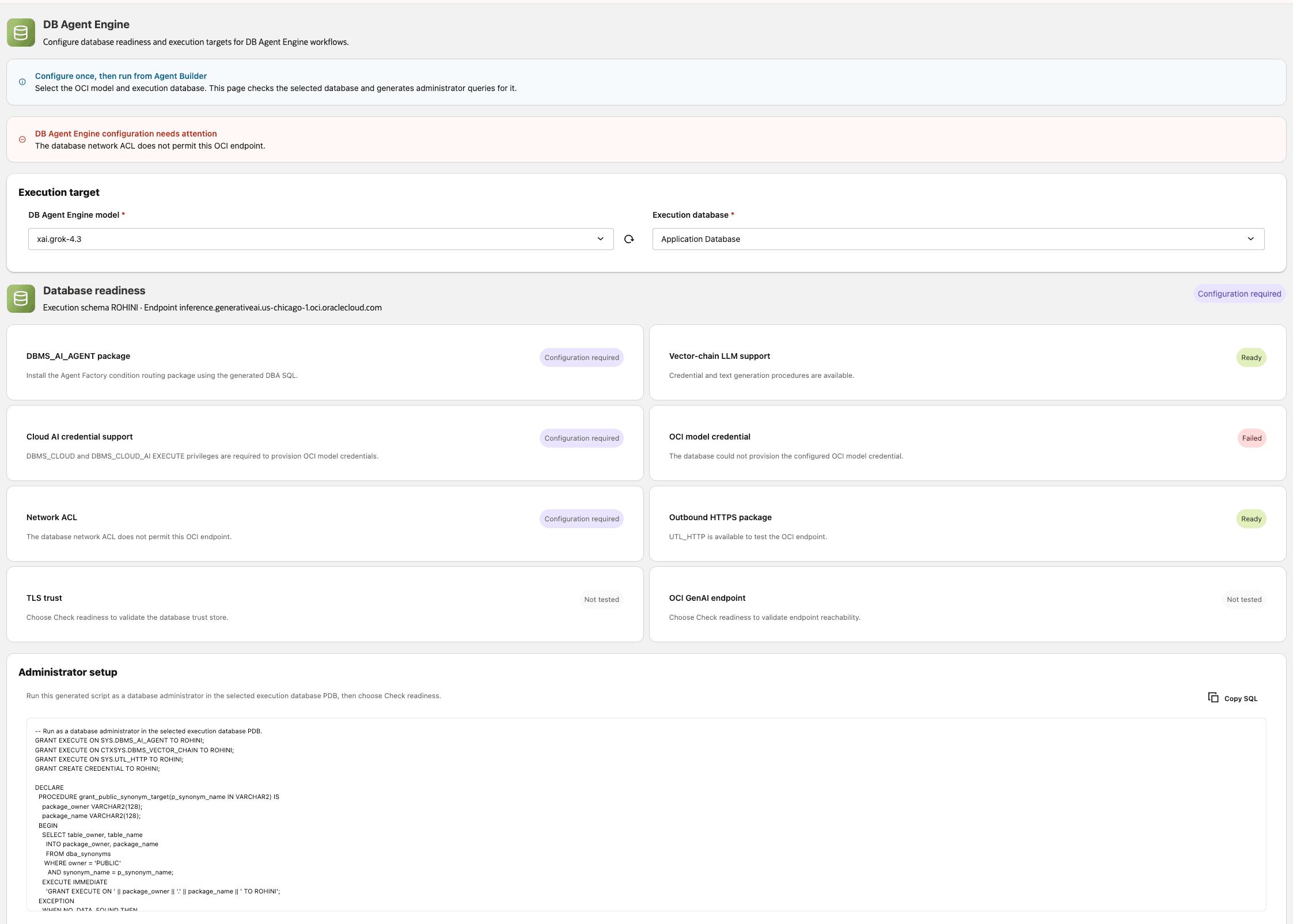
Description of the illustration db-agent-engine-database-model-selection.png
- Select Check readiness.
- Review the readiness cards for the selected database and model.
-
If a check fails, follow the displayed remediation guidance.
- When SQL remediation is available, copy the SQL and ask a database administrator to run it in the selected target PDB.
- For network, proxy, or TLS failures, ask a database administrator to configure the target PDB according to your organization’s security policy.
-
Select Check readiness again after the required changes are complete.
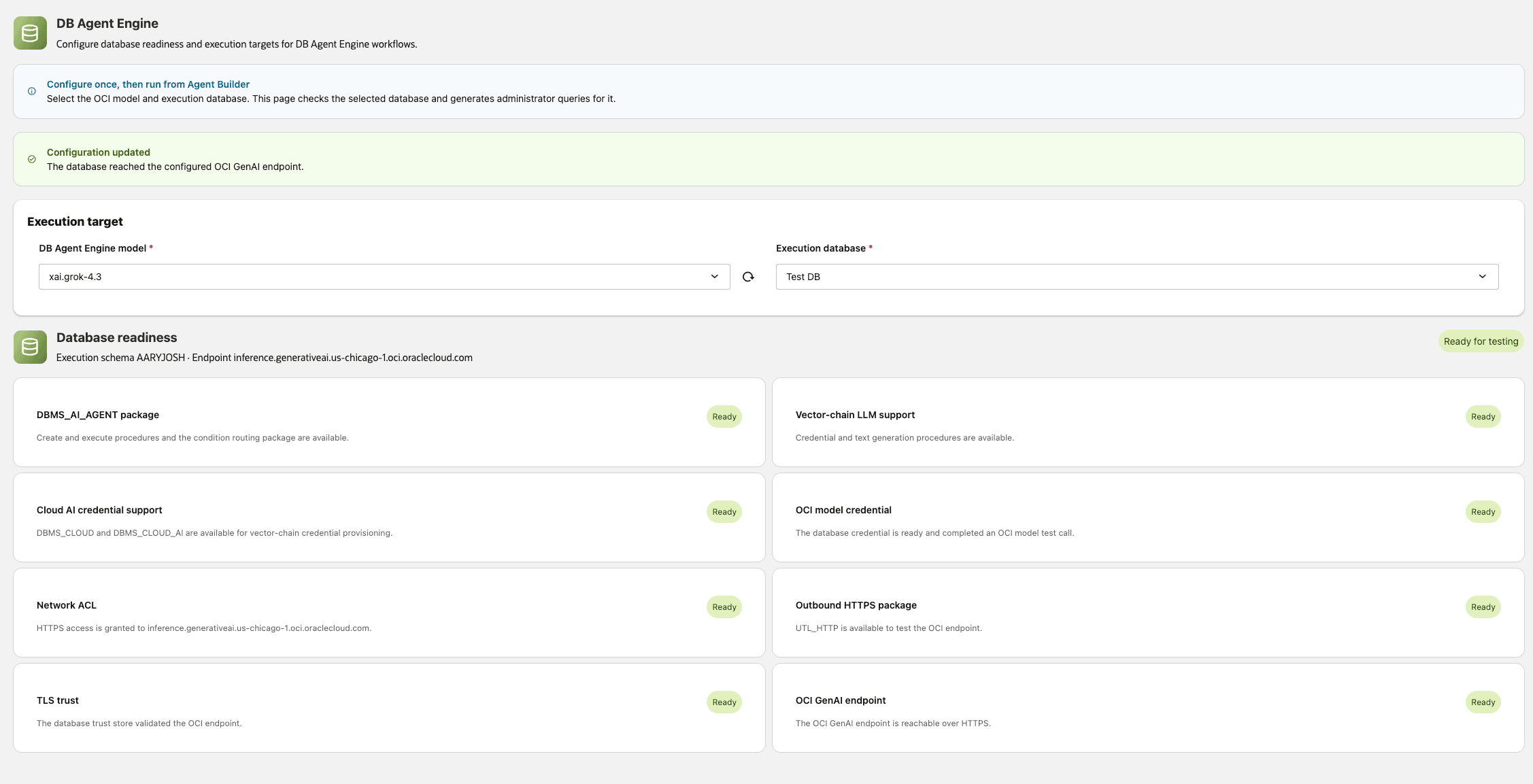
Description of the illustration db-agent-engine-readiness.png
Changing the execution database or model invalidates the previous readiness result. Run the readiness check again for the new combination. The refresh actions reload available databases or models but do not run readiness checks.
Enable DB Agent Engine for a Workflow
After the selected database and model pass the readiness check, select the execution database and enable DB Agent Engine in Agent Builder. See Select an Execution Database for DB Agent Engine Workflows.
Agent Factory validates the selected target and workflow components before it enables DB Agent Engine. For runtime details, limitations, and failure guidance, continue with the following sections.
Use Supported Agent Builder Nodes
DB Agent Engine supports the following Agent Builder nodes. The complete workflow, including referenced custom flows, must meet the requirements for the selected execution database.
| Node | Support and requirements |
|---|---|
| Chat input | Supported through translation. For Map and Parallel Map paths, the message must contain one JSON array and cannot be combined with direct non-map input. |
| Chat output | Supported through translation. The connected final output is returned to the user. |
| LLM | Supported natively. Select a compatible model, ensure that the execution target is ready, and use a credential available on that target. |
| Agent with supported tools | Supported natively when each tool has DB Agent Engine support. Each tool instance is scoped to the Agent node that uses it. |
| Condition | Supported through translation for exact-equality routing. Each True or False branch must have a downstream input or a non-empty branch message. |
| Oracle PL/SQL executor | Supported through translation. Select approved, typed routines on the execution target, and connect the node’s Tools output to an Agent node’s Tools input. |
| Map | Supported natively. Select exactly one compatible custom flow and provide an array input. |
| Parallel Map | Supported natively. Select exactly one compatible custom flow, provide an array input, and use an execution database that supports parallel workers. |
| Parallel Flow | Supported natively. Select at least two compatible custom flows with output contracts supported by DB Agent Engine. |
| Sticky Note | Available on the canvas but omitted from execution. |
Agent nodes that contain sub-agents are not supported. When you enable DB Agent Engine on an empty canvas, Agent Builder limits the Components panel to supported nodes.
Run Saved Custom Flows with DB Agent Engine
Use Map, Parallel Map, or Parallel Flow to run compatible saved custom flows with DB Agent Engine.
| Node | Use case | DB Agent Engine requirements |
|---|---|---|
| Map | Process each item in a JSON array sequentially through one saved custom flow. | Select exactly one custom flow. The input must be an array, and the selected flow must be fully compatible with DB Agent Engine. |
| Parallel Map | Process each item in a JSON array concurrently through one saved custom flow. | Select exactly one custom flow. The input must be an array, the selected flow must be fully compatible, and the target database must support parallel workers. |
| Parallel Flow | Run multiple independent saved custom flows concurrently and return each result. | Select at least two custom flows. Each flow and its output contract must be compatible with DB Agent Engine. |
Agent Factory validates the root workflow and every referenced custom flow. A selected database release can reject a component even when Agent Factory successfully prepares the workflow for DB Agent Engine.
The parent workflow’s execution mode and database control the run. A referenced flow’s saved execution mode and database do not override the parent workflow.
See Map, Parallel Map, and Parallel Flow for general configuration instructions.
DB Agent Engine Details and Limitations
- The complete workflow graph must be supported by the selected database runtime. Agent Factory does not silently fall back to Near-DB execution.
- DB Agent Engine returns the final result after database execution completes. Real-time database-token streaming is not available in Agent Factory chat.
- Agent Memory remains an Agent Factory feature and follows its existing user and workflow access controls.
- Workflow records, exports, Agent Spec content, browser responses, and chat responses do not contain OCI API private keys or database credential values.
Troubleshoot DB Agent Engine
| Issue | Action |
|---|---|
| DB Agent Engine cannot be enabled | Review the listed unsupported components. Remove or replace them, or use Near-DB mode. |
| Agent Factory asks you to complete the readiness check | Open Configuration > DB Agent Engine, select the database and model, and select Check readiness. |
| A package or grant check fails | Ask a database administrator to apply the target-specific remediation shown on the DB Agent Engine page. |
| The target cannot reach the OCI Generative AI endpoint | Configure outbound HTTPS access, the required ACL or proxy, and trusted TLS certificates for the target PDB. |
| A Map-family component reports an input error | Provide the array input required by that component and verify nested-flow compatibility. |
| Execution fails with a reference ID | Provide the reference ID to your support team and collect Agent Factory diagnostics. |