Ingestion Service
Prepare a searchable copy of information from one or more places so AI assistants can use it to answer questions. The last ready copy stays available while an update is being prepared.
What the Ingestion Service Does
An ingestion is a saved collection of information from one or more places, such as a folder, website, shared drive, cloud storage location, or database. The service reads the selected information and prepares a searchable copy. An AI assistant can use that copy to find information when answering questions; it does not receive the password or access token for the original sources.
When the information changes, you can refresh the copy. Assistants can keep using the last ready copy while the updated one is being prepared.
How Ingestions Work
A data source stores a connection to original content and its credentials. An ingestion stores references to one or more data sources and the processing configuration that prepares searchable content.
The ingestion parent is the stable resource that users manage. It groups the name, description, data source references, refresh schedule, permissions, and default version. Each version records an immutable processing configuration and the artifact set that it produces.
The artifact set includes normalized content, source metadata, chunks, embeddings, vector index state, citations, and PDF page information when available. A version becomes available only after all required processing stages succeed and the service publishes its artifact set.
An assistant uses the latest ready version by default. Some features may let you choose a particular ready version instead. Only a completed version can become the default.
Supported Data Sources and Consumers
An ingestion can use one or more accessible data sources, including:
- File systems and uploaded files. See File Source.
- Web pages and linked web content. See Web Source.
- SharePoint sites and libraries. See SharePoint.
- Google Drive locations. See Google Drive.
- Amazon S3-compatible buckets and prefixes. See S3-Compatible Object Storage.
- OCI Object Storage buckets and prefixes. See OCI Object Storage.
- Database tables and views. See Database.
The ingestion retains source references and processing settings. Each data source keeps its own credentials and connection settings.
Use an ingestion with a vector node to retrieve content from one ingestion. Deep Research RAG agents can use one or more ingestions. If a Deep Research RAG agent uses multiple ingestions, they must use the same embedding provider and model.
Create an Ingestion
-
Open Create Ingestion. Nothing is selected yet. The list shows the information sources you are allowed to use.
-
Select one or more sources. If you select more than one database, configure each database separately so the service knows which records and columns to read.
-
Choose the available preparation and search settings, including the preparation strategy, chunking settings, and embedding provider and model.
These choices determine how the service splits information into smaller passages and finds passages that are relevant to a question. They affect the prepared copy only; they do not change the original source.
Review the selected sources and settings. Go back and correct them before you start preparation if needed.
-
Select Create. The service checks that you can use each source and that the required choices are complete. If something is missing or invalid, the form points it out and does not start preparation.
-
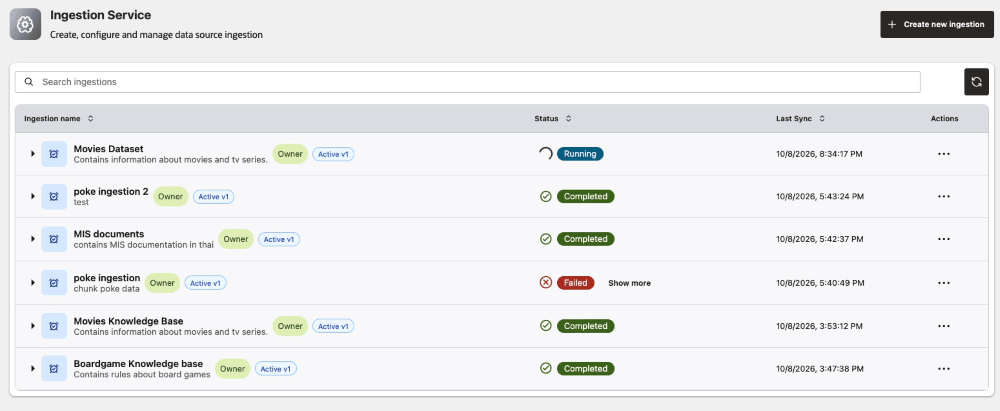
The new ingestion appears in your list while the service prepares the information. You can leave the page and return later to see its progress.
-
When preparation succeeds, the ingestion is ready to add to an assistant. Until then, an assistant cannot search it. If preparation fails, the details explain what went wrong and what you can try next.
Configure Database Sources
For a database source, select the tables or views. Identify the column that distinguishes each record (the row identity), and choose the columns whose contents should be searched (the columns to embed). When needed, also choose what to show as the result title and which field indicates where the result came from. Provide this configuration explicitly; the service does not guess when it is ambiguous.
Unsupported files can be skipped. If the service cannot read a supported source object, processing fails with an actionable explanation.
Monitor Status and Availability
The processing stage can be CRAWLING, STORING_CONTENT, CHUNKING, EMBEDDING, or INDEXING. A stage shows progress; only COMPLETED confirms that the artifact set is published.
During a later refresh, the service can show that the ingestion is running while the last successful artifact remains available. If the refresh fails or is cancelled, consumers continue to use that artifact.
Agent Factory shows the current stage, timestamps, progress where available, and a safe explanation for a failure. These statuses describe the reusable Ingestion Service resource. For the separate data source processing statuses, see What are the ingestion stages for a data source?.
Update and Refresh Ingestions
- Changing an ingestion name or description changes only how it appears in the list. It does not start processing or create a version.
- Changing preparation or search settings creates the next version. A version is a saved set of settings and the searchable copy produced with them. The service prepares it separately, while assistants keep using the current ready version. You cannot edit a version after processing starts.
- When a new version is ready, assistants that follow the ingestion default switch to it. If a feature supports selecting a particular version, an assistant that uses that selection continues using it. Only a completed version can become the default.
- If preparation fails, assistants keep using the previous ready version. Review the failure details and retry the new version when the action is available.
- A manual or scheduled refresh checks selected sources for new or changed information. If nothing changed, the service does not need to prepare a new copy. If information changed, the service prepares an updated copy for the active version without creating a new visible version.
- A retry uses the same failed version and configuration. It does not change the default until publication succeeds.
The service publishes replacement content only after all required stages succeed. A failed or cancelled update keeps the last successful artifact available.
Share and Delete Ingestions
Sharing lets another person use the prepared information and any lifecycle actions you allow them to take. It does not give them your source password or other sign-in details. Confirm that the prepared content is appropriate for the people who can access the ingestion.
Deletion is asynchronous. When you start deleting an ingestion, it becomes unavailable while removal finishes. You can delete only a non-active child version; deleting the parent removes its versions and artifacts after dependency checks succeed.
If an assistant still uses an ingestion, remove it from that assistant before deleting the ingestion. If an assistant dependency blocks deletion, the service identifies the assistant that is preventing deletion. A data source cannot be deleted while an ingestion or supported agent depends on it. Review the dependency details and remove the blocking references before retrying deletion.