16.5.1.2 Adjusting UI When Selected Job Changes
React to a value change using a dynamic action event handler.
When the hidden
P11_SELECTED_JOB_ID changes value, a When
Selected Job Changes dynamic action handles that event. It evaluates its
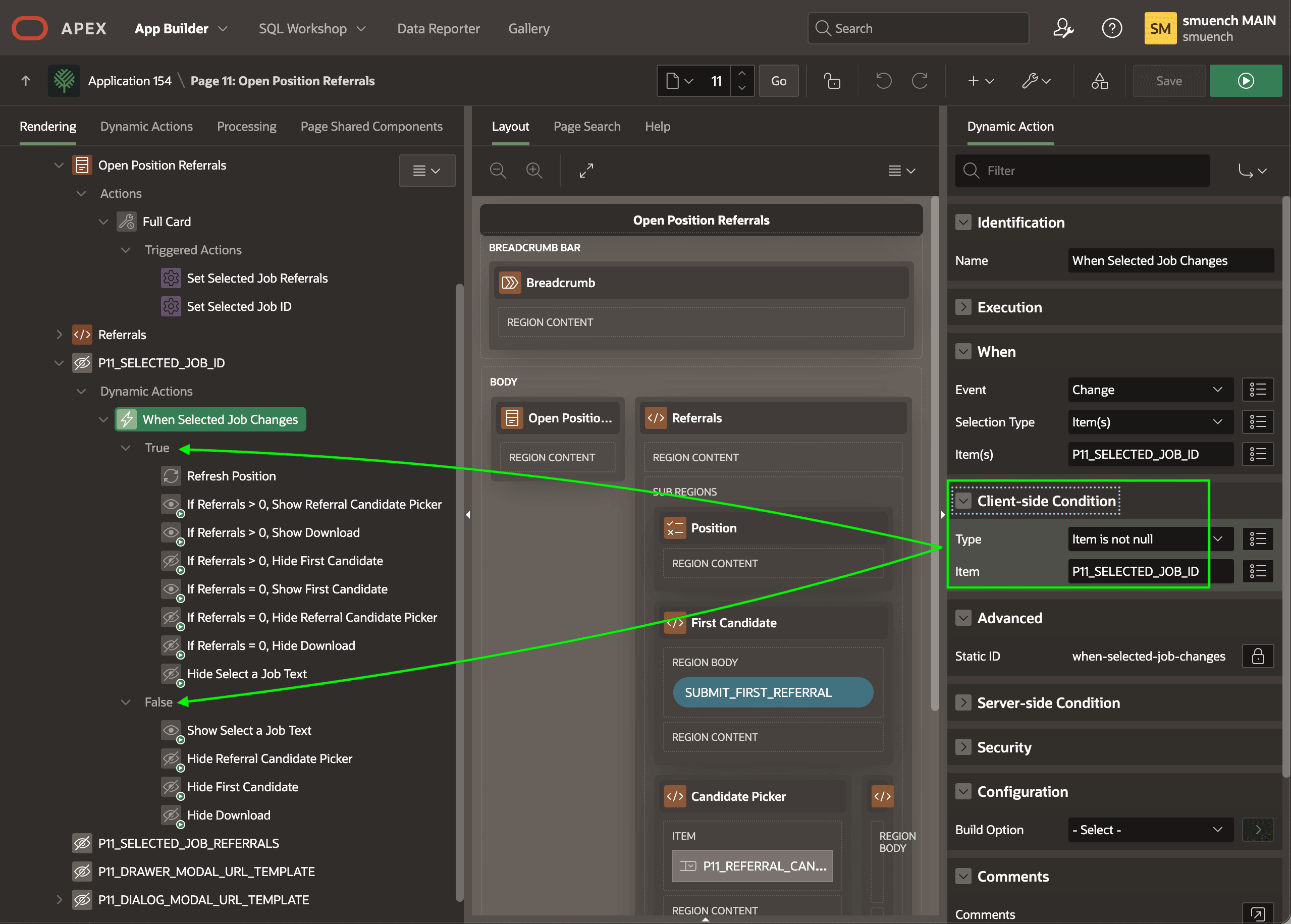
Client-side Condition highlighted below:
- Type:
Item is not null - Item:
P11_SELECTED_JOB_ID
P11_SELECTED_JOB_ID is not null, then the True list of
action steps executes. If it is null, then the False list of action steps
runs instead. These actions combine declarative Refresh, Hide, and
Show action steps with appropriate client-side conditions based on the
P11_SELECTED_JOB_REFERRALS to decide what to refresh, hide, and
show on the right side of the page.
Tip:
Assigning a descriptive name to each action step makes the logic easier to follow when you or a teammates needs to enhance this page in the future.
The figure shows the When Selected Job Changes dynamic action event handler selected in the component tree. It highlights how the true or false result of its configured Client-side Condition affects which set of action steps execute.
Figure 16-43 Using True or False Dynamic Action Steps to Adjust the User Experience
Description of "Figure 16-43 Using True or False Dynamic Action Steps to Adjust the User Experience"
Parent topic: Selecting an Open Job to Add Referral