20.1.5.1.2 Applying Aggregate Constraints with SQL
Use SQL aggregation in a page process after the data-saving processes to reject changes that violate cross-row rules.
Consider a constraint that the total monthly compensation for all employees in a
department cannot exceed a limit of 12000. The following SQL query using
SUM, GROUP BY, and HAVING returns
any departments that violate the rule. The COALESCE function returns
its first non-null argument. So a NULL salary or commission is treated
as a zero (0) while computing the total compensation by department.
-- Return any departments over monthly compensation limit
select deptno,
       sum(coalesce(sal,0) + coalesce(comm,0)) as total_comp
  from emp
 group by deptno
having sum(coalesce(sal,0) + coalesce(comm,0)) > 12000
The following CHECK_DEPARTMENTS_OVERBUDGET procedure uses this query in a FOR loop to check for offending departments. For any it finds, it adds their department number and total compensation amount to the l_overbudget string list using APEX_STRING.PUSH.
l_overbudget is not null, then some department was over budget. If so, it calls APEX_ERROR.ADD_ERROR to signal an error. This vetoes the transaction with a user-friendly error message. The p_message it passes is a translatable text message named OVERBUDGET_DEPARTMENTS whose source text looks like:Departments exceed the %amount budget: %department_listIt passes values for the two message placeholders amount and department_list when calling APEX_LANG.GET_MESSAGE to retrieve the text.
-- In package messages_app
procedure check_departments_overbudget
is
    l_overbudget apex_t_varchar2;
begin
    for j in (select deptno,
                     sum(coalesce(sal,0) + coalesce(comm,0)) as total_comp
                from emp
               group by deptno
              having sum(coalesce(sal,0) + coalesce(comm,0)) > 12000
               order by deptno)
    loop
        apex_string.push(
           l_overbudget,
           apex_string.format('%s (%s)',j.deptno,j.total_comp));
    end loop;
    if l_overbudget is not null then
        apex_error.add_error (
                p_message => apex_lang.get_message(
                                'OVERBUDGET_DEPARTMENTS',
                                apex_t_varchar2(
                                   'department_list',apex_string.join(l_overbudget,', '),
                                   'amount'         ,'12000')),
                p_display_location => apex_error.c_on_error_page);
    end if;
end check_departments_overbudget;
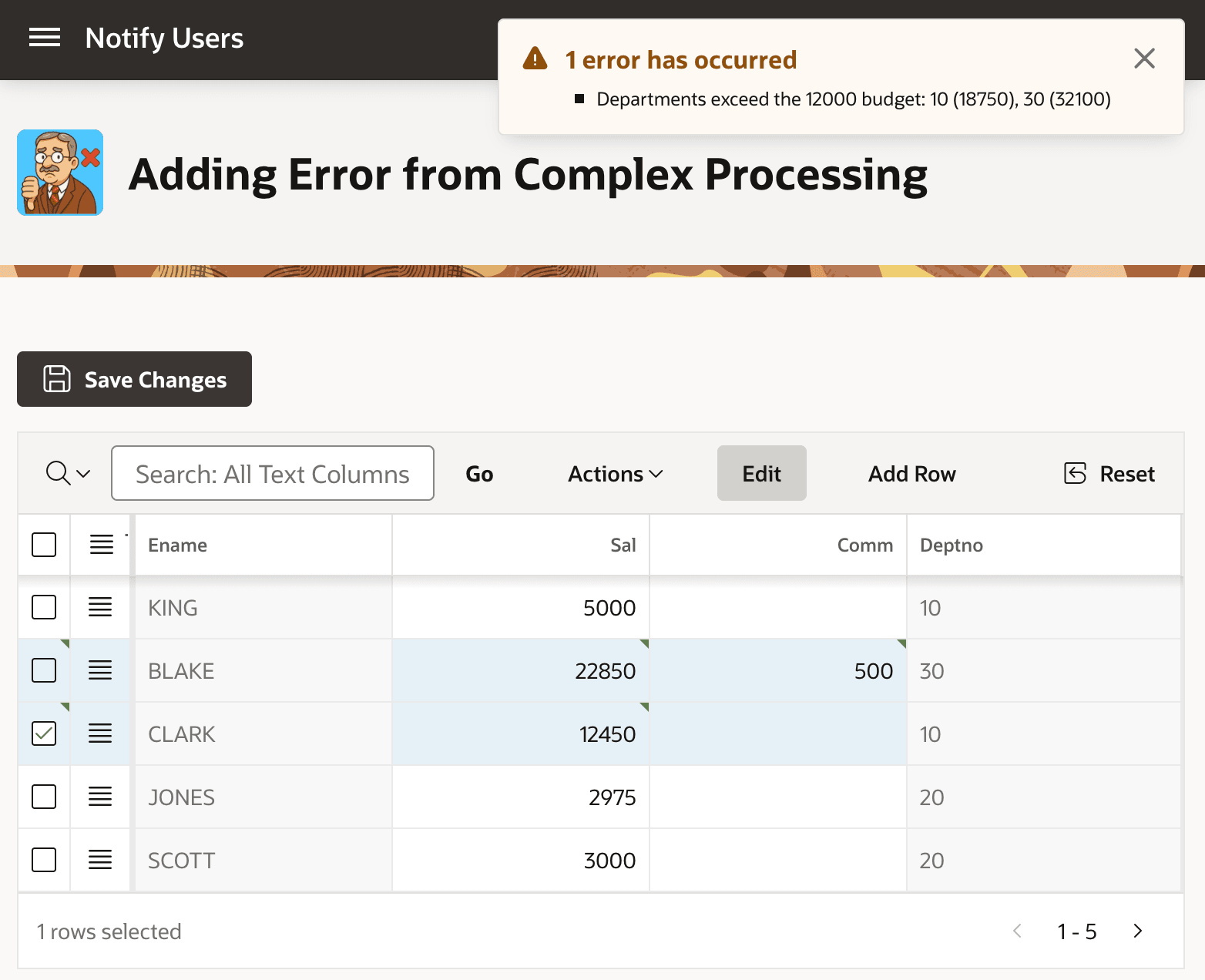
The result looks like the figure below at runtime.
Tip:
This logic can't be done as a Function Body (returning Error Text) validation, because the APEX engine runs validations before the Processing phase where data is saved. Since this aggregate query needs to "see" the pending changes, it must happen in the Processing section after the ones that save the user's changes. The effect is the same, however: changes get rejected with a user-friendly error message.
In the figure, a user editing an interactive grid of salaries and commissions clicks (Save Changes), and any offending departments with total compensation exceeding the 12000 monthly limit appear in the error message. No changes are saved. The user can correct their data entry and try again. The error notification error shows one error message with the text: "Departments exceed the 12000 budget: 10 (18750), 30 (32100)"
Figure 20-12 Aggregate SQL Checks Can Veto the Transaction Using ADD_ERROR
Parent topic: Adding an Error Message in PL/SQL