20.1.5.2 Displaying Messages with JavaScript
Show and clear page or field-level messages from JavaScript, including errors returned by eager server-side checks.
Use the apex.message.showPageSuccess JavaScript function to show a
success message as part of custom client-side logic.
apex.message.showErrors lets you display one or more errors inline
on a particular page item or at page-level. Use the companion
apex.message.clearErrors to clear all errors, or just the error for
a specific page item. To explore an example, combine clearErrors and
showErrors with an Execute Server-side Code dynamic action
to eagerly validate user data entry and show field-specific error messages before
the user submits the page.
Start by adding the following CHECK_DEPTNO function to complement the CHECK_EMPNO from Showing Messages with Dynamic Actions. If p_deptno is a valid department ID, it returns null; otherwise it returns an appropriate error message.
-- In package messages_app
function check_deptno(
    p_deptno in number)
    return     varchar2
is
begin
    for j in (select null
                from dept
               where deptno = p_deptno)
    loop
        return null; -- valid
    end loop;
    return apex_lang.get_message('INVALID_DEPTNO'); -- invalid
end;
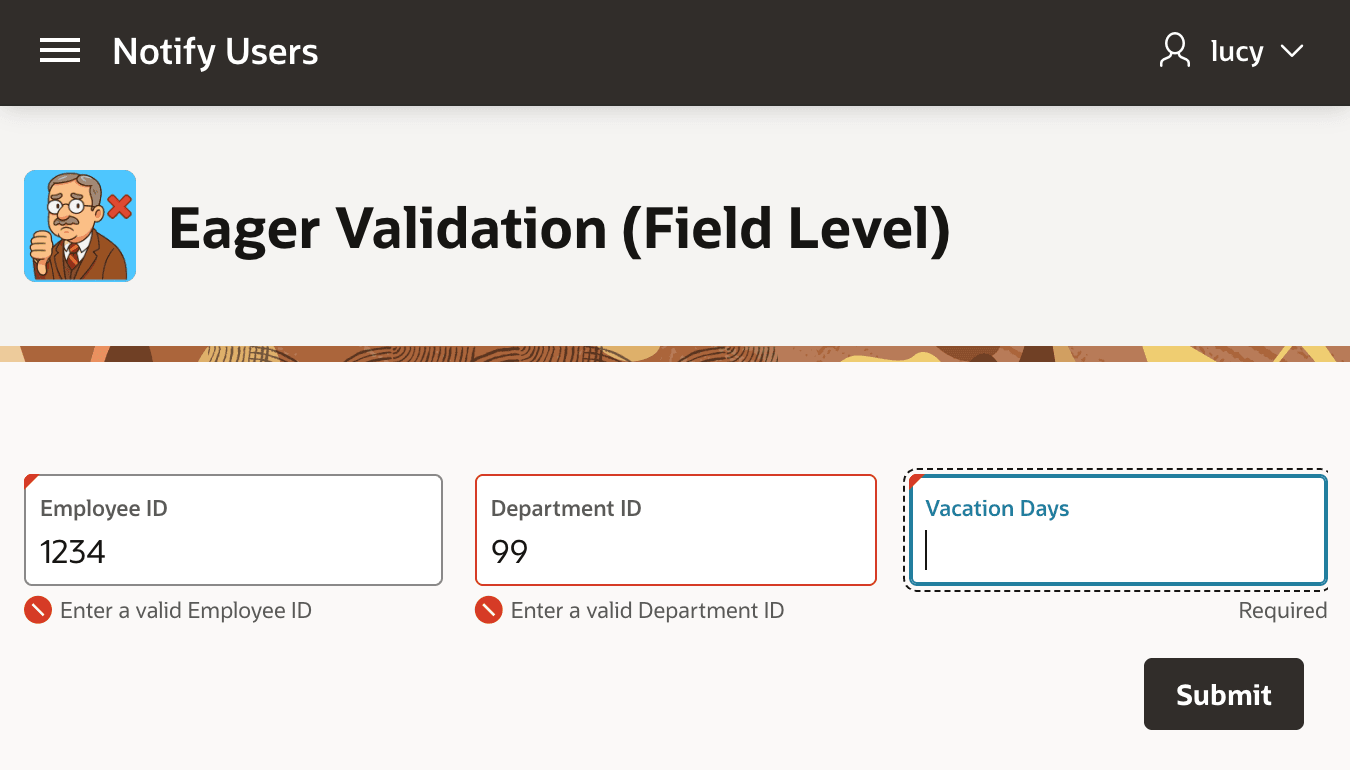
The goal is eagerly validating separate P5_EMPNO and
P5_DEPTNO form fields with error messages showing inline
with the relevant field as shown below. The figure shows a page with three fields. The
user has entered 1234 in Employee ID and 99 in
Department ID, then tabbed into Vacation
Days. Below Employee ID, a red field-level error
appears with a small red circular icon with a white diagonal slash: "Enter a valid
Employee ID". Below Department ID, a similar
error appears: "Enter a valid Department ID".
Figure 20-13 Showing Eager Field-Level Error Messages Before Submitting the Page
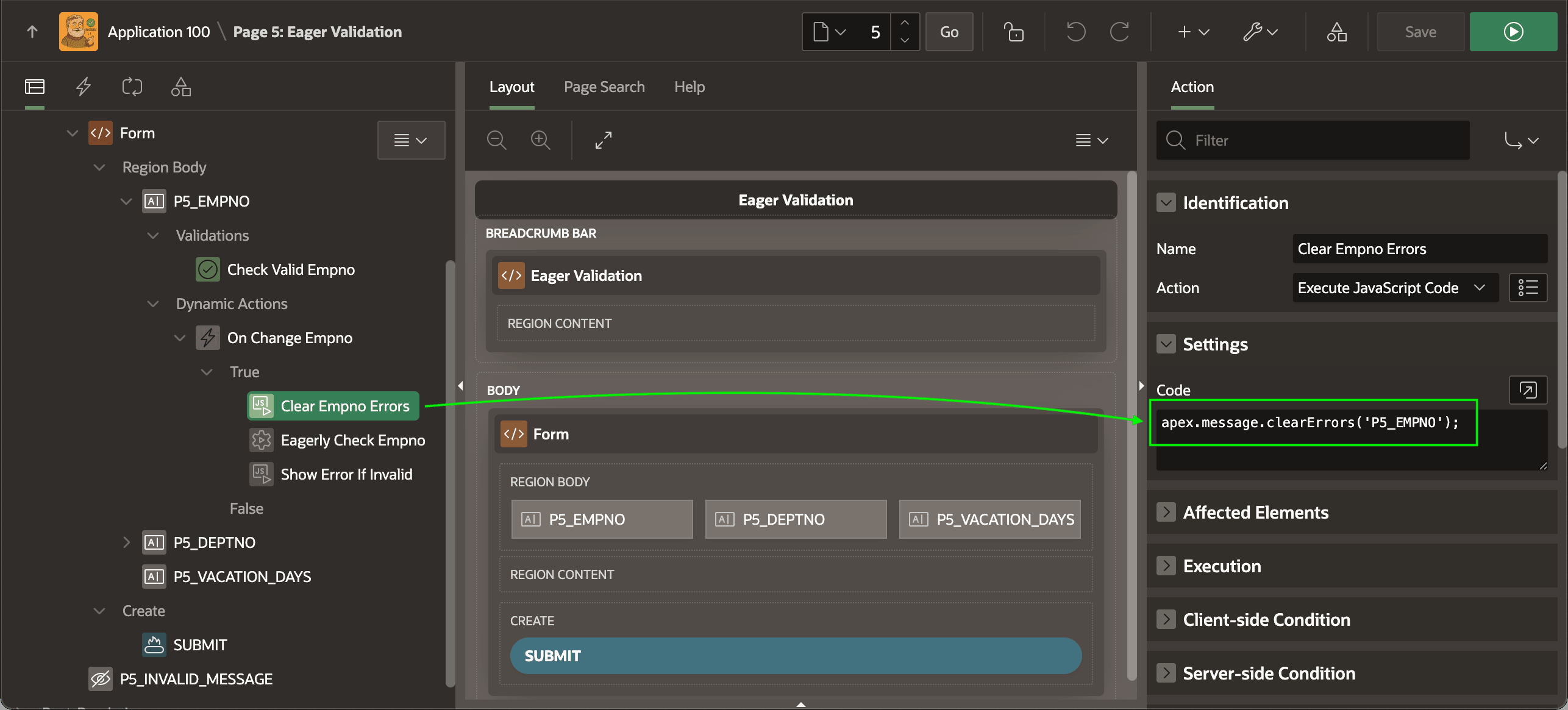
:P5_EMPNO to the CHECK_EMPNO function. Recall that it returns an error message if the employee ID is invalid. As shown below, a dynamic action event handler on the P5_EMPNO item's Change event starts by using a Clear Empno Errors action of type Execute JavaScript Code to clear the errors on that field with the following line of JavaScript:apex.message.clearErrors('P5_EMPNO');Figure 20-14 Clearing Field-Level Errors Before Checking Changed Employee ID
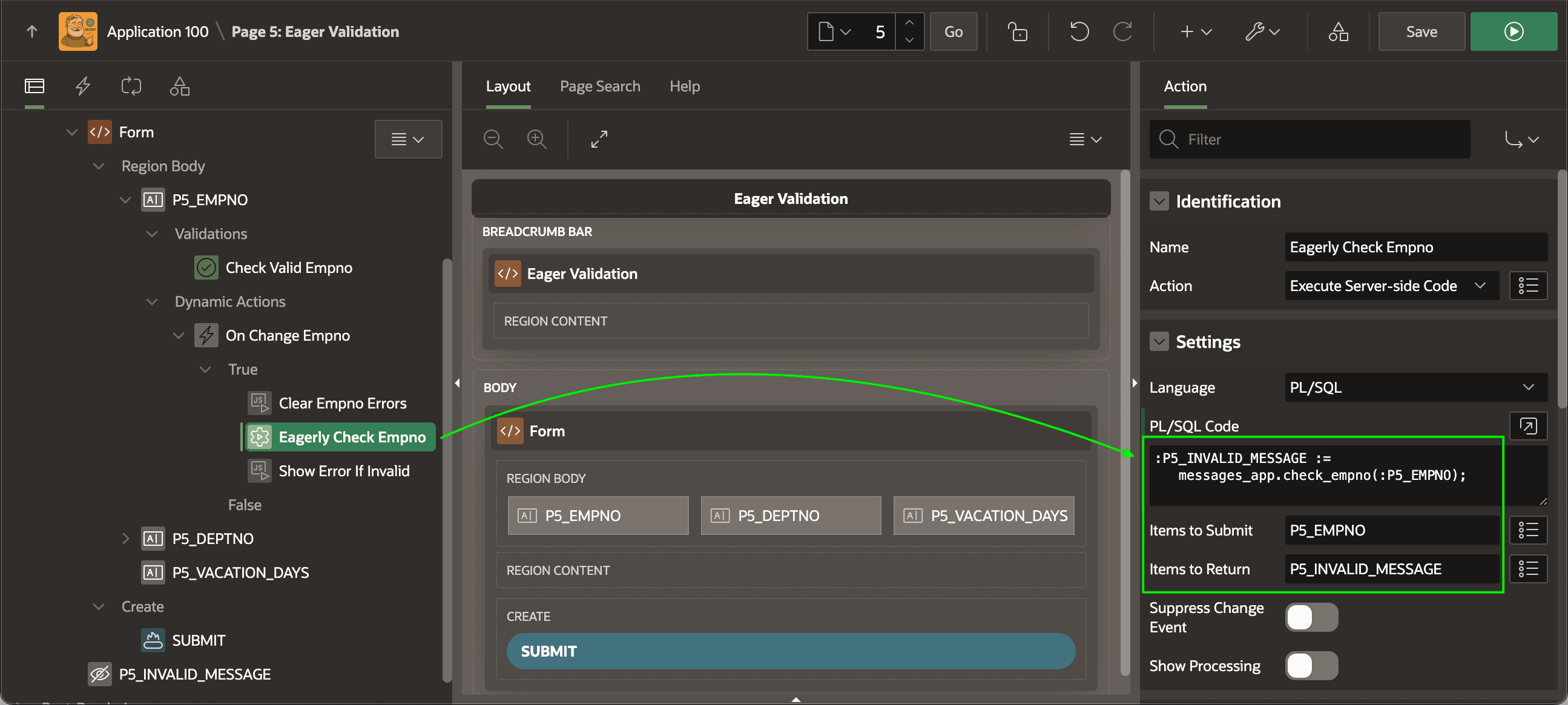
CHECK_EMPNO function, passing in P5_EMPNO and assigns its returned error message to the hidden P5_INVALID_MESSAGE page item. Notice below how the Items to Submit and Items to Return ensure your code gets the latest value of P5_EMPNO from the browser and returns a server-side value back into P5_INVALID_MESSAGE. The action runs this one line of PL/SQL to get the job done::P5_INVALID_MESSAGE := messages_app.check_empno(:P5_EMPNO);Figure 20-15 Validating the Employee ID on the Server
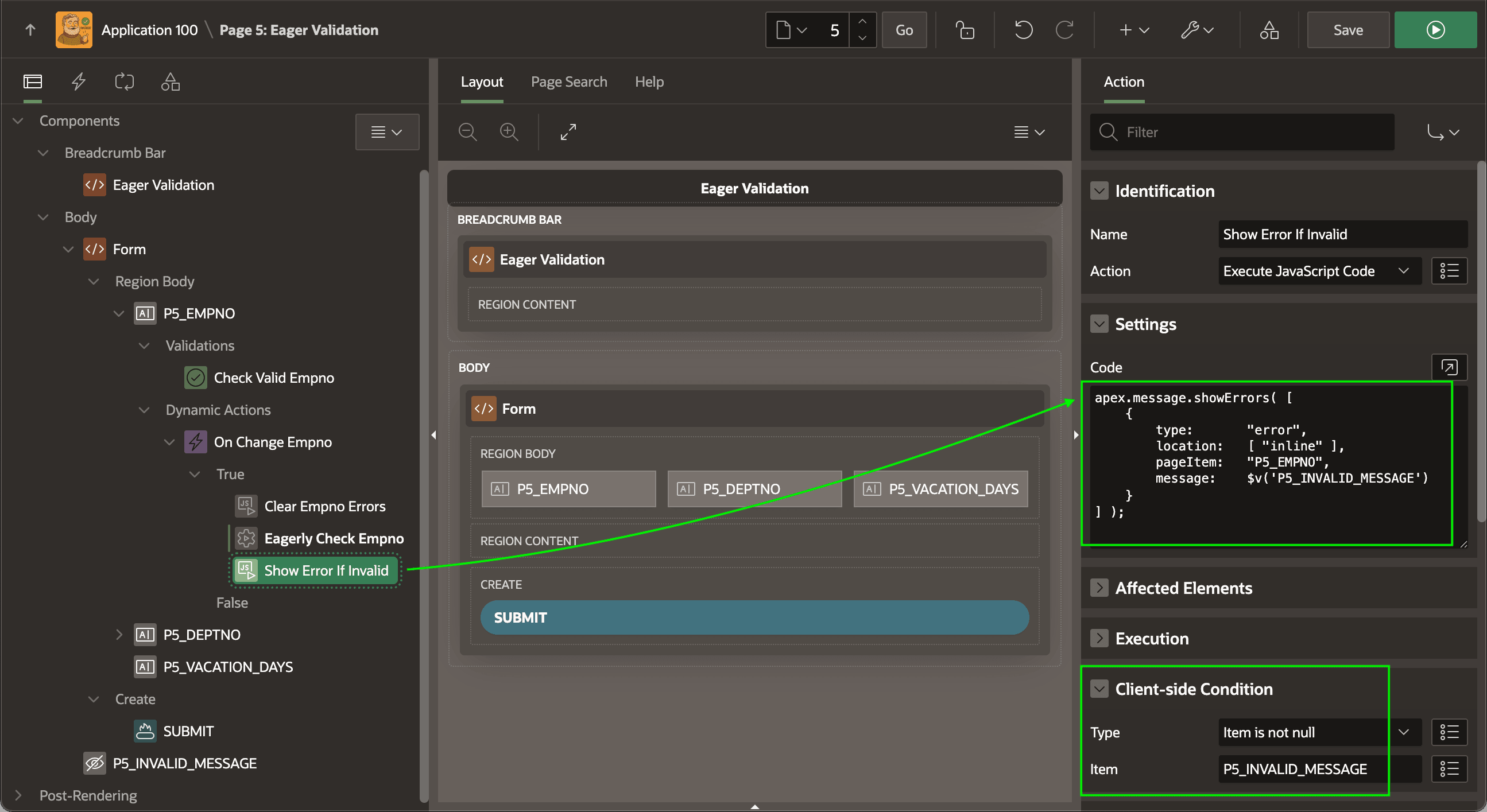
Finally, the Show Error If Invalid action of type Execute JavaScript Code finishes the recipe by conditionally showing the field-level error with the showErrors call below. It passes the error message returned by the server-side check using v$('P5_INVALID_MESSAGE') and indicates the error is inline on the P5_EMPNO item. Notice its Client-side condition is set to execute only if P5_INVALID_MESSAGE is not null.
Tip:
If your error message text contains HTML markup, pass the additional unsafe: false property to showErrors to avoid "escaping" reserved characters like angle brackets.
apex.message.showErrors( [
    {
        type:       "error",
        location:   [ "inline" ],
        pageItem:   "P5_EMPNO",
        message:    $v('P5_INVALID_MESSAGE')
    }
] );
Figure 20-16 Conditionally Showing Error Message Returned by Server-side Check
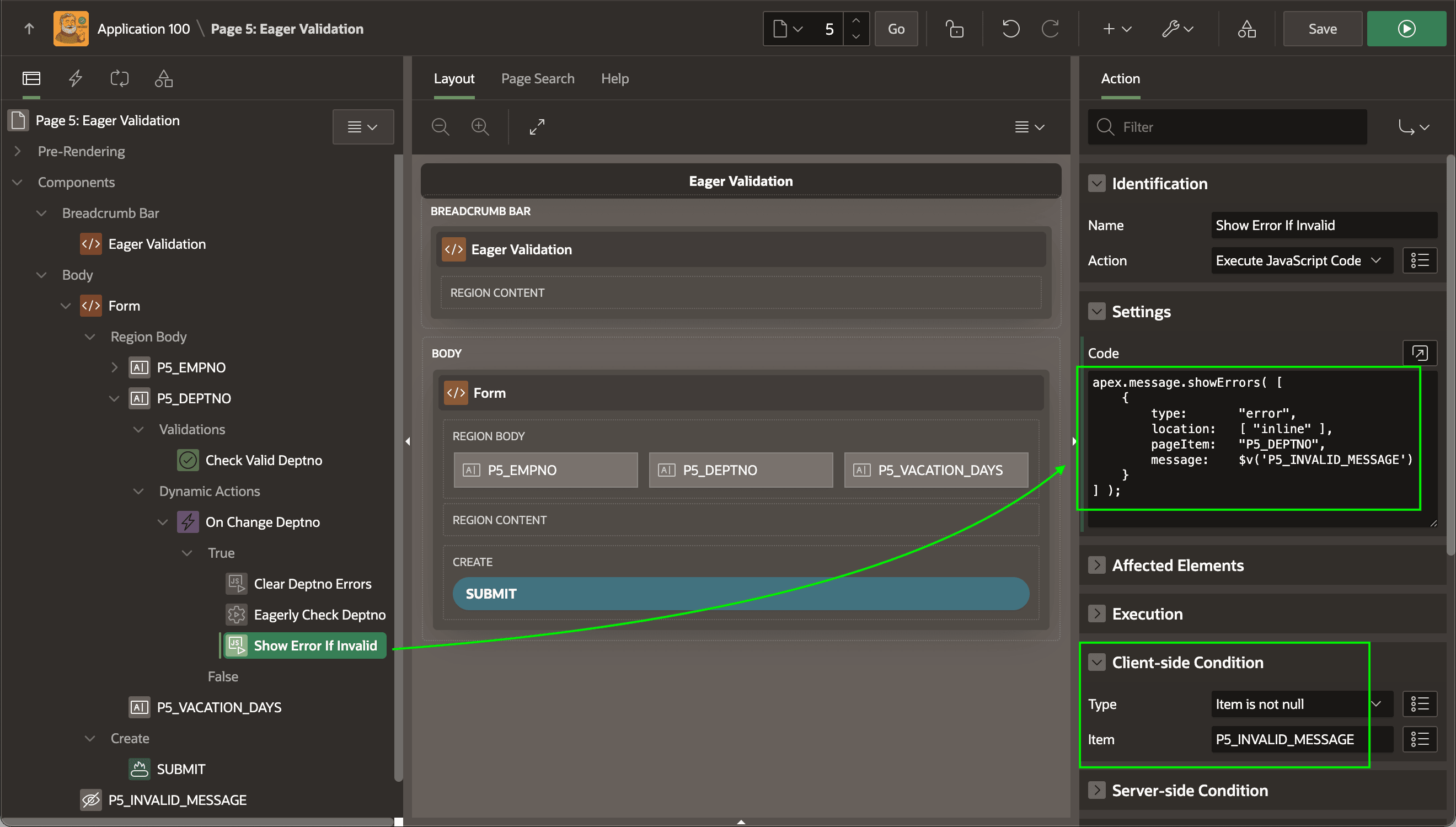
To repeat the same field-level validation on the second field P5_DEPTNO, just reuse the same recipe. Add a Check Valid Deptno validation of type Function Body (returning Error Text) that calls CHECK_DEPTNO. In the Eagerly Check Deptno server-side code, pass P5_DEPTNO to the CHECK_DEPTNO function instead, then show the error on P5_DEPTNO field. You can reuse the same hidden P5_INVALID_MESSAGE field.
Figure 20-17 Reusing the Same Recipe to Eagerly Validate Department ID
Parent topic: Showing Messages Programmatically