11.7.6 Authenticating with an External Provider
With the web credential defined, create a new Social Sign-in Authentication Scheme that references the Web Credential protecting the OAuth client ID and secret for the confidential app used for authentication.
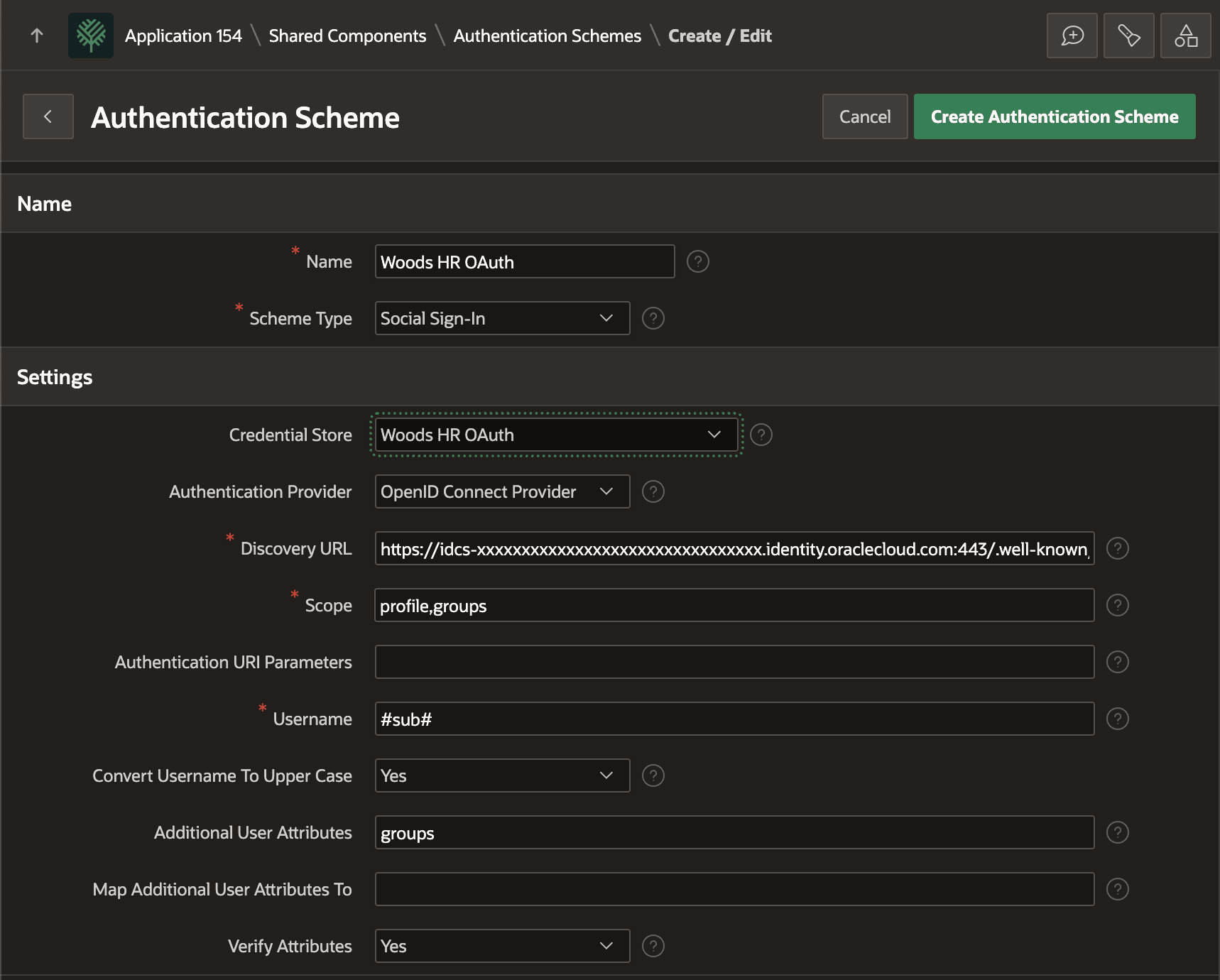
Create a new Social Sign-in Authentication Scheme named Woods HR OAuth. Configure the following options as shown below:
- Credential Store – Choose the web credential you just created
- Authentication Provider – Ensure it's OpenID Connect Provider
- Discovery URL – Enter the discovery URL of your IAM domain:
https://idcs-xx⋯xx.identity.oraclecloud.com/.well-known/openid-configuration - Scope – Enter the comma-separated list:
profile,groups - Username – Ensure it's
#sub#to use the IAM subject at the APEX username - Convert Username To Upper Case – Yes
- Additional User Attributes – Enter the attribute name:
groups
Figure 11-34 Configuring Social Sign-in Authentication Scheme for IDCS
Parent topic: Integrating an External Identity Provider