11.7.7 Enabling Groups in Post-Auth Procedure
To use the groups defined in your external identity provider, write a post authentication procedure and configure your Social Sign-in Authentication Scheme to invoke it.
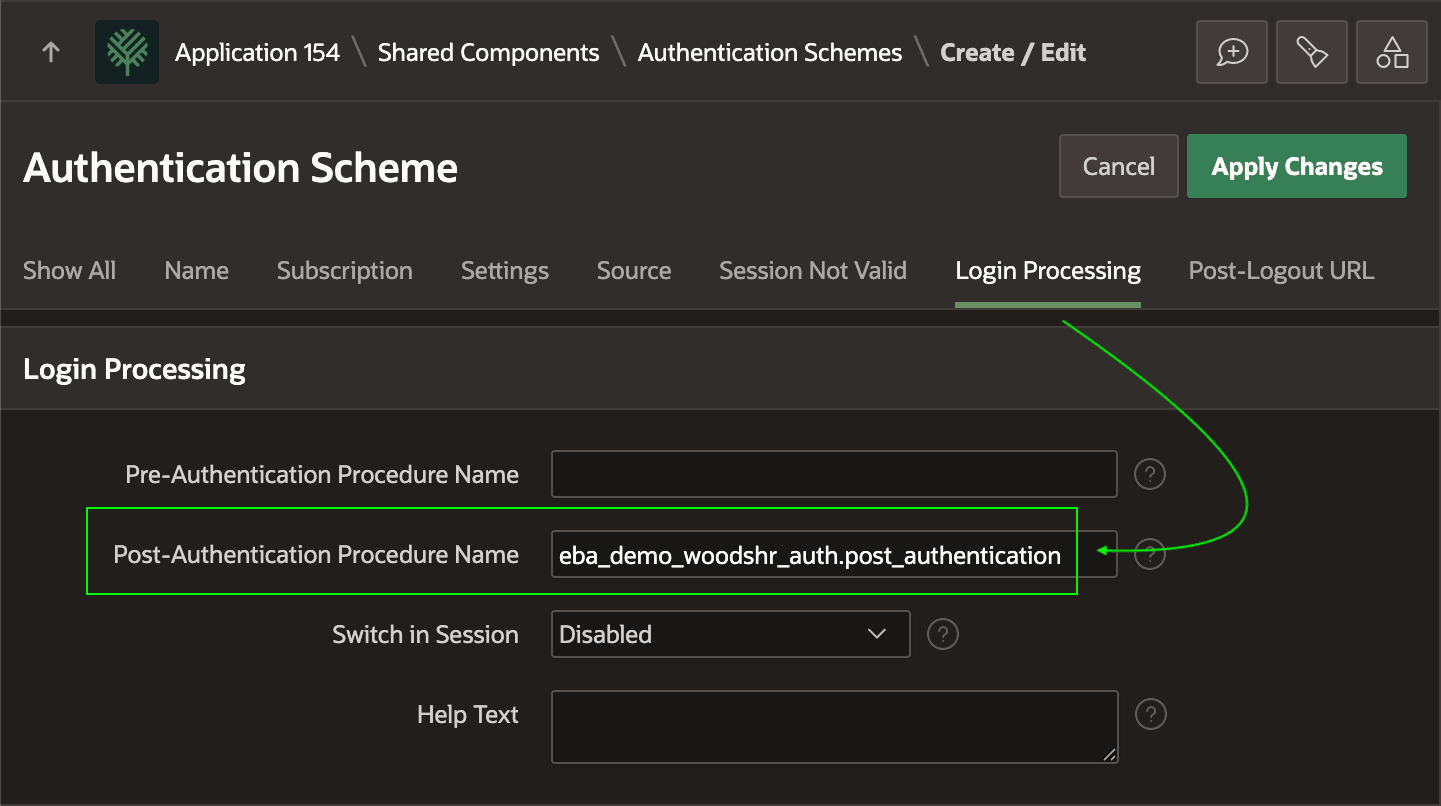
As shown below, the Post‑Authentication Procedure Name field on the Login Processing tab can reference the name of a procedure in a package.
Figure 11-35 Configuring Post-Authentication Procedure to Enable Groups
Your post-authentication procedure can reference the JSON response from the REST API call made to the external identity provider. Retrieve the group names the user belongs to from this document. They will be present in the JSON based on the value of the Scope and Additional User Attributes you configured previously.
For example, when user susan logs in using the OCI IAM Domain identity provider login page, the response looks like the following JSON document. Notice it contains a groups property whose value is an array of JSON objects. The name property of each object in this array provides the group name to which susan belongs (e.g. Employee and HR Rep).
{
  "family_name": "Sunshine",
  "given_name": "Susan",
  "groups": [
    {
      "id": "xxxxxxxxxxxx",
      "name": "Employee",
      "$ref": "http://dp-admin:9246/admin/v1/Groups/xxxxxxxxxxxx"
    },
    {
      "id": "yyyyyyyyyyyyy",
      "name": "HR Rep",
      "$ref": "http://dp-admin:9246/admin/v1/Groups/yyyyyyyyyyyyy"
    }
  ],
  "name": "Susan Sunshine",
  "preferred_username": "susan",
  "sub": "susan",
  "updated_at": 1755958517
}
The code for the post-authentication procedure follows. Using two private helper functions, the post_authentication procedure:
- gets the most recently parsed JSON document the
APEX_JSONpackage processed - accesses the JSON array property named
groups - processes the JSON objects in the
groupsarray- pushing the value of each one's
nameproperty into anAPEX_T_VARCHARstring list
- pushing the value of each one's
- calls
APEX_AUTHENTICATION.ENABLE_DYNAMIC_GROUPSto register the user's group names.
Tip:
If your external provider requires calling an additional service to get group information, do that from the post-authentication procedure using MAKE_REST_REQUEST in the APEX_WEB_SERVICE package or using a REST Data Source. In this alternate way, you can still produce a list of the group names to enable dynamically.
package eba_demo_woodshr_auth is
    procedure post_authentication;
end eba_demo_woodshr_auth;
--
package body eba_demo_woodshr_auth is
    --------------------------------------------------------
    -- Private helper function to return most recently
    -- parsed APEX_JSON document as JSON_OBJECT_T
    --------------------------------------------------------
    function post_auth_json
    return json_object_t
    is
        l_ret json_object_t;
    begin
        if apex_json.g_values.count > 0 then
            apex_json.initialize_clob_output;
            apex_json.write( p_values => apex_json.g_values );
            l_ret := json_object_t(apex_json.get_clob_output);
            apex_json.free_output;
        else
            l_ret := json_object_t();
        end if;
        return l_ret;
    end post_auth_json;
    --------------------------------------------------------
    -- Private helper function to return JSON object in array
    --------------------------------------------------------
    function get_object(
        p_array in json_array_t,
        p_index in pls_integer)
        return     json_object_t
    is
    begin
        return treat(p_array.get(p_index) as json_object_t);
    end get_object;
    --------------------------------------------------------
    -- Public Post Authentication Procedure enables dynamic
    -- groups returned from external identity provider
    --------------------------------------------------------
    procedure post_authentication
    is
        l_auth_data   json_object_t := post_auth_json;
        l_groups_arr  json_array_t;
        l_groups      apex_t_varchar2 := apex_t_varchar2();
    begin
        if     l_auth_data.has('groups')
           and l_auth_data.get('groups').is_array
        then
            l_groups_arr := l_auth_data.get_array('groups');
            for i in 0 .. l_groups_arr.get_size - 1 loop
                apex_string.push(l_groups,
                                 get_object(l_groups_arr,i)
                                 .get_string('name'));
            end loop;
            if l_groups.count > 0 then
                apex_authorization.enable_dynamic_groups(l_groups);
            end if;
        end if;
    end post_authentication;
end eba_demo_woodshr_auth;
Parent topic: Integrating an External Identity Provider