16.7.1 Configuring Single-File Download Action
Download a single file with a SQL query that returns the BLOB, file name, and MIME type.
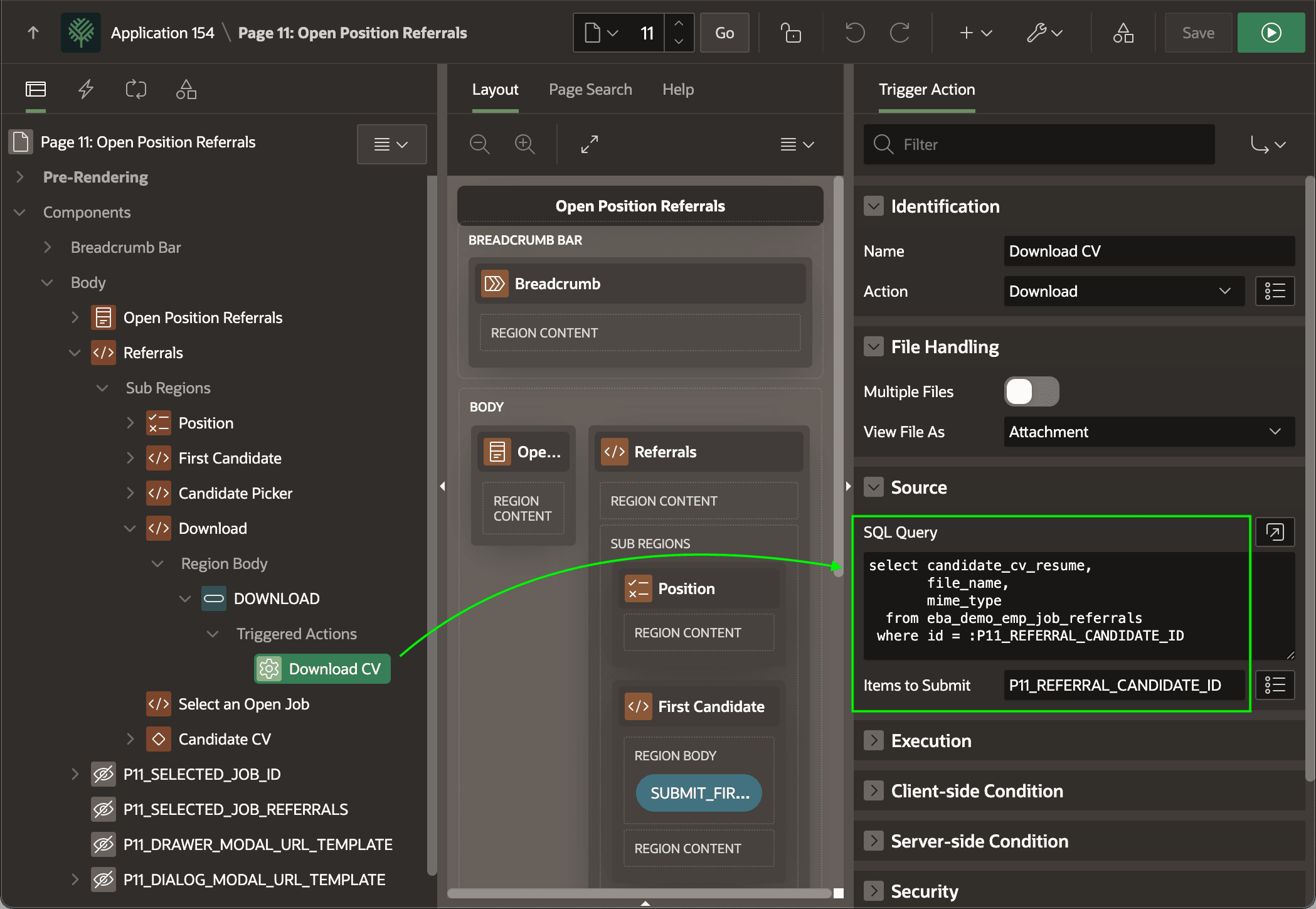
When downloading a single file using the Download dynamic action, provide a
three-column SQL query as shown below that retrieves the BLOB file data, the file name, and the
MIME Type of a single row. If the query references page item values as bind variables, make sure
to include their names in the comma-separated Items to Submit list. The query retrieves
the PDF BLOB containing the CV of the candidate whose ID is stored in the hidden page item
P11_REFERRAL_CANDIDATE_ID. This is the Select List page item that picks the
current candidate to review for the selected job.
select candidate_cv_resume,
       file_name,
       mime_type
  from eba_demo_emp_job_referrals
 where id = :P11_REFERRAL_CANDIDATE_ID
The figure shows the Download CV dynamic action selected in the component tree and highlights the SQL query that retrieves the BLOB content to download, its file name, and MIME type.
Tip:
When using the Download page process, the SQL query is the same but there are no Items to Submit to configure since it happens on the server.
Figure 16-67 Downloading a Single File with the Native Dynamic Action
Parent topic: Downloading a File for Offline Use