16.7.2 Downloading ZIP Archive of Multiple Files
Download multiple files as a zip archive by returning one BLOB and file name per row.
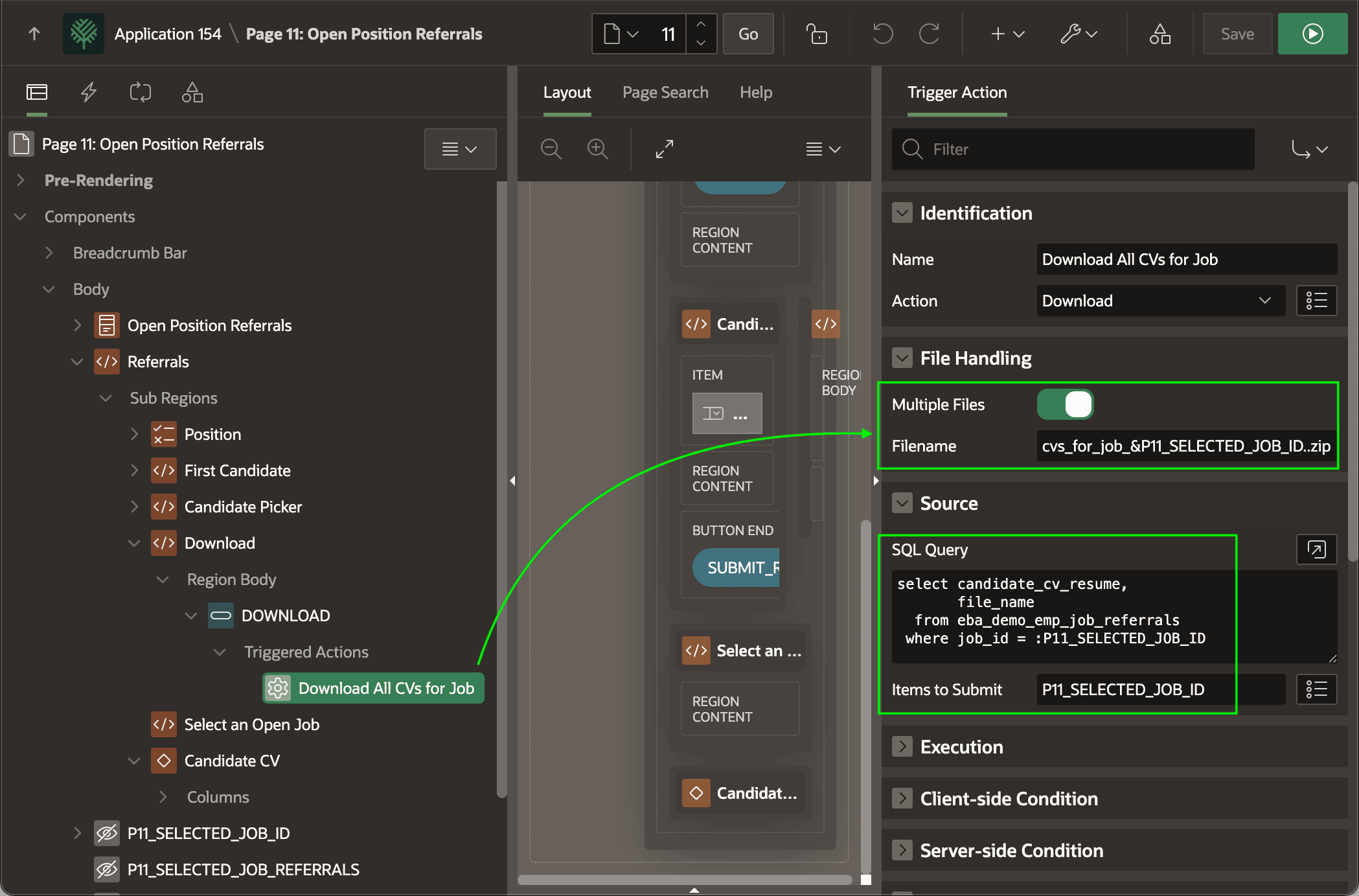
Multiple files get downloaded automatically in a zip archive. With a couple of small
changes, you can change the (Download) button to instead download all CVs for the selected
job instead. To do this, enable the Multiple Files switch, configure a name for the zip
file, and adjust the query to remove the MIME Type column and retrieve multiple rows as shown
below. The file name field can include substitutions like
&P11_SELECTED_JOB_ID. as part of the file name. Since the multi-CV query
uses a different P11_SELECTED_JOB_ID page item as a bind variable, adjust the
Items to Submit accordingly.
select candidate_cv_resume,
       file_name
  from eba_demo_emp_job_referrals
 where job_id = :P11_SELECTED_JOB_ID
Tip:
When using the Download page process, the SQL query is the same but there are no Items to Submit to configure since it happens on the server.
Figure 16-68 Downloading Multiple Files in a ZIP Archive with the Native Dynamic Action
Parent topic: Downloading a File for Offline Use