6.1.4 Counts, Dependency, and Charts
You can enhance the user experience by showing how many rows match each facet option value, optionally sorting by this count, and hiding options with no matches if useful. Facets can depend on other facets, and you can enable a chart view of a facet to help the user see a distribution of results.
You can include counts to show how many rows match each option and sort options by match count. If you show the counts, you can decide whether zero-count options are hidden. You can also choose to show the facet options in descending order by top counts for Checkbox Group and Radio Group facets.
One facet can depend on another, so it appears only if the user picks a value from the other one.
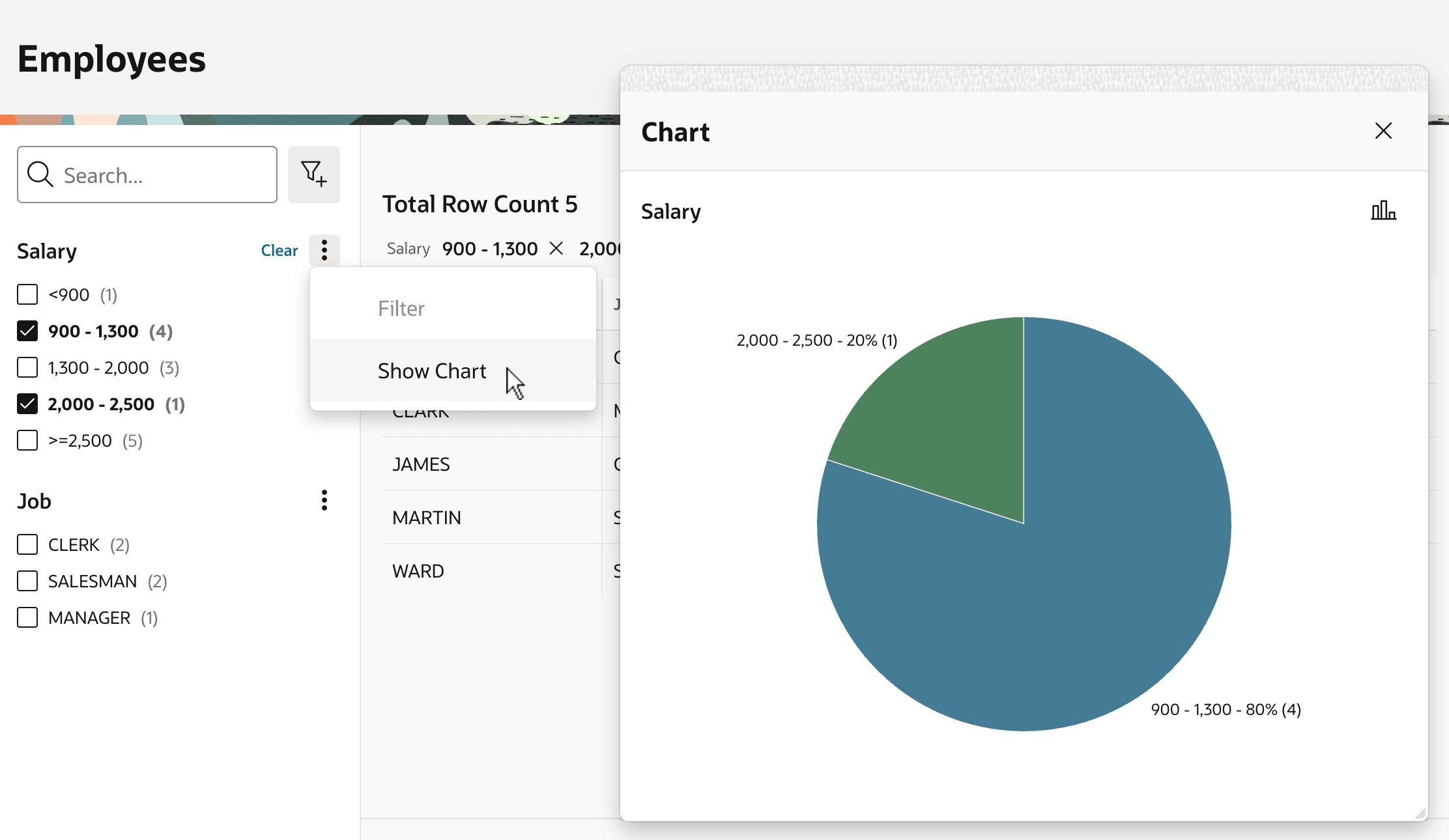
As shown below, you can also configure a facet to let end users review a pie or bar chart to understand how filtered rows are distributed across the facet's option values. The figure shows the Chart modal dialog that appears when the user chooses Show Chart from the Salary facet group's kebab menu. Users can toggle between a pie and bar chart to better understand how matching results are distributed across facet values.
Figure 6-5 Comparing Facet Value Distribution with Pie or Bar Chart
Parent topic: Narrowing a Search Using Facet Filters