6.1 Narrowing a Search Using Facet Filters
Use a Faceted Search region to let users narrow results by choosing options from groups called facets.
Each facet reflects specific values of an interesting characteristic on which the user might want to filter. Users familiar with internet shopping sites find the experience intuitive. Just as they search for a perfect laptop by indicating preferences in categories like Memory, Screen Size, or Price Range, they can use the same paradigm to find any kind of data in your APEX app.
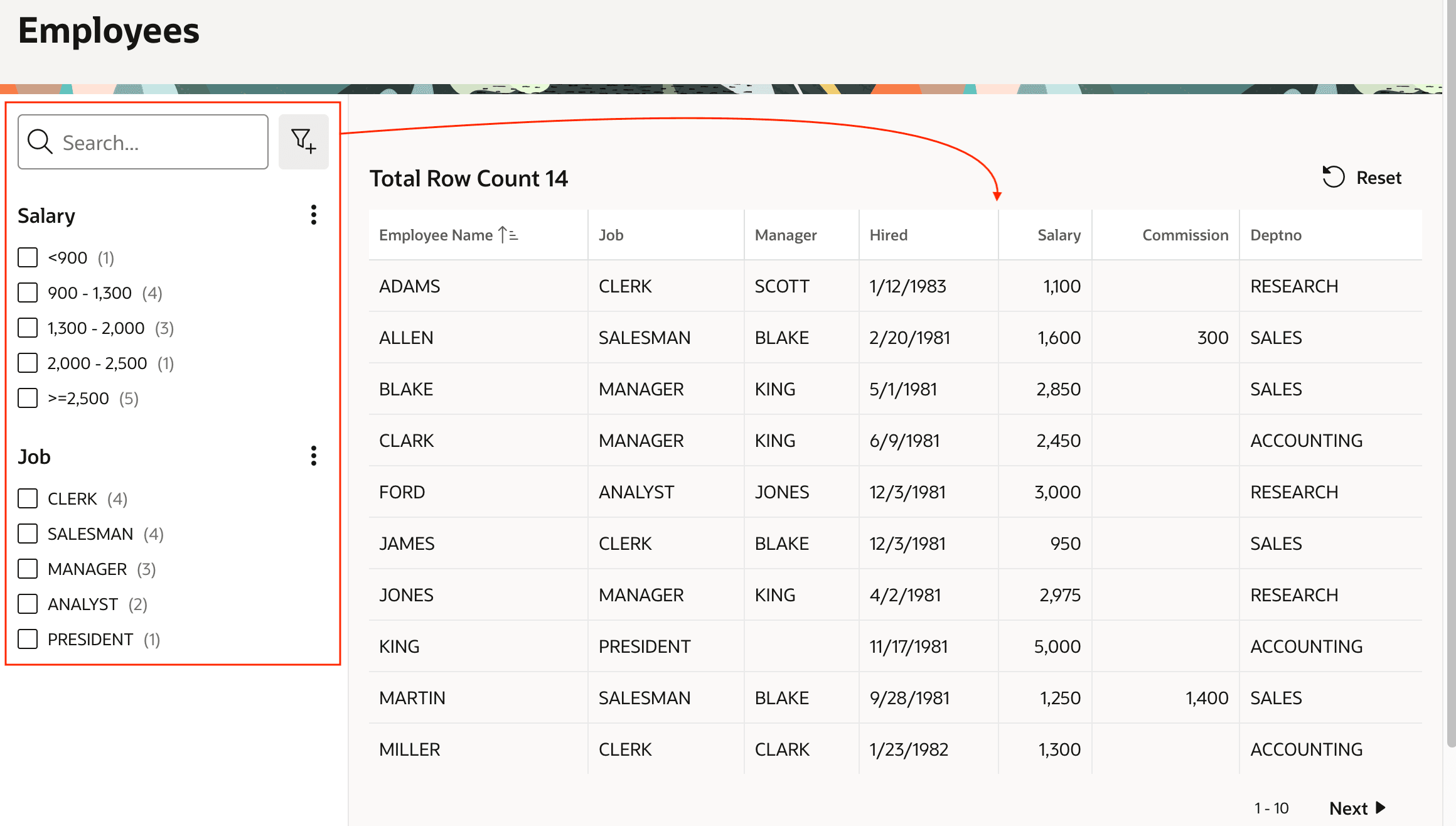
As shown below, you typically place a faceted search region in the Left Column slot of a page using the Left Side Column page template. It can filter a Classic Report, Cards, or Map region as well as Content Row, template components, and custom plug-ins that support facets. As a user selects criteria, the results refresh automatically. You control all aspects of how the facet behaves at runtime by configuring appropriate settings in the Property Editor.
Figure 6-1 Faceted Search in the Left Column Filtering Classic Report in the Body
- Defining Your Facets
For each facet, you configure a Label, a Type, and a Database Column to filter on. - Configuring Range Facets
For Range facets, ensure the source column's data type isNUMBER,DATE, orTIMESTAMP. The return values in the list for the different range intervals uses the vertical bar (|) character to separate a low value and high value. - Behavior of Multiple Selections
When using a Checkbox Group or Range facet, if users select multiple options, end users see results that match any of the selected choices as shown below. - Counts, Dependency, and Charts
You can enhance the user experience by showing how many rows match each facet option value, optionally sorting by this count, and hiding options with no matches if useful. Facets can depend on other facets, and you can enable a chart view of a facet to help the user see a distribution of results. - Working with Multi-Value Columns
If a facet's filtered column potentially stores multiple values in each row, then set the Multiple Values property to either Delimiter or JSON Array. Once selected, additional options appear. - Displaying Facets in Add Filter Dialog
When you configure a facet, in the Appearance section of the Property Editor you decide whether it will display inline or appear in the Add Filter dialog. - Finding Text Across Columns
By default, every Faceted Search region has a Search facet that lets users find text across columns. It can appear inline in the region, or reference a page item placed elsewhere on the page. - Showing Filter Chips and Total Row Count
Offer users additional filtering feedback with "chips" showing applied filters and a total row count.
Parent topic: Enhancing Search for End-Users