6.1.1 Defining Your Facets
For each facet, you configure a Label, a Type, and a Database Column to filter on.
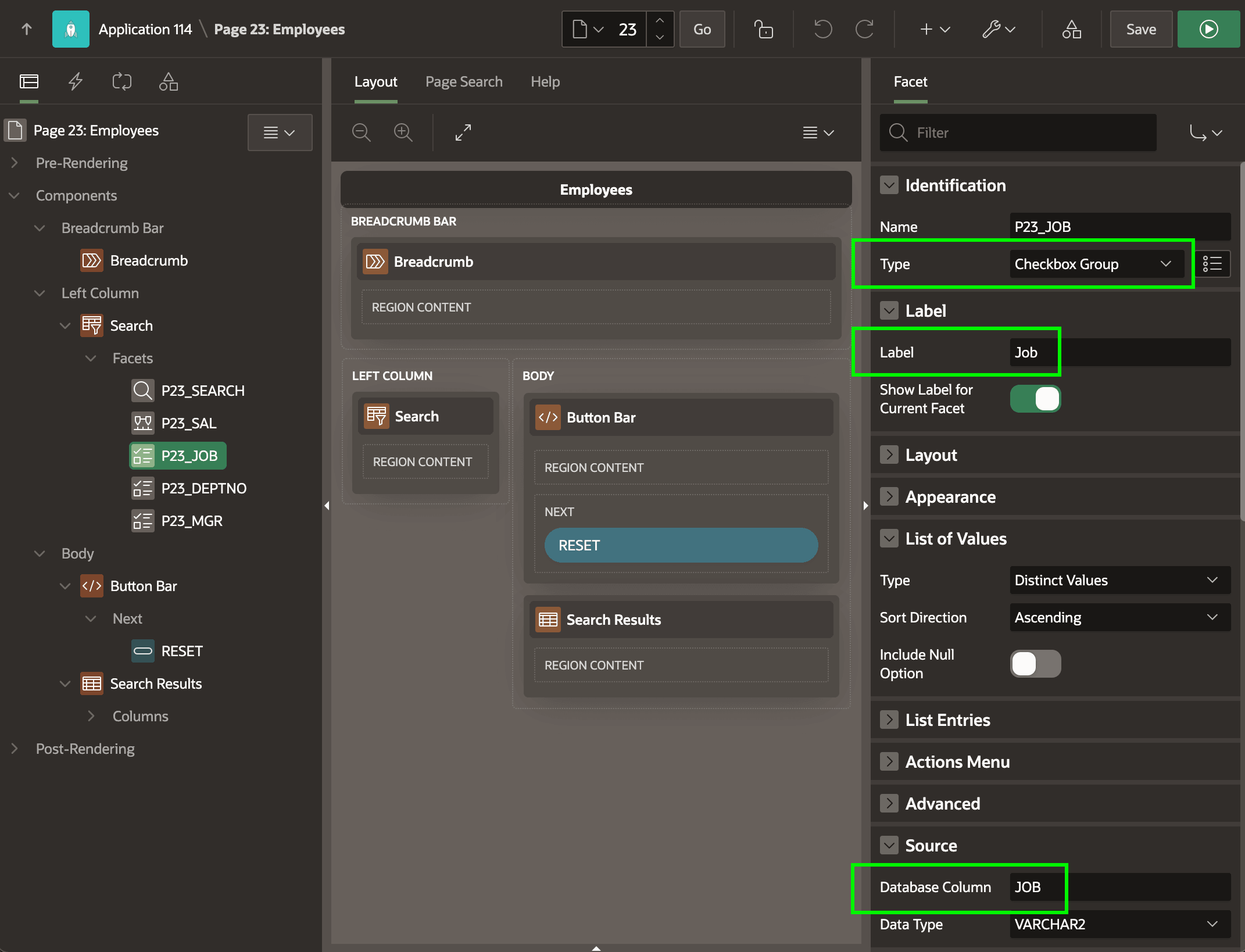
As shown in the Page Designer below, when using the Left Side Column page
template, the Layout pane shows the Left Column and Body slots.
Notice the Faceted Search region in the Left Column has five facets
defined, with the P23_JOB facet selected in the component tree. Facet
names look like page item names since they behave identically. At runtime, their values
reflect the choices the end user makes in each facet group.
For facets of type Checkbox Group, Radio Group, and Select List you provide a list of values to determine the choices the user sees. You specify the list in the same ways as for a list-valued page item, with one handy additional option: Distinct Values. When selected, APEX computes filter options using the distinct values of the underlying column in rows meeting the currently applied filters.
The figure highlights the Type, Label, and
Database Column properties of the selected
P23_JOB facet in Page Designer.
Parent topic: Narrowing a Search Using Facet Filters