6.1.2 Configuring Range Facets
For Range facets, ensure the source column's data type is NUMBER, DATE, or TIMESTAMP. The return values in the list for the different range intervals uses the vertical bar (|) character to separate a low value and high value.
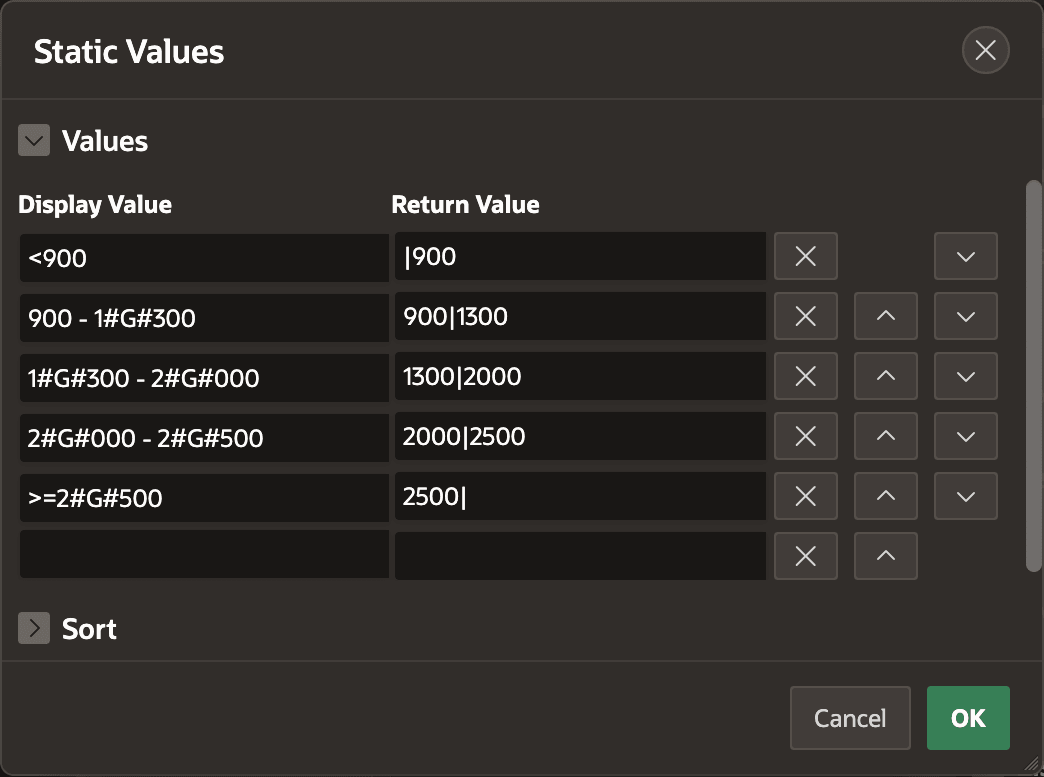
For example, the figure below shows the Static Values list for the P23_SAL range facet. The Display Value can use the substitution string #G# for the group (thousands) separator and #D# for the decimal separator. Notice how the Return Value uses the format:
LowValue|HighValue.
Omit either a low value or a high value to indicate an interval that is "unbounded" on that side. Notice the option with display value "<900" has a corresponding return value of |900 with no low value.
For date and timestamp columns, the low and high values use the canonical format
YYYYMMDDHH24MISS. For example, a date range option with display
value "Before 2020" would have a return value with no low value and a high value
representing December 31st, 2019 at 23:59:59 as follows:
|20191231235959
An option with display value "2020 to 2024" would have a corresponding return value with a low value of January 1st, 2020 at 00:00:00 and a high value of December 31st, 2024 at 23:59:59 like this:
20200101000000|20241231235959
Figure 6-3 Specifying Range Facet Interval Low and High Values
Parent topic: Narrowing a Search Using Facet Filters