16.9.8.2 Creating Pre-Authenticated Requests
Create short-lived pre-authenticated request URLs so clients can access private bucket files directly.
A user with privileges to manage the object bucket can create a pre-authenticated request (PAR) for a file. It defines an alternative, impossible-to-guess URL a client can use for a limited time to access a bucket file. The PAR can expire after a few minutes, or at any date in the future. During its lifetime, any client aware of the PAR URL can use it to access the particular file.
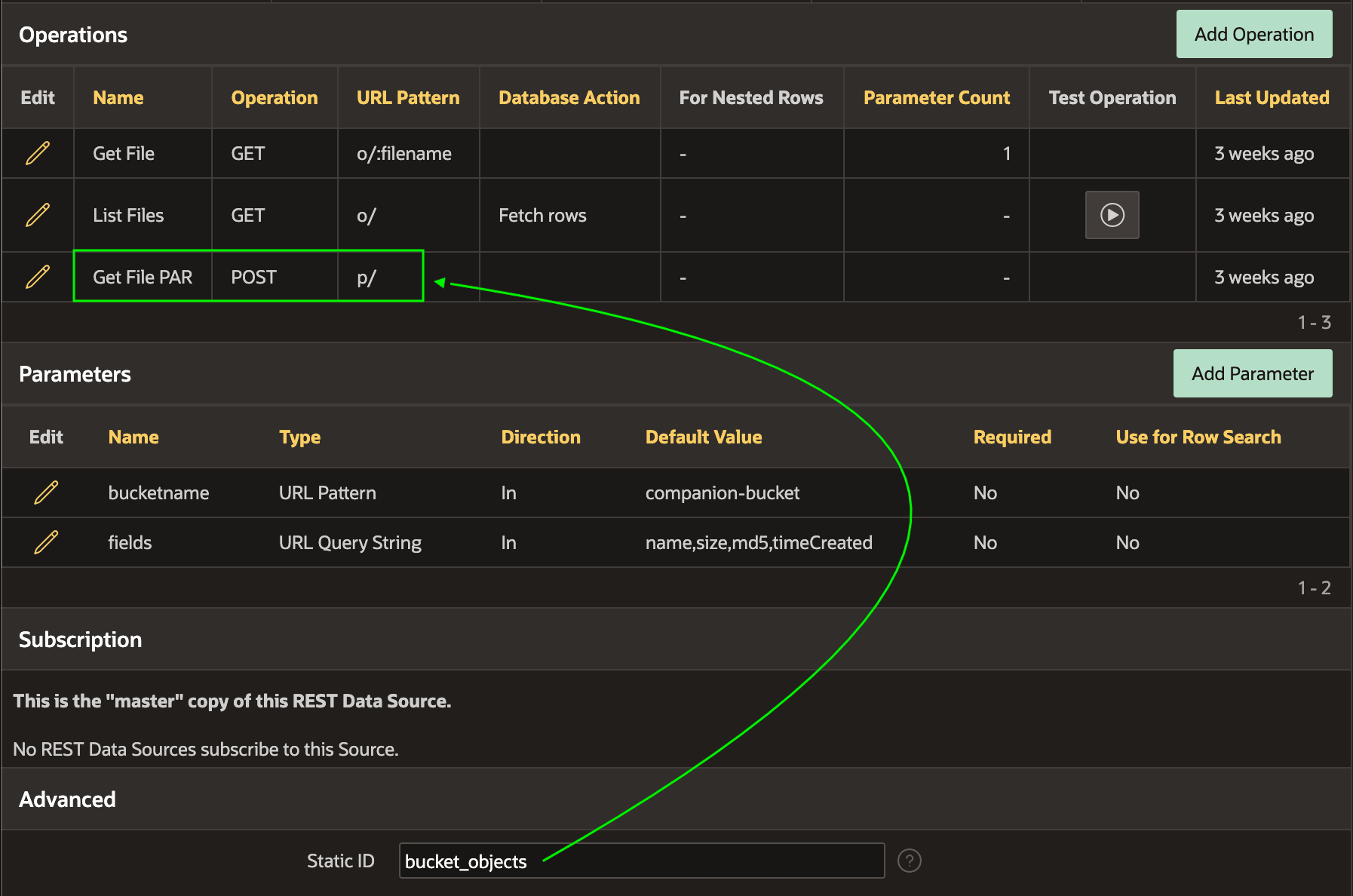
bucket_objects has a Get File PAR POST operation defined. The operation's Static ID is get_file_par. When its URL Pattern of p/ gets appended to the REST Data Source's base URL it becomes:https://objectstorage.eu-frankfurt-1.oraclecloud.com/n/x1y2z3a4b5c6/b/companion-bucket/p/Figure 16-98 Get File PAR Operation Has Base URL for Creating Pre-Authenticated Request
The CREATE_OBJECT_PAR procedure below shows how your app can create
a pre-authenticated request for the file identified by the
p_bucket_name and p_file_name passed in. It
accepts a p_ttl_seconds parameter to set the number of seconds the PAR
URL will be usable, defaulting to 120 (two minutes). It calls the
BUCKET_URL_FOR helper function to get the absolute URL to the
create PAR endpoint and web credential static ID to use to make the
POST call below.
Then, it computes the expiration date by adding the p_ttl_seconds to the systimestamp and formats the result using the ISO 8601 standard. It includes this as the value of the timeExpires property in the JSON document it creates to send as the Create PAR request body. That JSON also includes the accessType of ObjectRead and objectName with the file name. The procedure returns the new p_par_url and p_expires_utc expiration date in OUT parameters.
-- In package eba_demo_woodshr_oci
-------------------------------------------------------------------------------
-- Create a short-lived PAR (per object) and return URL + expiry.
-------------------------------------------------------------------------------
procedure create_object_par(
    p_bucket_name         in  varchar2,
    p_file_name           in  varchar2,
    p_ttl_seconds         in  pls_integer default 120,
    p_par_url             out varchar2,
    p_expires_utc         out timestamp with time zone,
    p_module_static_id    in  varchar2 default 'bucket_objects',
    p_operation_static_id in  varchar2 default 'get_file_par')
is
    l_url         varchar2(32767);
    l_cred        varchar2(4000);
    l_body        clob;
    l_resp        clob;
    l_access_uri  varchar2(32767);
    l_full_path   varchar2(32767);
    l_host        varchar2(1024);
    l_expires_str varchar2(64);
    l_resp_json   json_object_t;
begin
    bucket_url_for(
        p_module_static_id     => p_module_static_id,
        p_operation_static_id  => p_operation_static_id,
        p_bucket_name          => p_bucket_name,
        p_file_name            => p_file_name,
        p_credential_static_id => l_cred,
        p_file_url             => l_url);

    -- Compute expiration date by adding p_ttl_second to
    -- systimestamp and formatting using ISO 8601 for REST payload
    p_expires_utc := (systimestamp at time zone 'UTC')
                     + numtodsinterval(greatest(p_ttl_seconds, 1), 'SECOND');
    l_expires_str := to_char(p_expires_utc, 'YYYY-MM-DD"T"HH24:MI:SS"Z"');

    -- Build the JSON payload to send in the Create PAR request body
    select json_object(
             'name'        value ('par-'||replace(p_file_name,'/','_')),
             'accessType'  value 'ObjectRead',
             'objectName'  value p_file_name,
             'timeExpires' value l_expires_str
           returning clob)
      into l_body
      from dual;

    apex_web_service.set_request_headers(
        p_name_01 => 'Content-Type', p_value_01 => 'application/json',
        p_name_02 => 'Accept',       p_value_02 => 'application/json',
        p_reset   => true);

    l_resp := apex_web_service.make_rest_request(
                p_credential_static_id => l_cred,
                p_http_method          => 'POST',
                p_url                  => l_url,
                p_body                 => l_body);

    if apex_web_service.g_status_code not in (200,201) then
        raise_application_error(-20001,
            'Create PAR failed: HTTP '||apex_web_service.g_status_code);
    end if;

    l_resp_json  := json_object_t(l_resp);
    l_access_uri := l_resp_json.get_string('accessUri');
    l_full_path  := l_resp_json.get_string('fullPath');

    if l_full_path is not null then
        p_par_url := l_full_path;
    elsif l_access_uri is not null then
        l_host := regexp_substr(l_url, '^https?://[^/]+');
        p_par_url := case when substr(l_access_uri,1,1)='/' then l_host||l_access_uri
                          else l_access_uri end;
    else
        raise_application_error(-20001,
            'Create PAR failed: neither accessUri nor fullPath returned');
    end if;
end create_object_par;
Parent topic: Exploring Pre-Authenticated Requests