16.6.1 Creating PDF Viewer Template Component
Use a Template Component to simplify viewing PDF files inline.
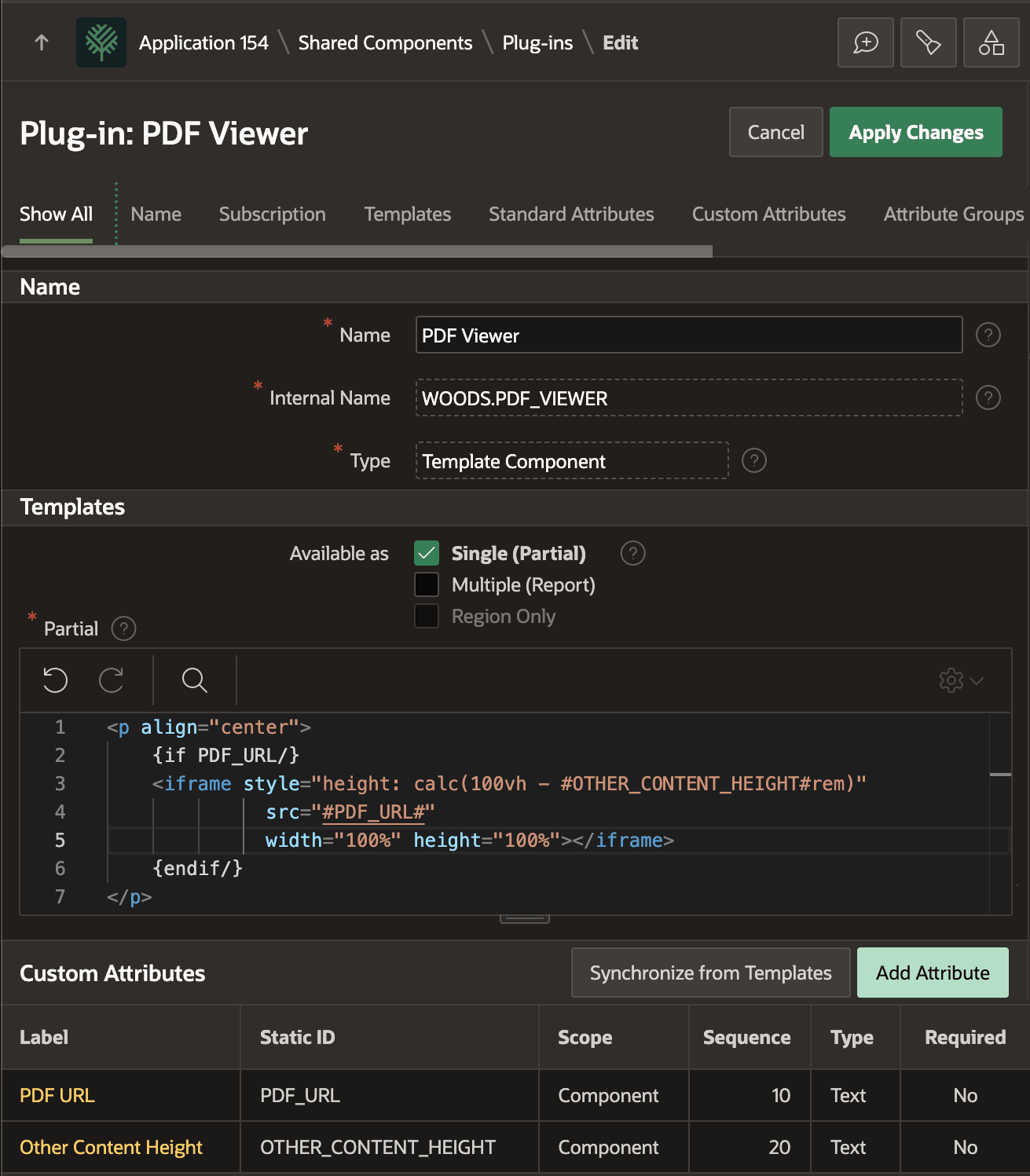
As shown below, the PDF Viewer component consists of simple HTML markup. It uses the {if/} Template Directive to conditionally include an <iframe> tag if the PDF URL custom attribute is set. The iframe's src attribute gets its value from this PDF URL parameter, using the substitution #PDF_URL#.
The developer can also set the Other Content Height attribute to vertically stretch the PDF-viewing frame. Its height will be the full vertical height of the viewport (100vh) minus the other content height (in rem units).
<p align="center">
    {if PDF_URL/}
    <iframe style="height: calc(100vh - #OTHER_CONTENT_HEIGHT#rem)"
              src="#PDF_URL#"
              width="100%" height="100%"></iframe>
    {endif/}
</p>
The Available As setting of Single (Partial) means the component expects to be used with a data source that retrieves a single row of data.
Figure 16-59 Simple Template Component to More Easily View PDFs Inline
Parent topic: Previewing BLOB Column PDF Files Inline