19.2.4 Defining Automation Actions in Sequence
Define automation actions that decide which rows to process, perform conditional updates, and notify affected users.
- Log Employee Name Being Considered
- Give 3% Raise to Lucky Employee
- Bump Lucky Salesperson's Commission, Too
- Update Commission If Changed
- Email Lucky Recipient the Good News.
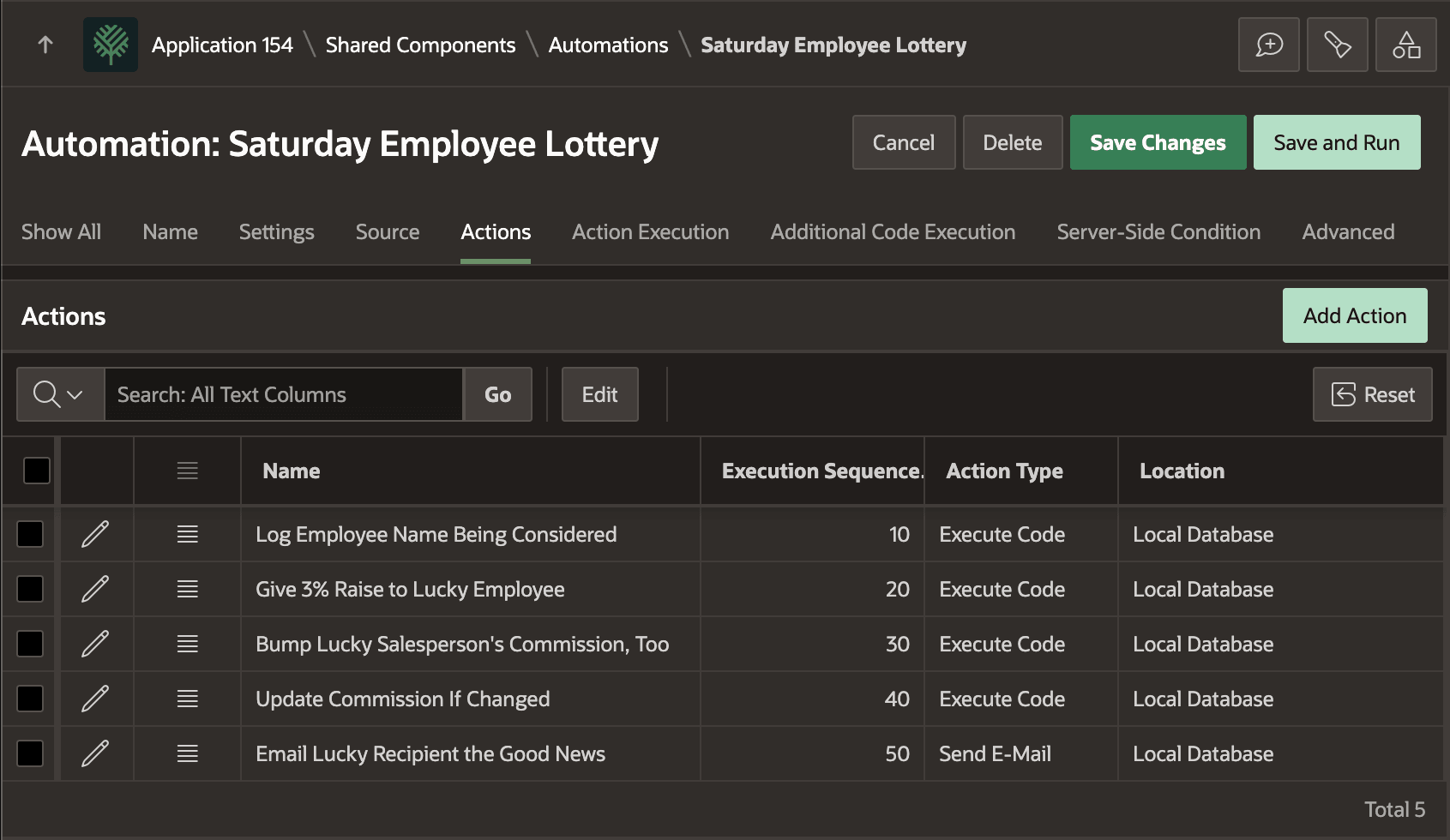
The figure shows the Actions tab of the Automation edit page showing the five actions described above, in execution sequence order, listing the Action Type for each one. Each one is explained in more detail below.
Figure 19-4 Five Actions in the Saturday Employee Lottery Automation
Log Employee Name Being Considered
Log Employee Name Being Considered writes a message to the
automation log with information about the employee being processed. It is an
Execute Code action with the following code. If the ordinal
RN value matches the randomly selected winning row number, then
it logs a message to that effect. Otherwise, it calls
SKIP_CURRENT_ROW to continue on to process the next row. This
avoids the execution of the remaining actions in the sequence for the non-winning
employee row.
if :RN = :G_LOTTERY_PICK then
    apex_automation.log_info(
        apex_string.format('Processing bottom quartile lucky employee %s with rn=%s',
                           :ENAME, :RN));
else
    apex_automation.skip_current_row(
        apex_string.format('Skipping bottom quartile employee %s with rn=%s',
                           :ENAME, :RN));
end if;
Give 3% Raise to Lucky Employee
If the employee is the lucky one, Give 3% Raise to Lucky Employee
computes their 3% salary raise, updates their SAL in the
EBA_DEMO_EMP table, and writes a message to the automation log.
It is an Execute Code action with the following Server-side condition so it
only executes for the winning employee.
:RN = :G_LOTTERY_PICKIt has the following code. Notice how it's using the
NEW_SALARY column in the current row as temporary storage for
the new salary it calculates. The Send E-Mail action below passes this
NEW_SALARY value to an email template placeholder.
:NEW_SALARY := round(to_number(:SAL) * 1.03);
apex_automation.log_info(
    apex_string.format('Lucky employee %s gets 3% salary raise from %s to %s',
                       :ENAME, :SAL, :NEW_SALARY));
update eba_demo_emp
   set sal = :NEW_SALARY
 where empno = :EMPNO;
apex_automation.log_info(
    apex_string.format('Updated Lucky employee %s salary from %s to %s',
                       :ENAME, :SAL, :NEW_SALARY));
Bump Lucky Salesperson's Commission, Too
If the lucky employee is a salesperson, Bump Lucky Salesperson's Commission, Too computes their 3% commission raise and writes a message to the automation log. It is an Execute Code action with the following Server-side condition so it only executes for a winning salesperson with an existing commission.
:RN = :G_LOTTERY_PICK and :JOB = 'SALESMAN' and :COMM is not nullIt has the following code. Notice again how it's using the
NEW_COMMISSION column in the current row as temporary storage
for the new commission it computes. The Update Commission If Changed and the
Send E-Mail action below both reference this value.
:NEW_COMMISSION := round(to_number(:COMM) * 1.03);
apex_automation.log_info(
    apex_string.format('Lucky Salesperson %s also gets 3% commission bump from %s to %s',
                       :ENAME, :COMM, :NEW_COMMISSION));
Update Commission If Changed
If the commission has changed, Update Commission If Changed reflects the change in the database and writes a message to the automation log. It is an Execute Code action with the following Server-side condition to only run if a new commission got set.
:NEW_COMMISSION is not nullIt has the following code. Notice how it's referencing the
NEW_COMMISSION column in the current row that the previous
action might have assigned a value to. It shows how temporary storage columns
can be assigned by earlier actions in preparation for a later action to save the
changes.
update eba_demo_emp
   set comm = :NEW_COMMISSION
 where empno = :EMPNO;
apex_automation.log_info(
    apex_string.format('Updated Lucky Salesperson %s commission from %s to %s',
    :ENAME, :COMM, :NEW_COMMISSION));
Email Lucky Recipient the Good News
If the employee is the lucky one, Email Lucky Recipient the Good
News sends them an congratulatory email with their new salary, and
commission if relevant. It is a Send E-Mail action with Server-side condition
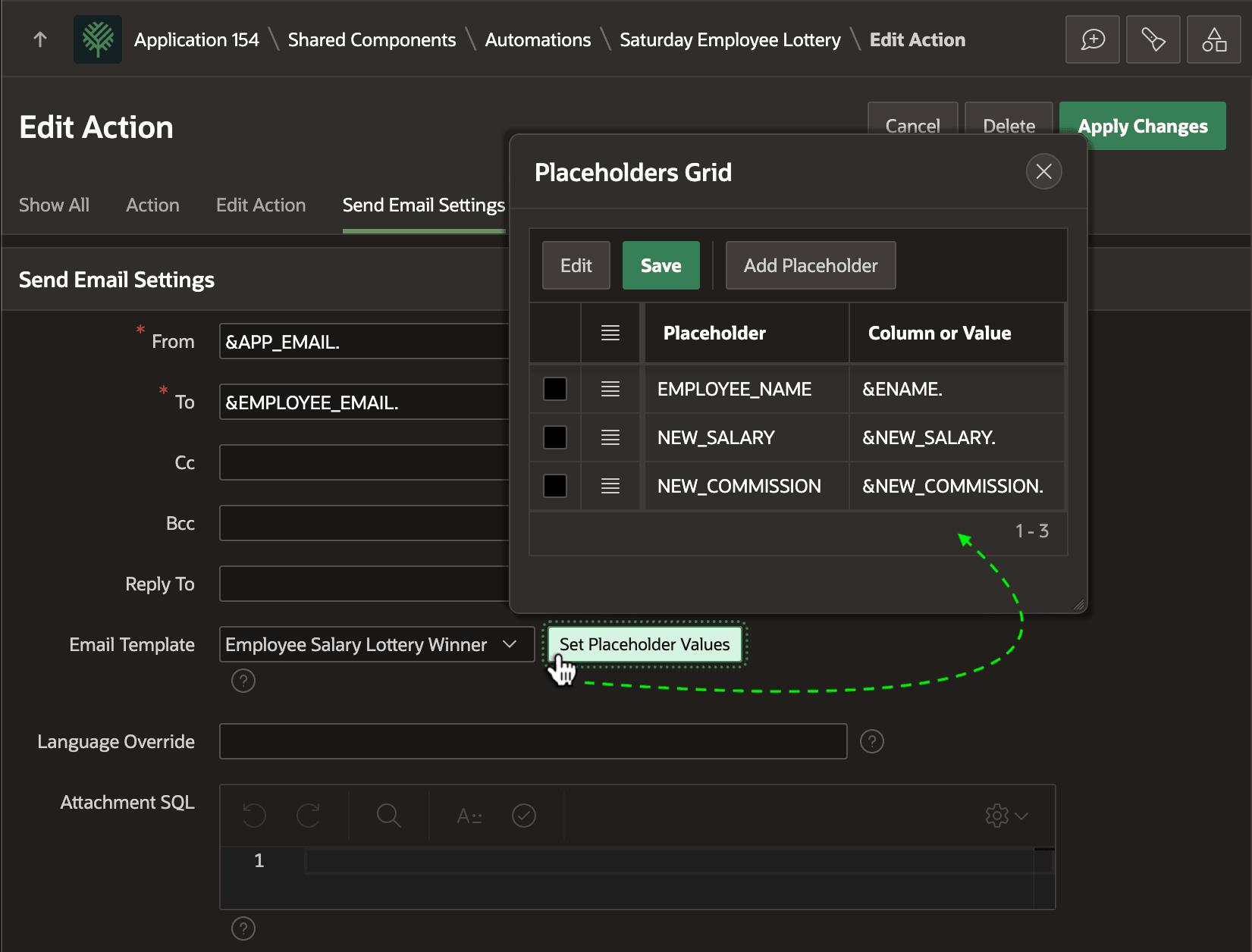
:RN = :G_LOTTERY_PICK configured as shown below. Notice how
it's using the Email Salary Lottery Winner email template. The email template
placeholders get their values using substitution syntax from the columns names in
the current row.
Figure 19-5 Configuring Email Template and Placeholder Values for a Send E-Mail Action
Parent topic: Exploring an Automation Example