21.2.3 Defining Report Query Sources
Create a Report Query definition to supply the report data.
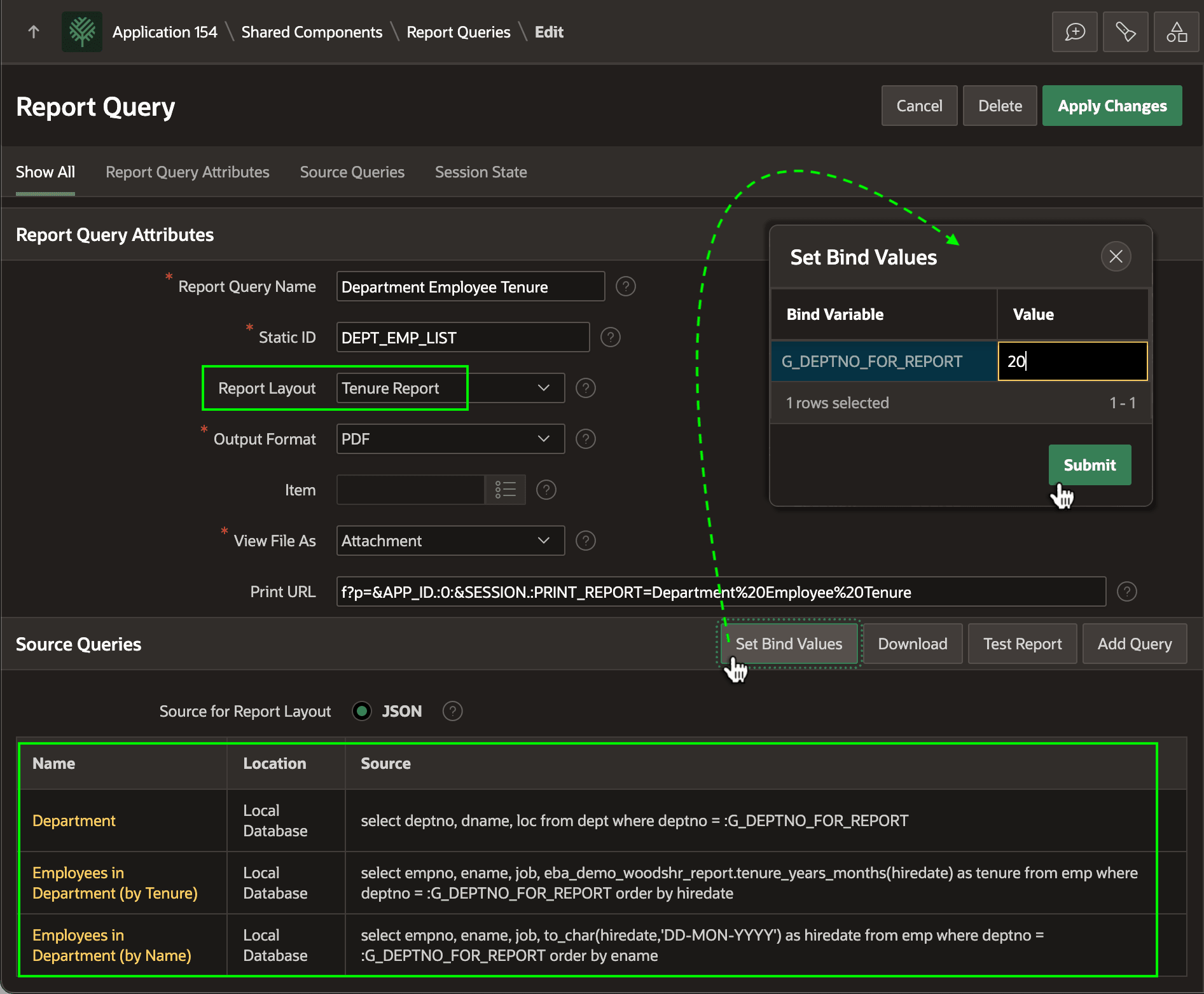
As shown below, this Department Employee Tenure definition includes three report sources and references the Tenure Report layout. Each source you include can be from any supported data source type including local or remote queries, tables, and views, REST Data Sources, and more. Here all three sources use a local database SQL query.
For example, the Department source uses the SQL query below that references the G_DEPTNO_FOR_REPORT application item as a bind variable.
select deptno, dname, loc
  from dept
 where deptno = :G_DEPTNO_FOR_REPORT
Notice the (Set Bind Values) button. It opens a dialog in which you can set example values for any bind variables your report source queries might reference. These example values are used when you click the (Download) button to produce a sample JSON file representing the data for your report. If you click (Test Report) the same JSON file is sent along with the layout to the remote print server so you can validate your report output.
Figure 21-5 Configuring Report Query Data for Tenure Report
Parent topic: Printing Report with an Excel Template