25.4.7 Deploying Workflows to Production
Promote active workflow versions from development so production stays in sync.
Once your workflow has an Active version – for example,
1.0.0 – you can promote your application to the production
environment. Any new workflow instances created in production, use the
Active version at their time of creation. Every workflow instance tracks the
version used to create it, and continues using that version for its entire
lifecycle.
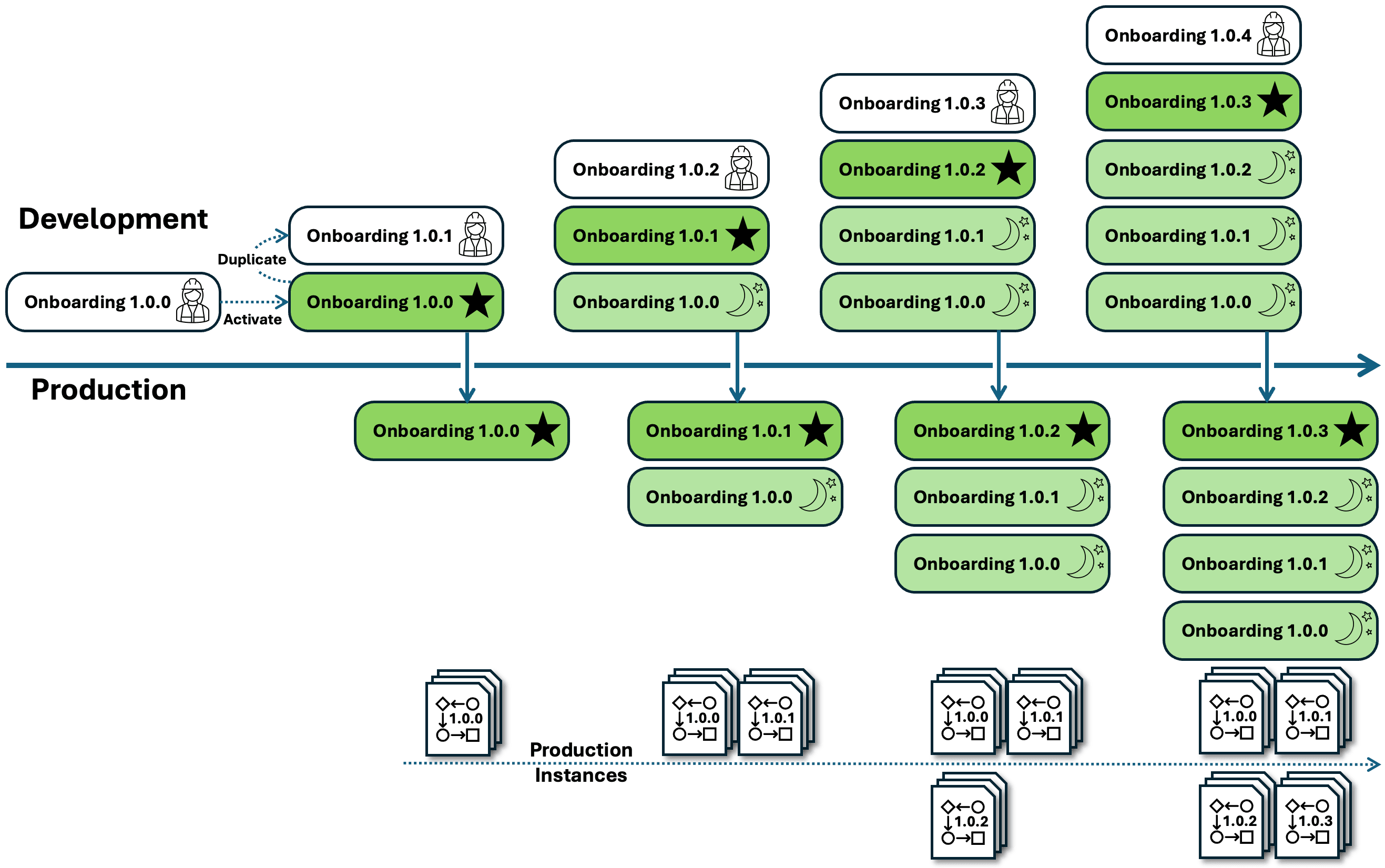
Business processes change over time. So naturally, at some point new requirements compel you to duplicate Active version 1.0.0 to create the In Development version 1.0.1. Always do this in your Development environment. You make any necessary changes to the process, testing the In Development version in Development Mode by running your app from App Builder. When it's ready, you activate version 1.0.1 in development.
When you next promote your application to production, new workflow instances will
now use the Active version 1.0.1, while previously created flows
continue using the Inactive version 1.0.0 they were created
with. As time goes on, your application accumulates new workflow versions by repeating
this process over and over. You only modify In Development workflow versions in
your Development environment, promote the application to Production, and never
modify workflow versions in Production. This ensures your production environment is
always in sync with development. The diagram illustrates how workflow versions
accumulate in production over an application's lifecycle. The starred workflow version
is the single active one. The versions with a moon icon are inactive, but might still be
used by existing workflow instances.
Figure 25-162 Workflow Versions Accumulate Over Time
Caution:
To keep development and production environments in sync, never duplicate Active versions in production. Since your APEX application export contains all component definitions, the application you import into production technically contains the In Development versions, too. However, since these are only usable in Development Mode, the diagram omits them in production for clarity.
Parent topic: Maintaining Workflow Processes