7.1.9 Enabling Row Selection
If you make your template component available as a Multiple (Report) region, enable row selection by checking Has Row Selection Support in the Standard Attributes section of the edit page.
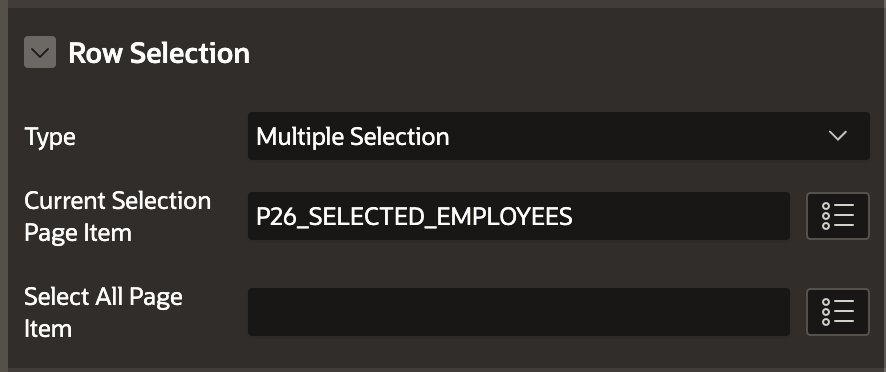
When this setting is on, the Property Editor displays the Row Selection section shown below. A developer using your component can enable single row selection, multiple selection, or focus-only selection, and optionally provide the name of a page item to store the selected row primary keys. For multi-row selection, the value stored in the Current Selection Page Item uses a colon (:) to delimit multiple values.
Figure 7-11 Row Selection Settings on Template Component Available as Multiple (Report)
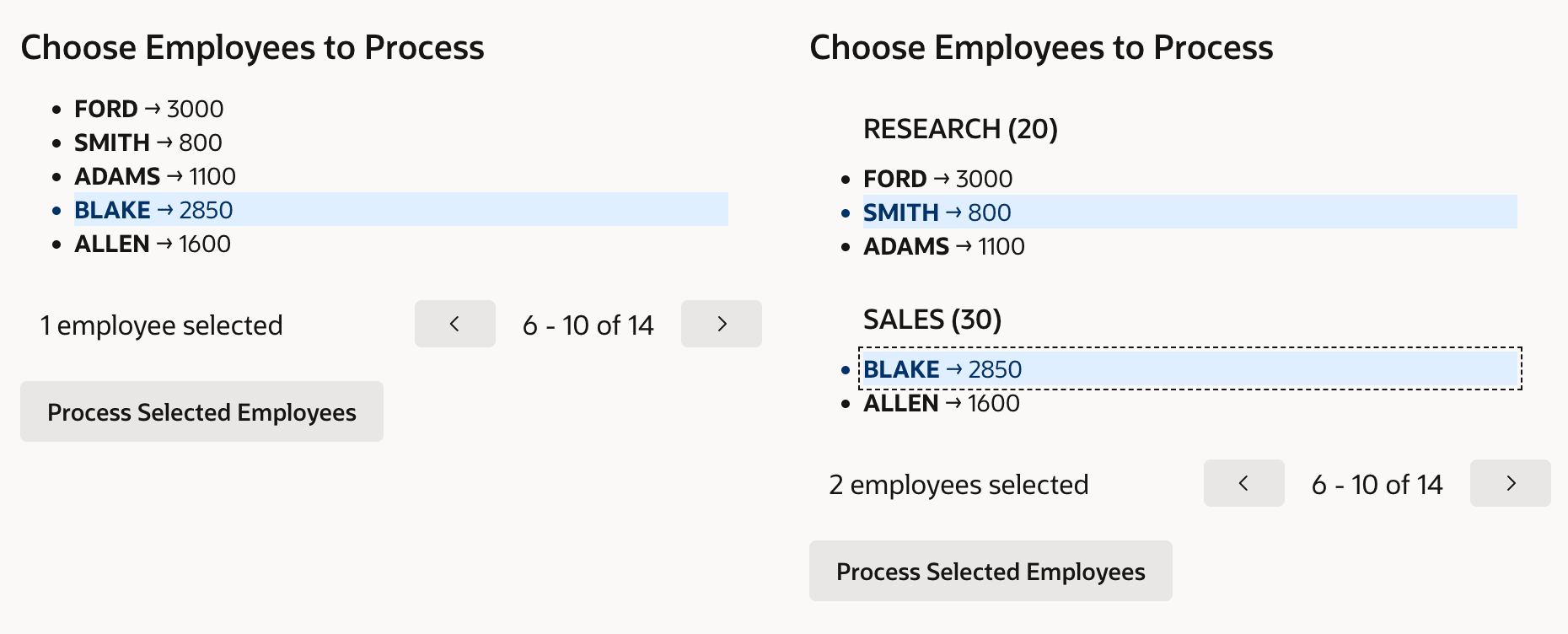
In the figure below, the Grouped Name/Value Pairs template component appears twice. Both instances are configured to show ENAME and SAL and to use pagination with five rows per page. The instance on the right has also configured DNAME and DEPTNO as the group name and group id. The end user has selected a single row in the template component on the left, and multiple employees in the one on the right. Notice the messages "1 employee selected" and "2 employees selected". The developer configured the component's Entity Title settings to use "employee" for the Singular and "employees" for the Plural to make the selection message more user-friendly.
Figure 7-12 Single & Multiple Selection Showing Entity Title
The page contains a Handle Selected Emps page process using the PL/SQL code below to iterate over the selected employees by "splitting" the colon-delimited primary keys in the P26_SELECTED_EMPLOYEES page item. If no employees were selected, it adds a translatable error message using the text message key SELECT_AT_LEAST_ONE_EMP. If some employee primary keys were processed, then it uses the GET_MESSAGE() function in the APEX_LANG package to retrieve a translatable text message to assign to the hidden P26_SUCCESS_MESSAGE page item. If a single row was processed, it uses the message with key PROCESSED_ONE otherwise it uses the key PROCESSED_MANY. The page process references this dynamically computed success message as &P26_SUCCESS_MESSAGE. in its Success Message property.
declare
    l_processed apex_t_varchar2;
begin
    for cur_emp in
       (select ename, empno
          from emp
         where empno in
            (select column_value
               from apex_string.split_numbers(
                  :P26_SELECTED_EMPLOYEES,':')))
    loop
        apex_string.push(l_processed,cur_emp.ename);
        -- Process cur_emp.empno employee here
    end loop;
    -- SELECT_AT_LEAST_ONE_EMP => "Please select at least one employee"
    if l_processed is null then
        apex_error.add_error(p_error_code       => 'SELECT_AT_LEAST_ONE_EMP',
                             p_display_location => apex_error.c_on_error_page,
                             p_page_item_name   => null);
    else
        -- PROCESSED_ONE  => "Processed employee %0 successfully"
        -- PROCESSED_MANY => "Successfully processed employees %0"
        :P26_SUCCESS_MESSAGE := apex_lang.get_message(
                                   'PROCESSED_'||
                                   case l_processed.count
                                   when 1 then 'ONE' else 'MANY' end,
                                    apex_t_varchar2('0',
                                      apex_string.join(l_processed,', ')));
    end if;
end;
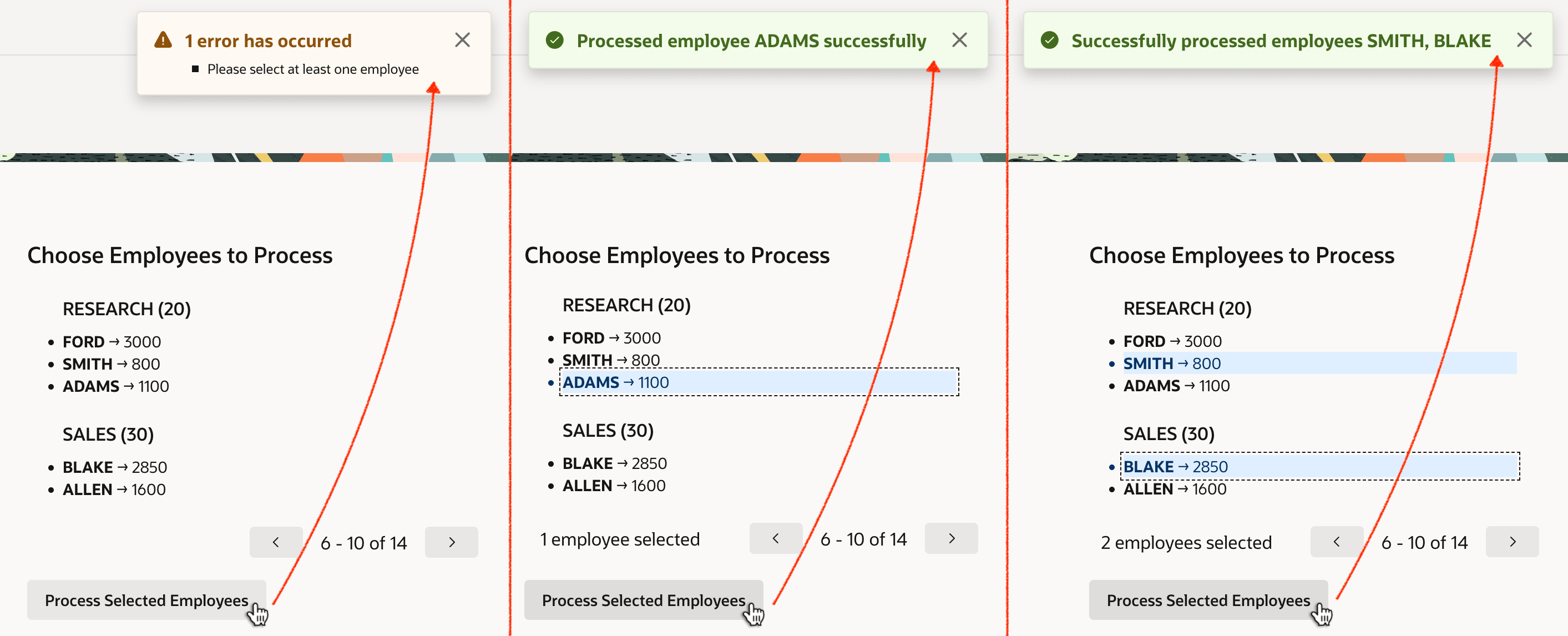
The figure below shows the three different situations the end user might encounter upon clicking the Process Selected Employees button. In the first example, with no employees selected, the user sees an error requesting that they select at least one. In the second example, after selecting a single employee they see a message containing the singular name that was processed. In the third example, they see a message listing all the employees processed.
Figure 7-13 Processing Zero, One, and Multiple Selected Rows
Parent topic: Reusable Components Using HTML Skills