5.7.5 Enhancing Event Display
To further customize calendar event display, you can use a custom formatting notation, paired with an event content formatter function.
The SQL below updates the existing query to use the FORMAT function in the APEX_STRING package to inject two values into a string template: [[%s]]|with %s. You supply the PURPOSE column value for the first %s placeholder. To conditionally return either the CALENDAR_FOR_ENAME or the MEET_WITH_ENAME depending on the value of the P19_CALENDAR_FOR select list you use a CASE statement.
select id,
       apex_string.format('[[%s]]|with %s',
          purpose,
          case to_number(:P19_CALENDAR_FOR)
             when calendar_for_empno then meet_with_ename
             else calendar_for_ename
          end) as formatted_title,
       starts_at,
       ends_at
  from emp_meetings_v
where calendar_for_empno = :P19_CALENDAR_FOR
   or meet_with_empno    = :P19_CALENDAR_FOR
The string template value ends up looking like the following for one example EMP_MEETINGS row:
[[Hiring Review]]|with ADAMSYou further customize the calendar event behavior and display by using a JavaScript Initialization Function like the one below. This function configures calendar settings on the pOptions object it is passed as an argument, then returns the modified pOptions object as its result. The function can use any of the features of the open-source FullCalendar library to tailor how the calendar looks and behaves.
The custom event rendering function below replaces the [[,
]], and | with appropriate HTML tags to bold the title and
add a line break before the additional detail text. You can't directly use HTML tags in the
original string because for security reasons the APEX engine would escape them and it wouldn't have the desired effect. It also sets the calendar
locale to en-gb for a UK date format. Notice it configures
an eventContent function that returns custom html formatting
for the event display. It references the event title using arg.event.title
and uses the JavaScript replace() function to replace | by
<br>, [[ by <b>, and
]] by </b>. It also wraps the event title content
with in an HTML <center> tag.
function (pOptions) {
    pOptions.locale       = "en-gb"; // UK date format
    pOptions.eventContent = function(arg) {
      return {
        html: '<center>' +
              arg.event.title.replace(/\|/g, '<br>')
                             .replace(/\[\[/g,'<b>')
                             .replace(/\]\]/g,'</b>') +
              '</center>'
      }
    };
    return pOptions;
}
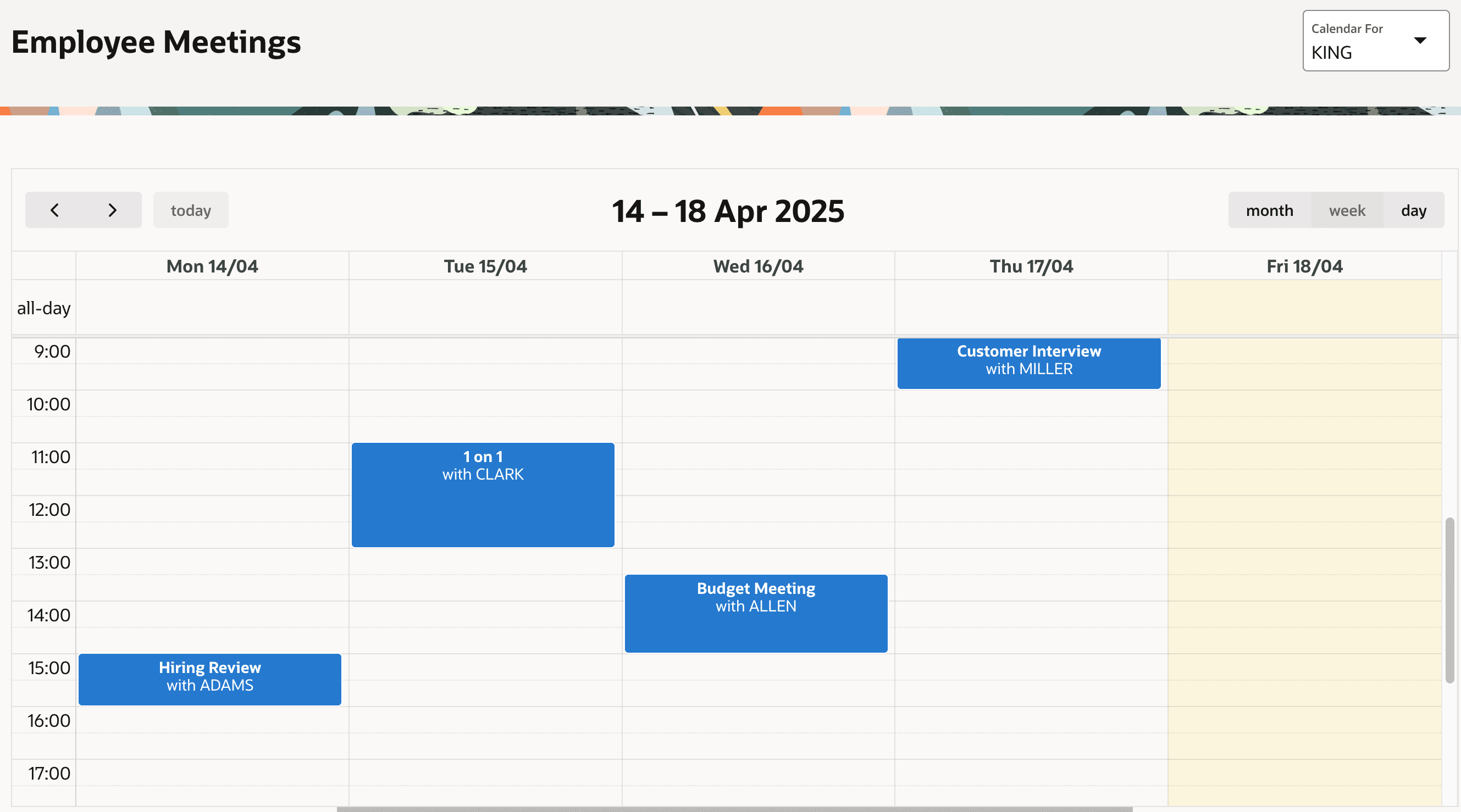
This combination of using the EMP_MEETINGS_V view to join in
employee names and custom event title formatting produces the updated calendar you see below.
Each event's text is centered, and shows the purpose of each meeting on its own line in a bold
font, and the person the meeting is with on a second line. You can customize the calendar
further using CSS styling. Consider installing the Sample Calendar app from the gallery
to explore additional examples of what the calendar region can do. For more information, see
Creating Calendars in Oracle APEX App Builder
User’s Guide.
Figure 5-19 Employee KING's Week of Meetings
Parent topic: Placing Events on a Calendar