16.5.2.1.1 Generating Dialog URL on the Server
Generate a checksum-protected dialog URL on the server before opening a modal page.
- (Submit First Referral) that opens a modal drawer, or
- (Submit Referral) that opens a modal dialog.
Both of these dialog pages accept the selected job id as a parameter into a hidden page item so the new job referral gets linked to the appropriate job.
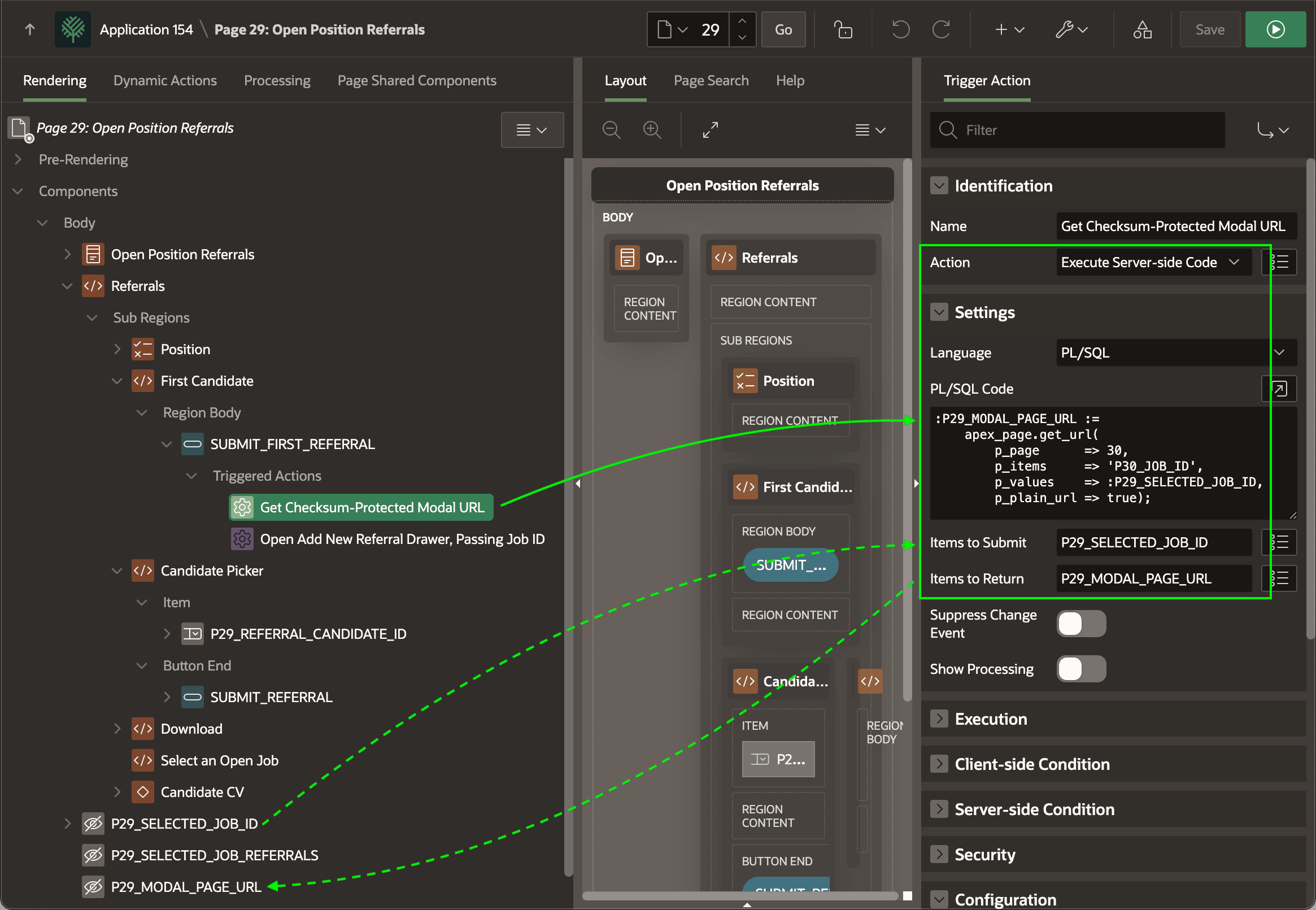
Use a triggered action to generate the modal drawer URL on the server and store it in a hidden page item as shown below. Using Execute Server-side Code, the Get Checksum-Protected Modal URL triggered action on the SUBMIT_FIRST_REFERRAL button sets the value of P29_MODAL_PAGE_URL by calling APEX_PAGE.GET_URL. That generates the URL to the modal drawer page 30, passing in the value of P29_SELECTED_JOB_ID to the P30_JOB_ID hidden page item in the target. Notice the Items to Submit mentions the selected job ID page item name the PL/SQL references as a bind variable. The Items to Return lists the modal page URL item name.
Figure 16-44 Triggered Action Generates Dialog URL Before Opening It Using JavaScript
A similar triggered action on the SUBMIT_REFERRAL button runs the code below to generate the modal dialog URL to open page 31, passing in the value of P29_SELECTED_JOB_ID to the P31_JOB_ID hidden page item in the target. Its Items to Submit and Items to Return properties are configured the same as above.
:P29_MODAL_PAGE_URL :=
    apex_page.get_url(
        p_page      => 31,
        p_items     => 'P31_JOB_ID',
        p_values    => :P29_SELECTED_JOB_ID,
        p_plain_url => true);
Parent topic: Opening Server-Generated Dialog URL