25.1.9.2.9 Inspecting Resulting Workflow Instance
Inspect workflow variables and diagram progress after a waiting activity continues.
If a page calls CONTINUE_ACTIVITY in the
APEX_WORKFLOW package to signal a Wait activity to proceed,
any workflow variable whose Static ID matches a key in the parameter map is
assigned its corresponding value. The default workflow detail page you generate when
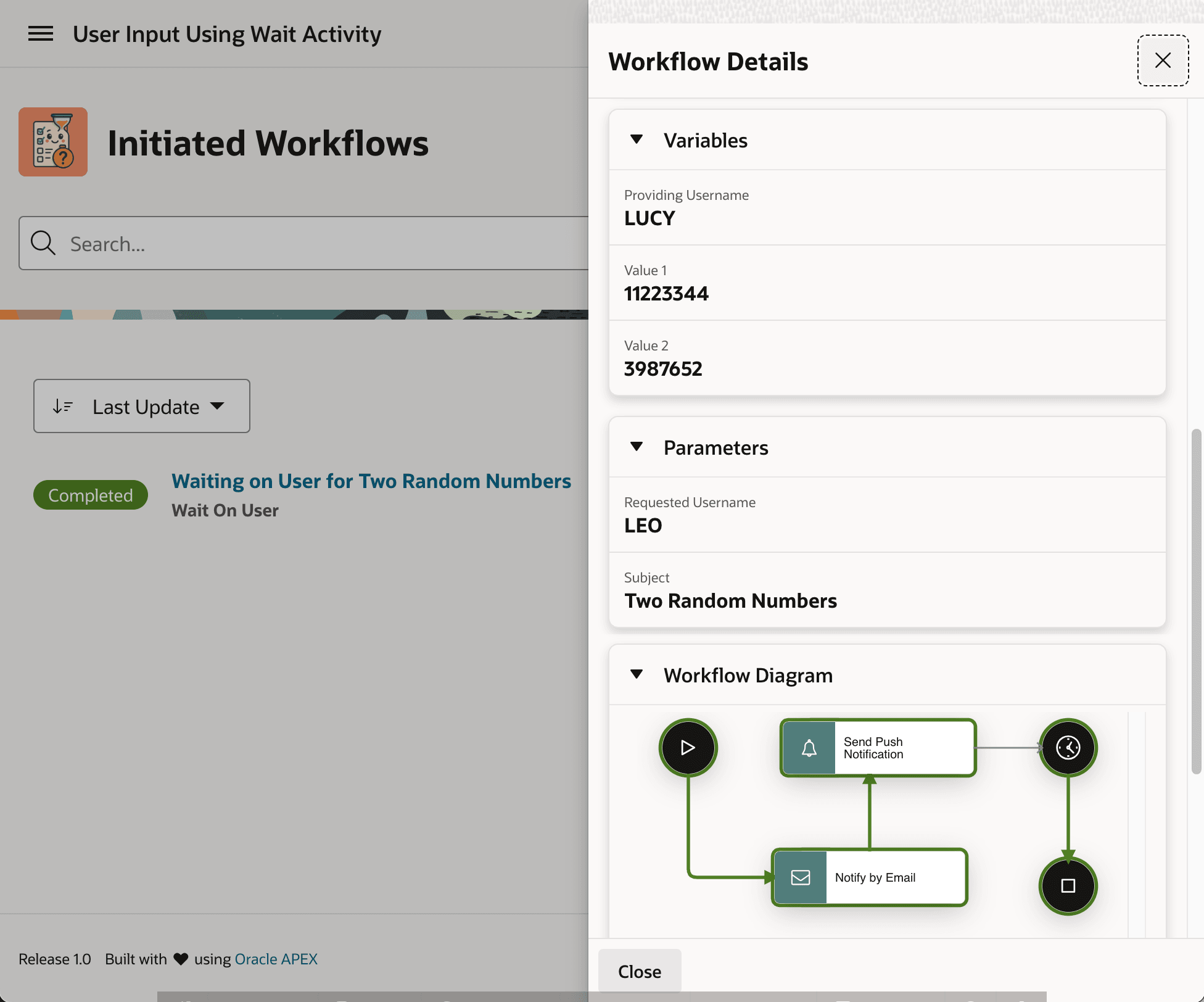
creating a Workflow Console in the Create Page Wizard displays the workflow
variables and parameter values. It also displays a Workflow Diagram showing the
workflow path completed so far. As shown below, while the requested username parameter
was LEO, he must have forwarded the email to his colleague
LUCY to click on the link and provide the data. Notice in the
Variables region, the values she provided are reflected, along with her
username. The page displays the user-friendly labels and values of the
V_PROVIDING_USERNAME, V_VALUE1, and
V_VALUE2 variables. The Completed badge in the Initiated
Workflows Content Row region confirms this workflow instance is done executing.
The visual diagram's highlighted activities also confirm this.
Figure 25-70 Inspecting the Details of the Completed Workflow
Parent topic: Waiting for a Signal to Continue