1 Introduction
Oracle APEX is a complete low-code platform for rapidly building secure, scalable enterprise apps of any size and complexity.
Using APEX App Builder in a browser, you define pages and features by configuring powerful built-in components and data sources. You add code only for custom business logic that only you could write. With Oracle APEX you deliver immediate business value by leveraging a full range of critical capabilities in a single development and runtime environment. This guide helps you understand key areas of APEX functionality and how to use those features in your apps.
- Browser-Based Enterprise App Development
Build, run, and manage enterprise applications you can trust entirely in a browser. - Model-Driven, Direct Data Access
Build apps from declarative metadata with direct access to Oracle Database. - Extensible, Powerful Components
Use high-function, data-savvy components to build rich web applications. - Responsive, Polished User Interface
Create responsive, polished user interfaces that adapt to desktop, mobile, and installed app use. - Complete Application Platform
Build complete apps with workflow, AI, reporting, files, REST APIs, and integration. - Open, Agent-Ready APEXlang
Use APEXlang to generate and edit APEX apps that tools and coding agents can validate. - Spec-Driven App Scaffolding
Blueprints turn a functional specification and data model description into a working, scaffolded app. - Pricing and Deployment Options
Oracle APEX is cost‑effective and offers flexible deployment options. - Active, Helpful Community
Connect with a worldwide APEX community for support, learning, and reusable plug-ins. - App Development as a Service
Offer self-service app development with multi-tenant APEX workspaces and isolated data. - Learning Resources and Free Workspaces
Find APEX learning resources and request a free workspace for hands-on practice.
1.1 Browser-Based Enterprise App Development
Build, run, and manage enterprise applications you can trust entirely in a browser.
A web browser is all you need to develop and run APEX apps. This includes all aspects of the enterprise application lifecycle from designing a data model and loading data, to implementing business logic and configuring user interfaces, as well as issue tracking, deployment, monitoring, and access control.
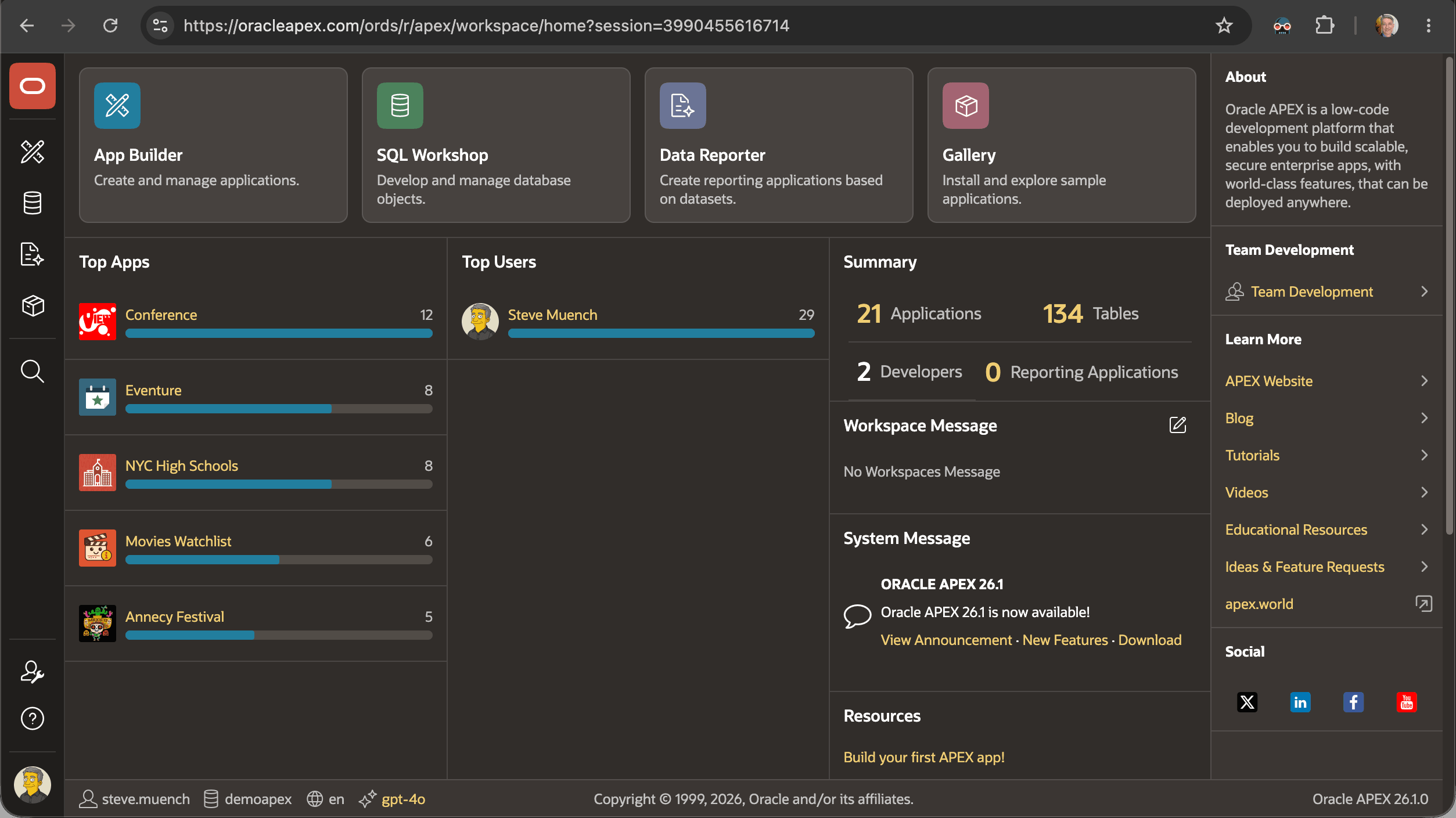
Teammates of different skill levels collaborate in a shared workspace to create, deliver, maintain, and enhance applications. Each developer uses a working copy of the main app to isolate the individual feature or fix. When ready, in the browser they merge their changes back into the main app for testing and deployment. The figure below shows the landing page for App Builder for a DEMOAPEX workspace.
Figure 1-1 App Builder Landing Page for a DEMOAPEX Workspace on apex.oracle.com
Parent topic: Introduction
1.2 Model-Driven, Direct Data Access
Build apps from declarative metadata with direct access to Oracle Database.
Oracle APEX is a model-driven execution engine, dynamically generating application pages at runtime based on metadata stored in the database. You configure your pages and features using declarative settings, adding custom business logic only where needed using SQL, PL/SQL, or JavaScript.
Development is rapid and iterative: you see changes immediately by simply refreshing the browser page. APEX renders pages and handles end-user interaction based on your app definition, so your solutions automatically benefit from platform enhancements and technology upgrades.
Co-locating the application engine with the data makes Oracle APEX fast, reliable, and secure. It leverages the proven and robust capabilities of Oracle's data platform including transactions, concurrency, session-state management, high availability, disaster recovery, analytics, SQL, PL/SQL, and more. By directly accessing data with no network overhead, your APEX apps get fast response times, reduced CPU load, and simplified management and debugging. The Oracle database securely manages any kind of data in a consistent way, so your APEX apps get maximum data-handling speed and flexibility using a single set of low-code skills. APEX's built-in authentication and authorization guarantee only intended users see the application pages and data you allow them to work with.
Parent topic: Introduction
1.3 Extensible, Powerful Components
Use high-function, data-savvy components to build rich web applications.
The Oracle APEX platform's many native components include regions that simplify searching for, creating, editing, visualizing, analyzing, mapping, and processing the information your app requires.
You add these components to your pages and configure what data they should
work with. The components work the same way whether the data comes from the local
database or from a remote data source when needed. The vibrant worldwide APEX developer community has built hundreds of additional components you can download from
the apex.world website.
Developers who may be familiar with the basics of Hypertext Markup Language (HTML) and Cascading Style Sheets (CSS) can create reusable template components for the rest of the team to use just like built-in ones. Using template directives, your components produce conditional output based on any number of custom attributes that your teammates configure declaratively in Page Designer. This can be a no code experience, or more sophisticated template components can make use of JavaScript as needed.
Parent topic: Introduction
1.4 Responsive, Polished User Interface
Create responsive, polished user interfaces that adapt to desktop, mobile, and installed app use.
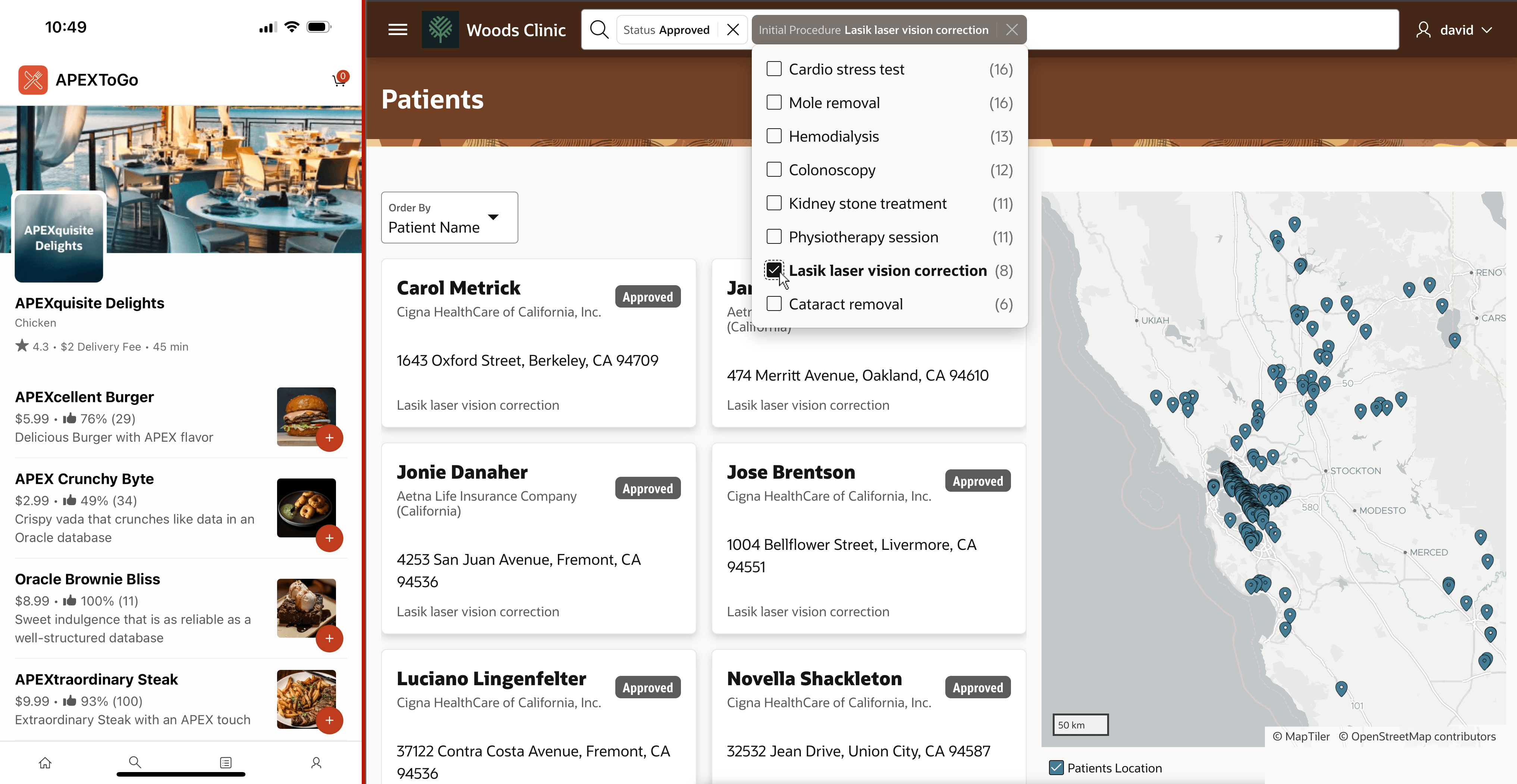
In APEX Page Designer, developers use an intuitive grid layout to position and size components, relative to others on the page. Their pages automatically adapt to any screen size on desktop and mobile devices, and the Universal Theme design system ensures pages are consistent and professional with no expertise required.
Choose a built-in theme style, and customize it interactively in the browser to override colors, fonts, icons, or other aspects to match a particular corporate look and feel.
With a single click, you can let users install your apps to launch them like native ones from their device's home screen, dock, or taskbar. Your apps can leverage native device facilities like location, tailored data entry keyboards, and multiple cameras. By following the best practices illustrated in the APEX To Go sample in the gallery, your apps look and work just like native mobile apps with the advantage that they are always up to date.
Figure 1-2 Examples of APEX Apps on Mobile and Desktop
Parent topic: Introduction
1.5 Complete Application Platform
Build complete apps with workflow, AI, reporting, files, REST APIs, and integration.
Your APEX apps can easily go well beyond data management. You can automate business processes and human approvals, apply artificial intelligence, and predict outcomes using machine learning. Producing pixel-perfect reports using Microsoft Word or Excel templates is easy.
Extending Oracle Fusion Applications, working with remote REST data, loading external data files, and uploading images and files are simple. The platform also makes it easy to automate repetitive tasks, expose REST APIs for integration, offload work to the background, and notify end-users of interesting events.
Parent topic: Introduction
1.6 Open, Agent-Ready APEXlang
Use APEXlang to generate and edit APEX apps that tools and coding agents can validate.
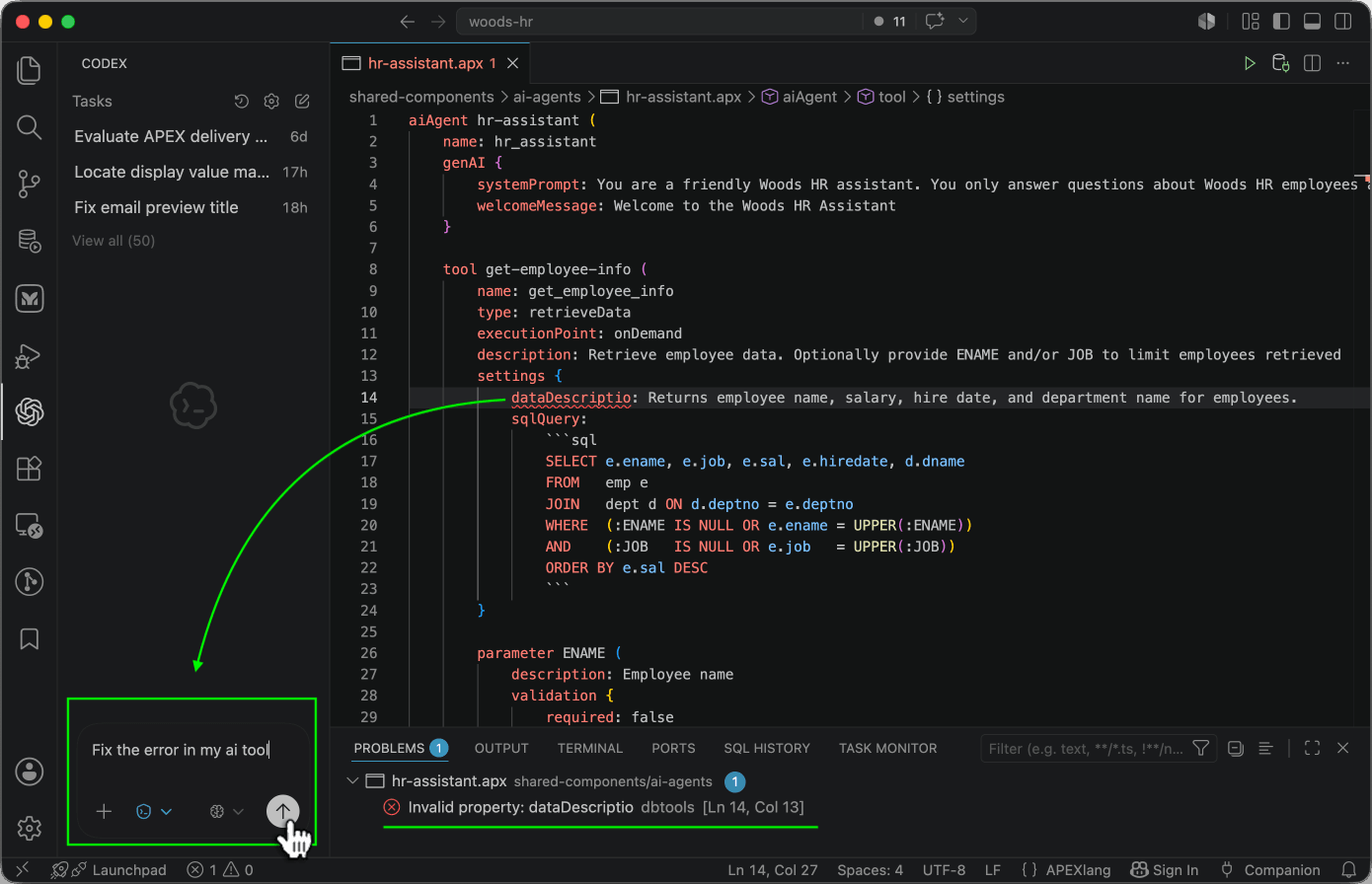
APEX applications are metadata-driven. APEXlang represents that metadata in an open, readable text format that developers, external tools, and coding agents can create and edit. SQLcl can validate APEXlang files without a database connection, giving tools and coding agents the feedback they need to correct errors before import. Open source APEXlang skills help agents create and evolve APEX apps, while the SQL Developer extension for Visual Studio code offers code completion, proactive error highlighting, and built-in import and export support. Developers can work in App Builder, in APEXlang with their favorite external tools, or both. All paths use the same open application metadata.
Because APEXlang targets the APEX application model, generated definitions run on the APEX platform rather than as standalone application code. The platform provides runtime services for sessions, authentication, authorization, transactions, data access, page rendering, approvals, and workflow. Your app can also define AI Agents with Tools that give an LLM a contract for looking up permitted data or performing allowed actions. The generated artifacts are human-readable metadata with a documented shape, so developers can review, maintain, and enhance them even when a coding agent helped author them.
Figure 1-3 Using AI Coding Agent in VS Code to Fix Problem Highlighted in APEXlang File
Parent topic: Introduction
1.7 Spec-Driven App Scaffolding
Blueprints turn a functional specification and data model description into a working, scaffolded app.
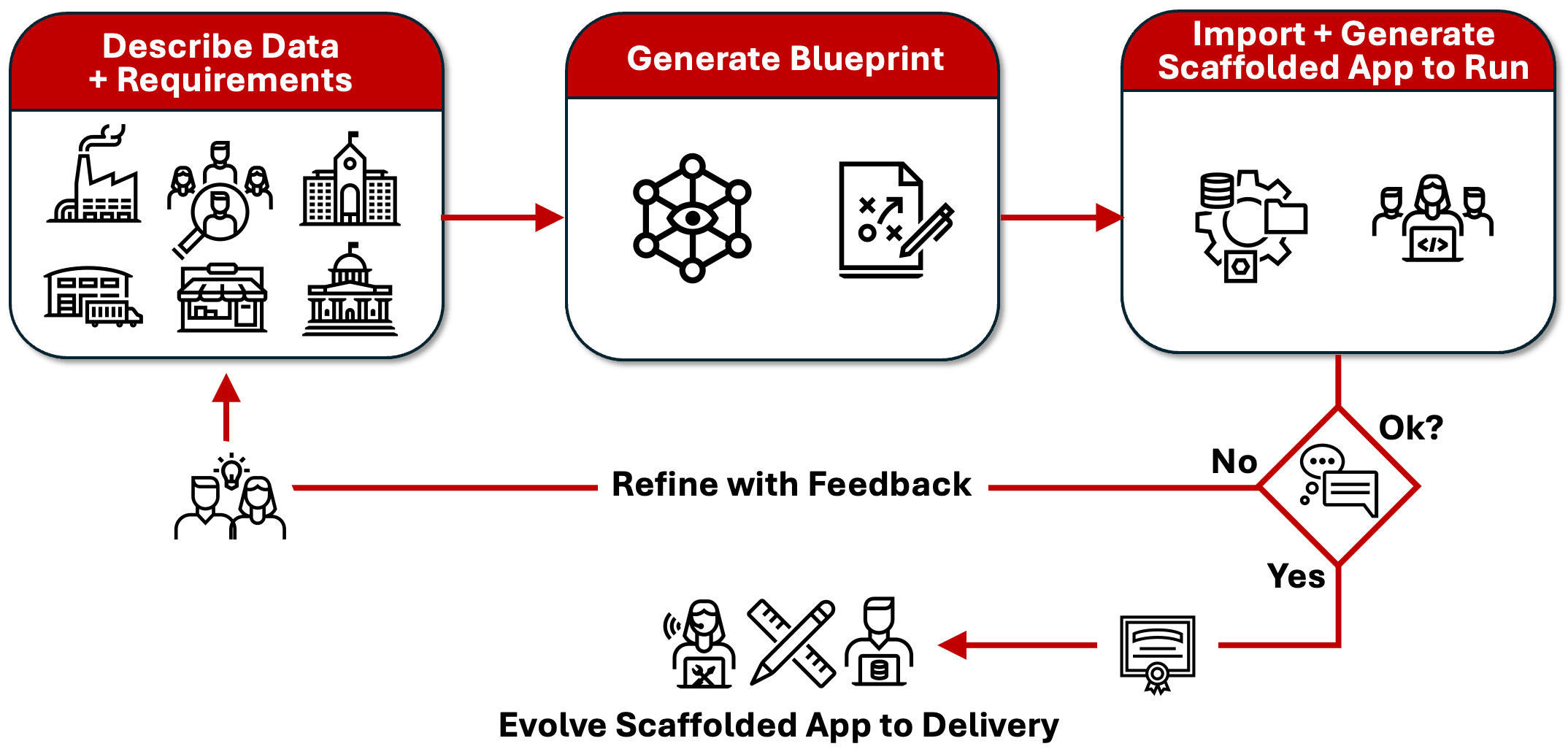
APEX blueprints help teams refine specifications quickly and avoid costly surprises later. Start with a draft functional spec and a data model description, then use an AI coding agent with Oracle's detailed blueprint generation prompt to produce a readable plan for the app. This structured Markdown document uses a simple, predictable format to describe proposed pages, navigation, reports, forms, charts, filters, actions, and initial page behavior using curated patterns. Stakeholders can review it while requirements are still easy to change. More important, they can try a working, scaffolded app that implements the current specification.
APEX imports the blueprint and deterministically generates a scaffolded app from APEXlang templates that represent tested building blocks. Key users can see real pages, follow real navigation, and react early. Gaps become visible. Vague requirements become specific. You can revise the specification, regenerate the blueprint, and produce another scaffolded app until stakeholders and builders agree on what the app needs to do.
This creates a fast prototyping loop. The scaffold is not the finished application. It helps the team refine the specification, expose missing requirements, and agree on the application’s shape. After stakeholders sign off, the final scaffold becomes the foundation for the app you deliver. You and the development team then refine the user experience, add business logic, and implement integrations using any combination of App Builder and AI coding assistants with APEXlang skills. You finish the app with the detail and judgment real systems require, and stakeholders get the application they helped shape.
Figure 1-4 Generating Scaffolded App with AI Produced Blueprints to Converge Requirements
Parent topic: Introduction
1.8 Pricing and Deployment Options
Oracle APEX is cost‑effective and offers flexible deployment options.
Oracle APEX is free to use with any Oracle AI Database license, including the Oracle Database 26ai Free. It is also available as a fully-managed cloud service with usage-based pricing. Oracle APEX has no limits on applications, developers, or end-users, and the apps you build can run on-premises, in the Oracle Cloud, or in third-party clouds with no changes.
Parent topic: Introduction
1.9 Active, Helpful Community
Connect with a worldwide APEX community for support, learning, and reusable plug-ins.
The worldwide Oracle APEX developer community is a vibrant, supportive group of hundreds of thousands of developers. They organize many annual user group conferences and developer meet-ups around the world to share APEX knowledge.
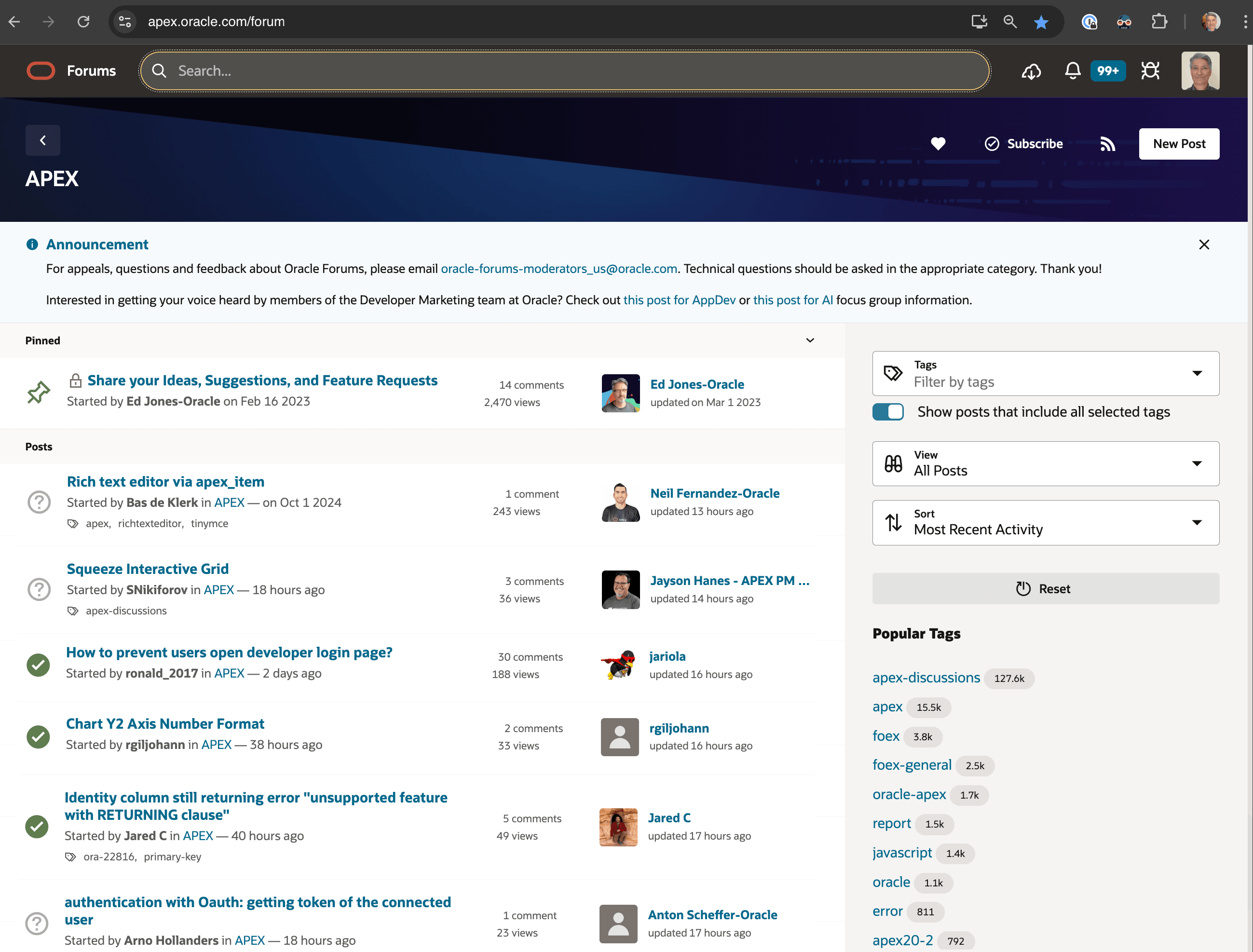
Community members help each other every day on the APEX Forum at oracleapex.com/forum. The site is
an Internet-scale Oracle APEX app, that easily handles over a million requests a day for all developer questions
about all Oracle products. The figure below shows a page of discussion threads where both Oracle and
community APEX experts answer questions from the community.
Figure 1-5 APEX Community Discussion Forum, Built Using APEX
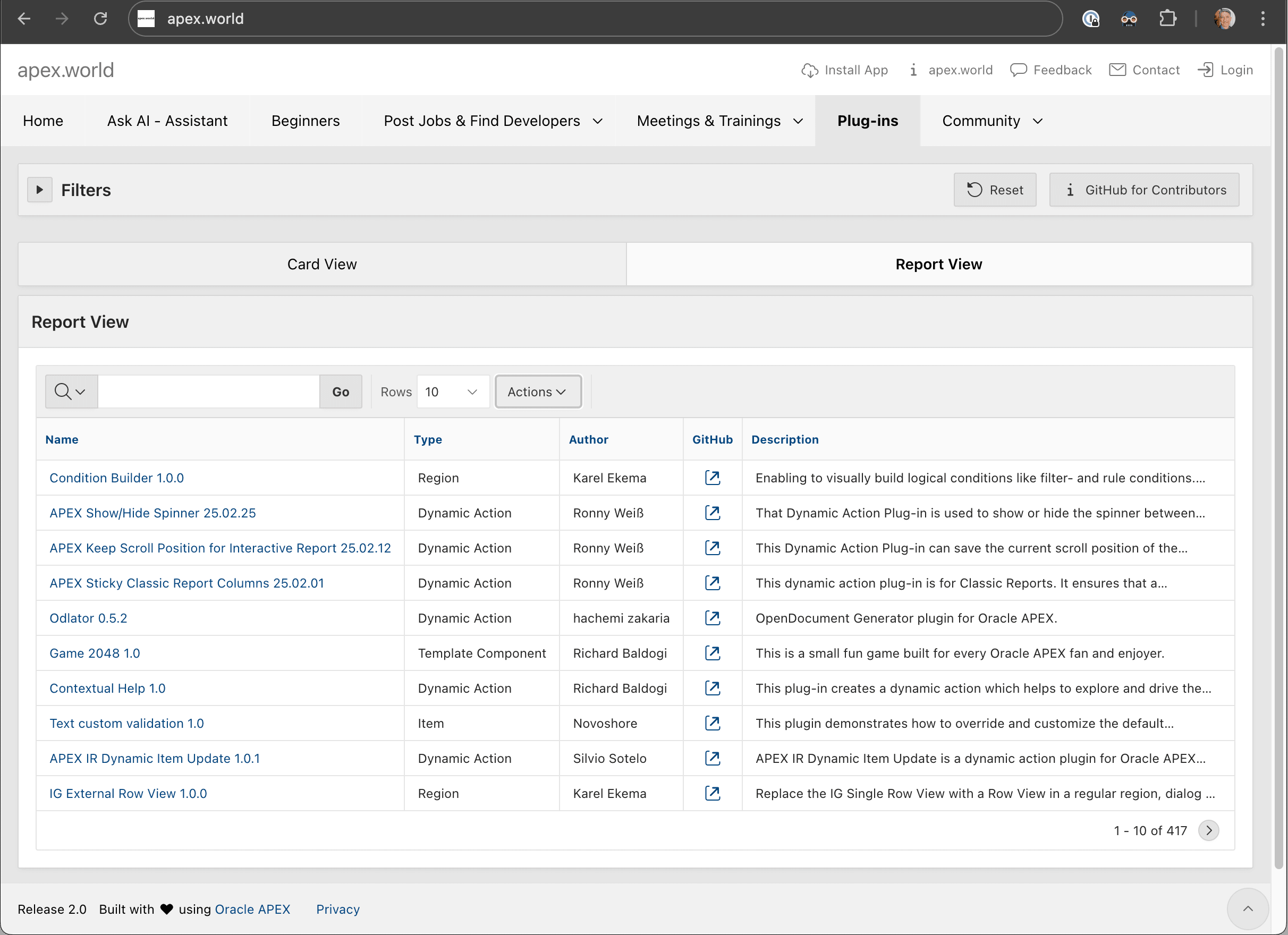
The APEX community also maintains the apex.world website shown below, where you can find the latest APEX-related product news, blog articles, meetings, trainings, social media posts, and over 400 reusable components called plug-ins.
Figure 1-6 APEX World Community Site for News, Component Exchange, and More
Parent topic: Introduction
1.10 App Development as a Service
Offer self-service app development with multi-tenant APEX workspaces and isolated data.
Using Oracle APEX, any company can offer an App Dev as a Service option, empowering staff to rapidly turn ideas into apps. Oracle APEX is a multi-tenant low-code platform organized into workspaces. Each developer or team can use their own workspace on the same APEX instance and separate workspace schemas provide data isolation. APEX's self-service provisioning mode lets developers request a new workspace and get a link to log in to their workspace in a confirmation email. New requests can be approved manually or automatically.
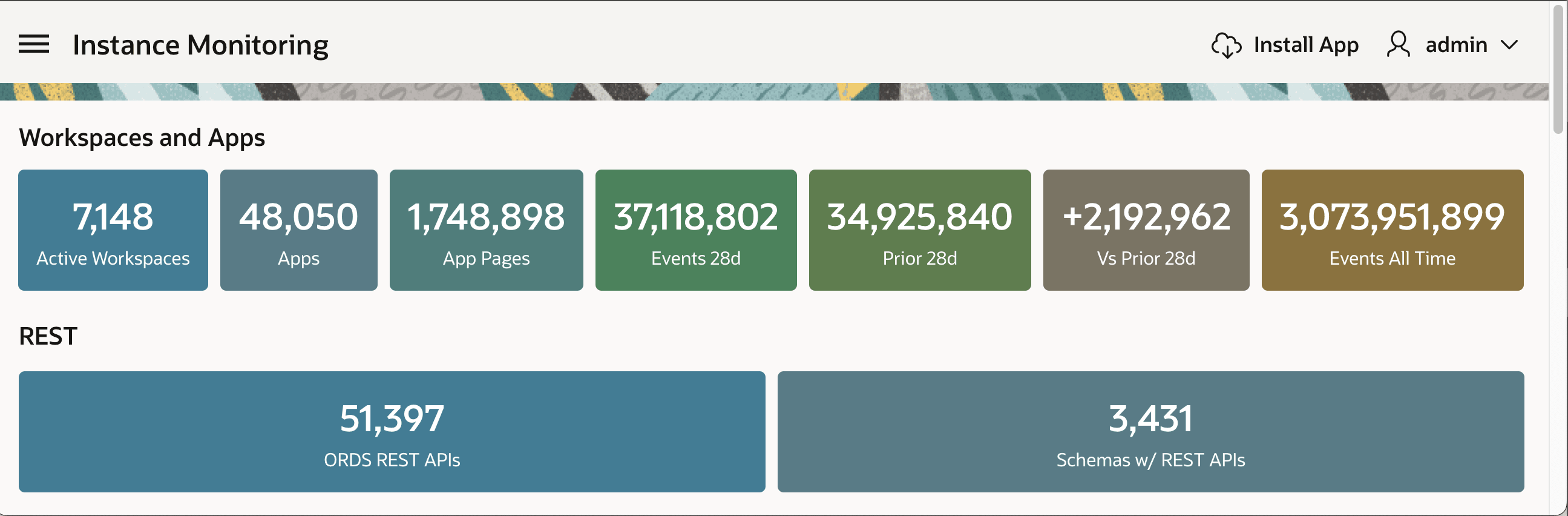
Oracle extends this capability to all internal stakeholders. Tens of thousands of employees of every skill level, job description, line of business, and country use APEX internally to create apps that help run Oracle's day-to-day operations. The figure below shows statistics for one of Oracle's largest internal APEX instances supporting over 7000 active workspaces and thousands of production applications. Any Oracle employee can request a workspace and start building applications in minutes.
Figure 1-7 Statistics for Large Internal APEX Instance
Parent topic: Introduction
1.11 Learning Resources and Free Workspaces
Find APEX learning resources and request a free workspace for hands-on practice.
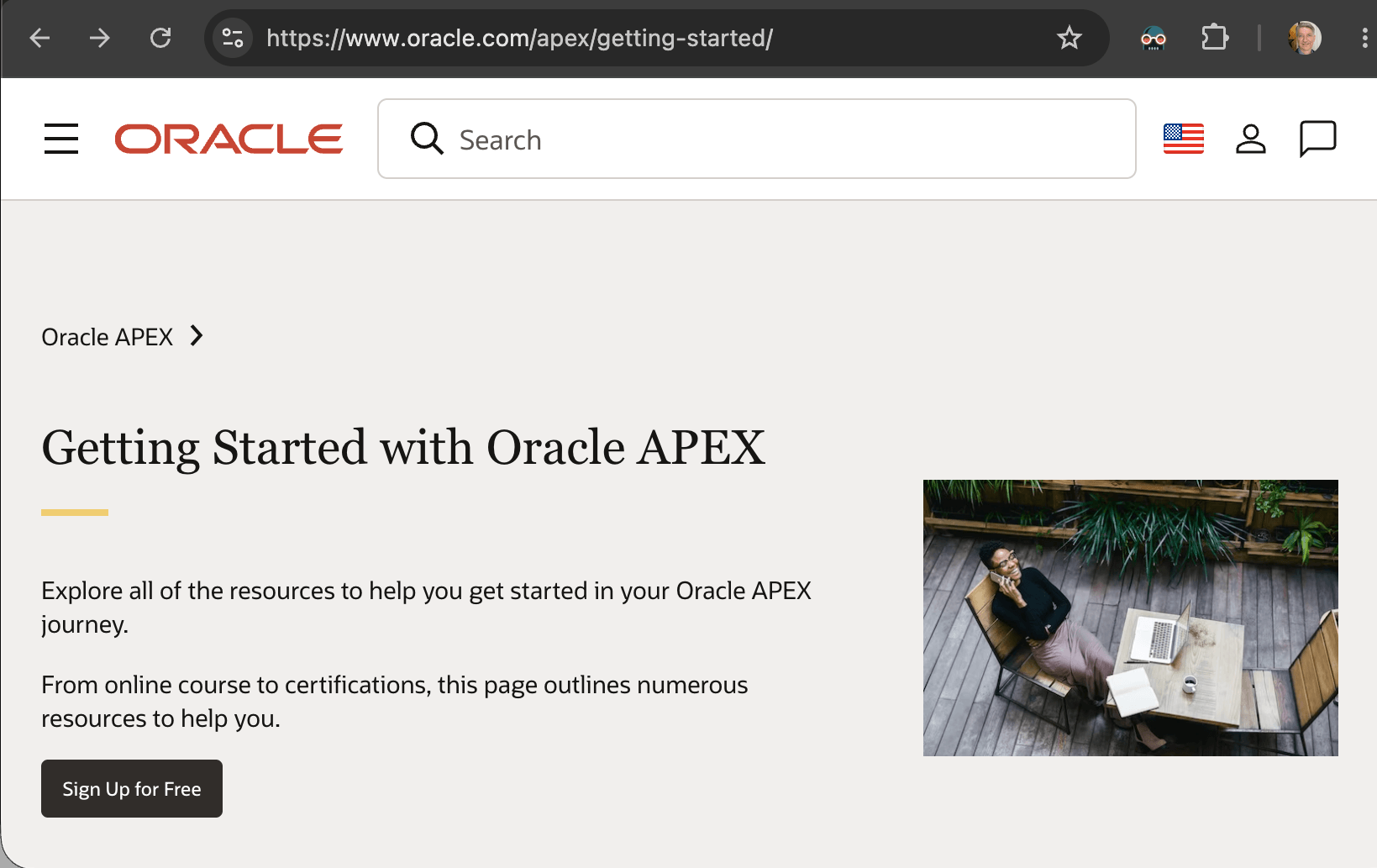
The Getting Started page at oracle.com/apex/getting-started is your hub for
quick access to documentation, training and certifications, labs and tutorials, videos,
and additional resources about Oracle APEX.
As shown below, you can click Sign Up for Free to request a free workspace. It gives you access with no time limit to all features of the latest version of the APEX platform right from your browser for learning, exploration, or prototyping.
You can also provision an Always Free-Tier tenancy on Oracle Cloud Infrastructure. Oracle APEX is pre-installed in every OCI Autonomous AI Database.
Figure 1-8 Browsing Other Learning Resources
Parent topic: Introduction