5.1 Listing Data with Classic Reports
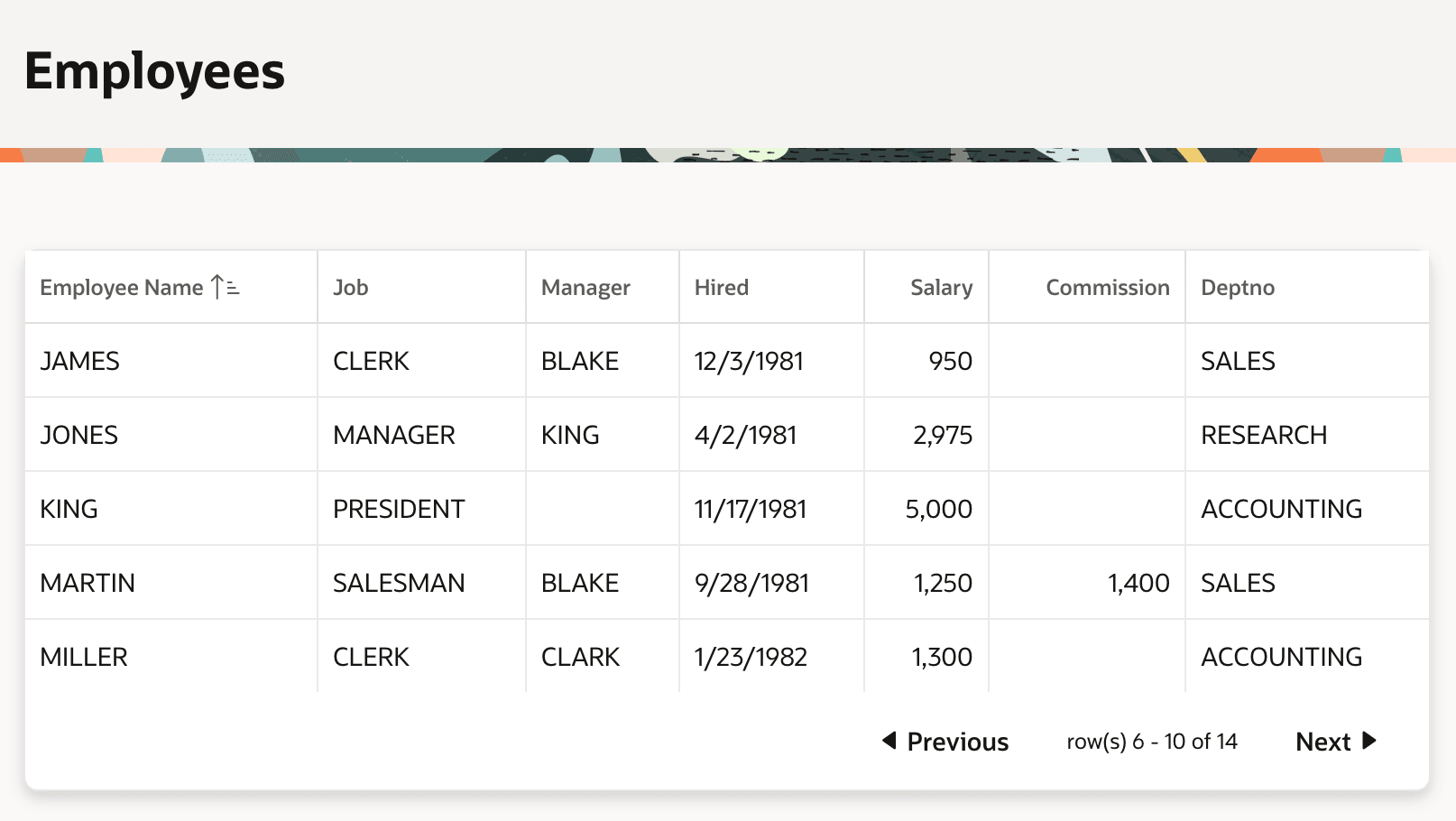
The Classic Report region displays data in a table, with optional pagination.
If the number of rows is reliably small, you can show them all at once. When the
result set may be larger, configure pagination to efficiently retrieve rows page by
page. By adjusting a column's settings in Page Designer, you control its display type,
heading, format mask, sort behavior, alignment, and more. For a column of type Plain Text, you can use an HTML
Expression to customize how it renders. You can mix HTML tags, conditional
formatting directives, and column values, referencing even hidden ones using
#SOME_COLUMN_NAME#. As shown below, when the value of a
column like Deptno is a foreign key, set its type to Plain Text (based
on List of Values) to have APEX automatically render its user-friendly display value instead.
Figure 5-1 Classic Report Region Showing Employees Data with Pagination
The Standard report template is the default, but the
Universal Theme Reference App at oracleapex.com/ut
shows other available templates like Value Attribute Pairs,
Media List, Search Results, Timeline, and more. When none of the built-in templates meet your
needs, you can create custom templates to format the rows and columns of data in a
classic report in any way necessary.
For more information, see Managing Classic Reports in Oracle APEX App Builder User’s Guide.
Parent topic: Visualizing and Analyzing Data