17.4.3.5 Loading Data with Native Page Process
Understand how the generated Data Loading page uses a native Data Loading process to load the uploaded file.
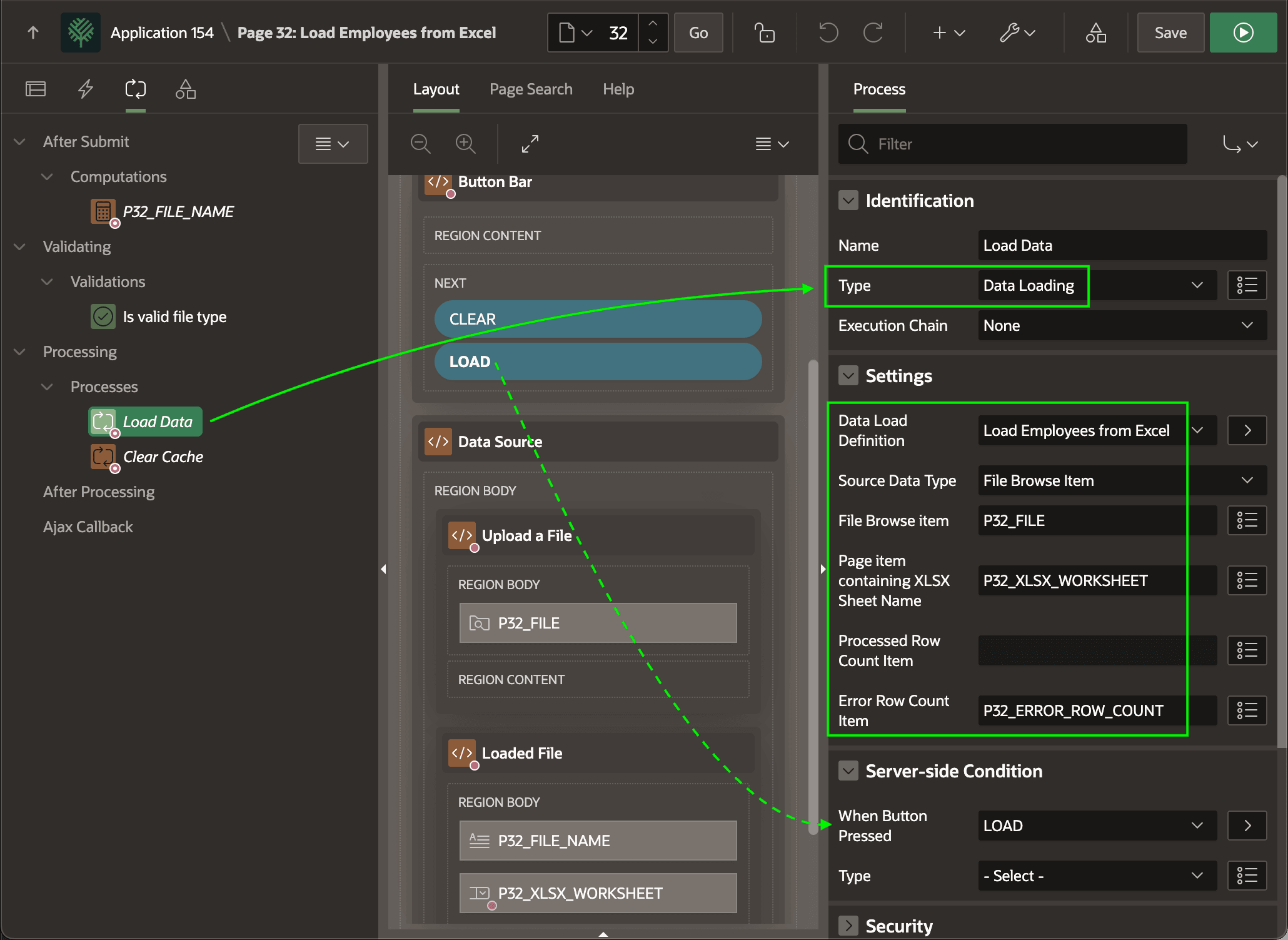
After reviewing the data preview, when the user clicks the (Load) button to
load the data, it submits the page and executes the Load Data page process. As
shown below, its server-side condition ensures it runs only when the
LOAD button is pressed.
The Load Data page process is a native Data Loading process type, with its Data Load Definition set to Load Employees from Excel.
While it can also load data from a text area, or a SQL query returning a CLOB or BLOB, here it's set to use the contents of the P32_FILE File Upload item's temporary file. It configures the P32_XSLX_WORKSHEET item to supply the worksheet name, if any.
Tip:
If you configure a Success Message on the Load Data page process, that takes precedence. Otherwise a Data Loading page process shows a default success message indicating the number of rows loaded.
Figure 17-20 Configuring Native Data Load Page Process
Parent topic: Understanding Data Loading Pages