25.3.3 Modeling the Medical Procedure Lifecycle
Model status-driven business logic with a workflow that waits for procedure status or schedule changes.
- Scheduled – staff send an email to the patient
- Completed – staff prepare a draft invoice to review with the insurance provider
- Invoiced – staff email the invoice to the client for payment
- Paid – staff consider the procedure's lifecycle complete.
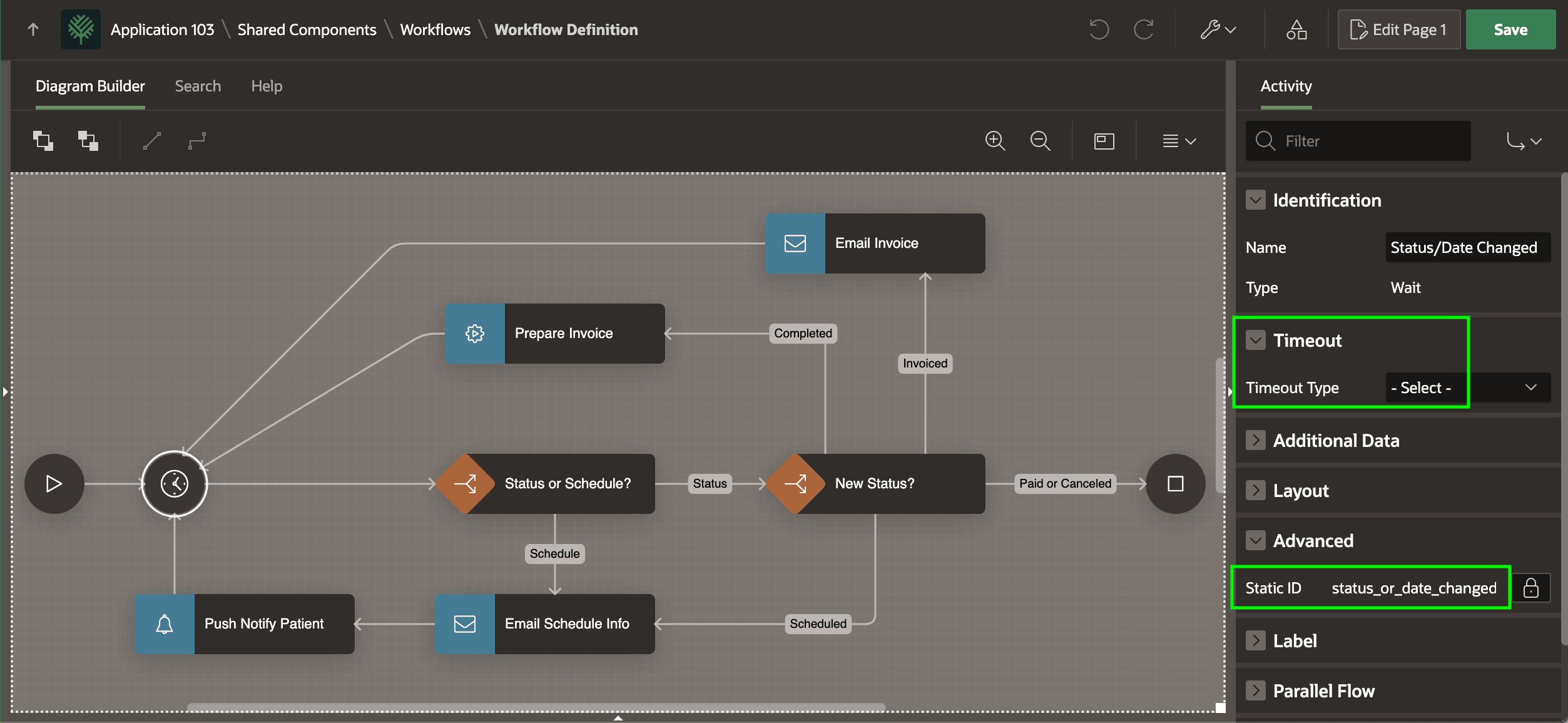
You can use a workflow with a Wait activity as shown below to automate this medical procedure lifecycle. Notice the Wait activity has the Static ID unique identifier of status_or_date_changed and that it has left the Timeout Type unset. This makes the workflow wait indefinitely until your application logic signals it to continue.
V_WHAT_CHANGED with the value:
STATUS– if the medical procedure status has changed, orSCHEDULE– if its schedule has changed.
The Switch activities can use the value of the V_WHAT_CHANGED variable and Additional Data columns like STATUS, DOCTOR, and PROCEDURE_DATE of the associated FRC_MEDICAL_PROCEDURES row to perform appropriate business logic. Most of the paths in the workflow connect back to the Wait activity to await further data changes. However, when STATUS reflects the final "Paid" status, the workflow ends.
Figure 25-113 Procedure Lifecycle Workflow Coordinates Application Logic
- Scheduled – your workflow emails the patient
- Completed – your workflow prepares the draft invoice as a pixel-perfect PDF document
- Invoiced – your workflow emails the invoice as an attachment to the client for payment
- Paid – your workflow marks the procedure as complete.
Parent topic: Automating Business Entity Lifecycle Logic