15.1.7.4 Preventing Enter Key from Submitting
Prevent the Enter key from submitting a single-field dialog by adding a visually hidden text field.
When a user presses the [Enter] key in a web page, for historical reasons, all browsers submit the page when it contains just a single input field. In contrast, if the page has two or more input fields, then the [Enter] key does not do this.
The Employee Address modal drawer is a "single input field" page.
Technically, its only input field is P60_ADDRESS since the Geocoded
Address page item P60_GEO_JSON_POINT renders as a map. In this
situation, the simplest solution to avoid [Enter]'s submitting the page is to add
a second input field. By hiding this second field as described, the end
user does not even know it's there.
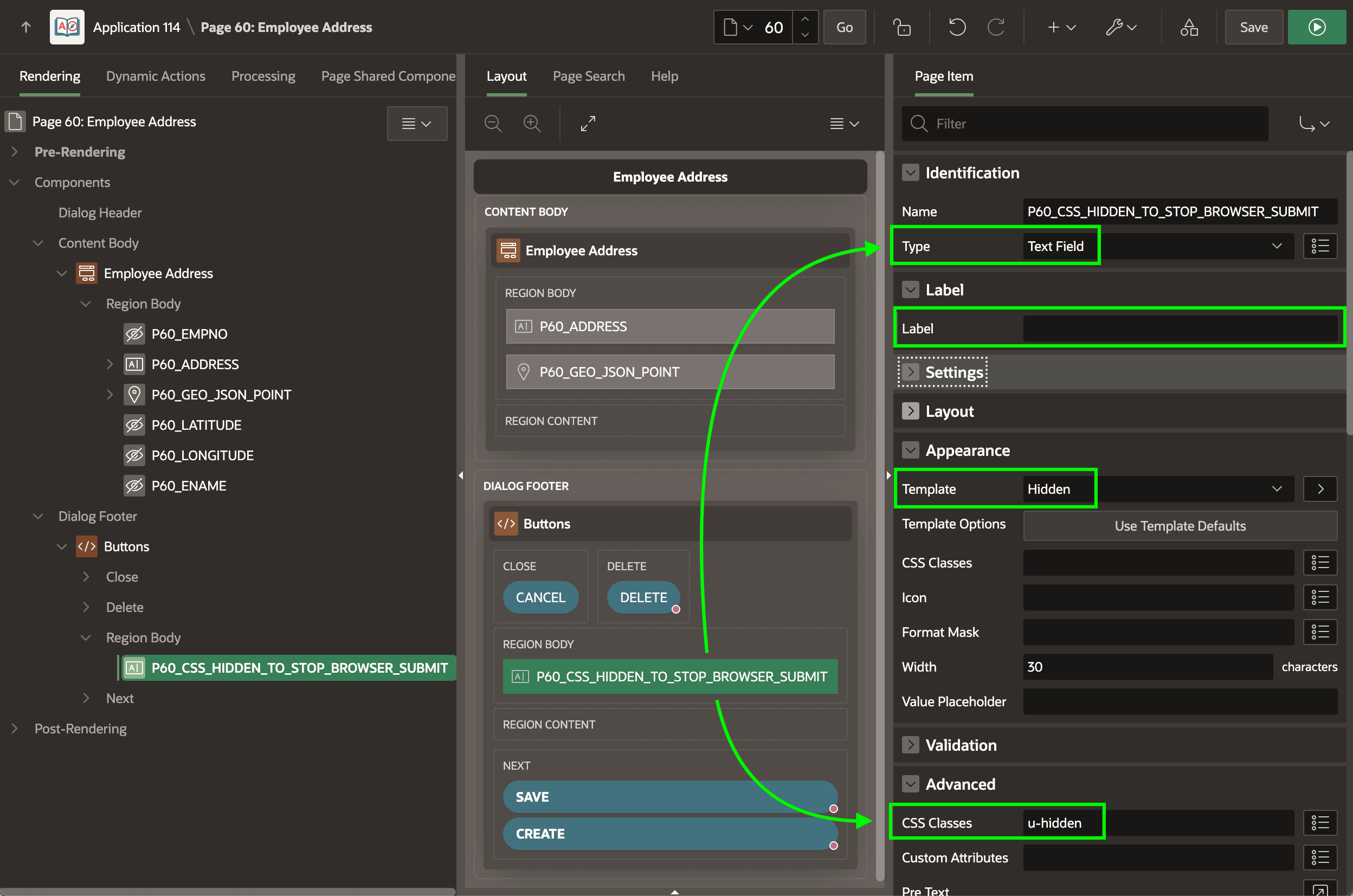
When adding this hidden field, give it a name that clarifies its special purpose. As shown below, leave its page item type as Text Field instead of Hidden. Then add the Universal Theme CSS class u‑hidden to its Advanced > CSS Classes property to hide it instead. Notice the label is blank and the Appearance > Template is set to Hidden as well. Despite its not being visible to the user, the browser counts this second field which avoids the [Enter] key from submitting the page.
Figure 15-19 Adding CSS-Hidden Field to Stop Enter Key from Submitting Page
Parent topic: Exploring Additional Page Features