17.6.3 Processing Multiple Uploaded Files
Process multiple uploaded files with PL/SQL that chooses the right Data Load Definition and expands ZIP archives.
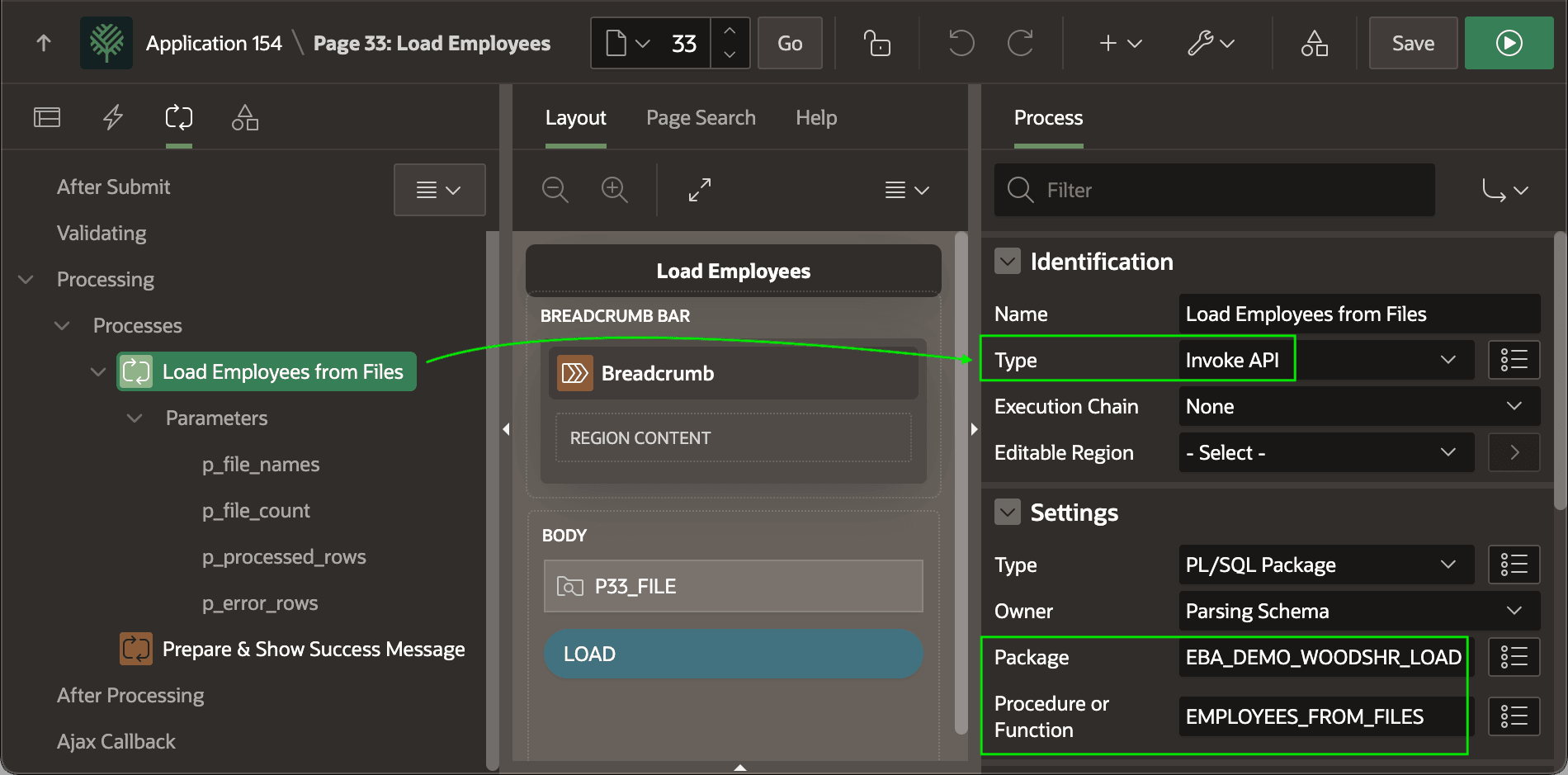
EMPLOYEES_FROM_FILES procedure in the
EBA_DEMO_WOODSHR_LOAD package explained below. The
p_file_names
IN parameter gets its value from the File Upload page
item P33_FILE, and the three OUT parameters
return their values into respective hidden page items:
p_file_count=>P33_FILE_COUNTp_processed_rows=>P33_PROCESSED_ROWSp_error_rows=>P33_ERROR_ROWS
Figure 17-23 Calling Custom Data Load File Processing with Invoke API Page Process
ONE_FILE_ROWS_PROCESSED=> "Loaded 1 file, new employees: %0"MANY_FILES_ROWS_PROCESSED=> "Loaded %0 files, new employees: %1"
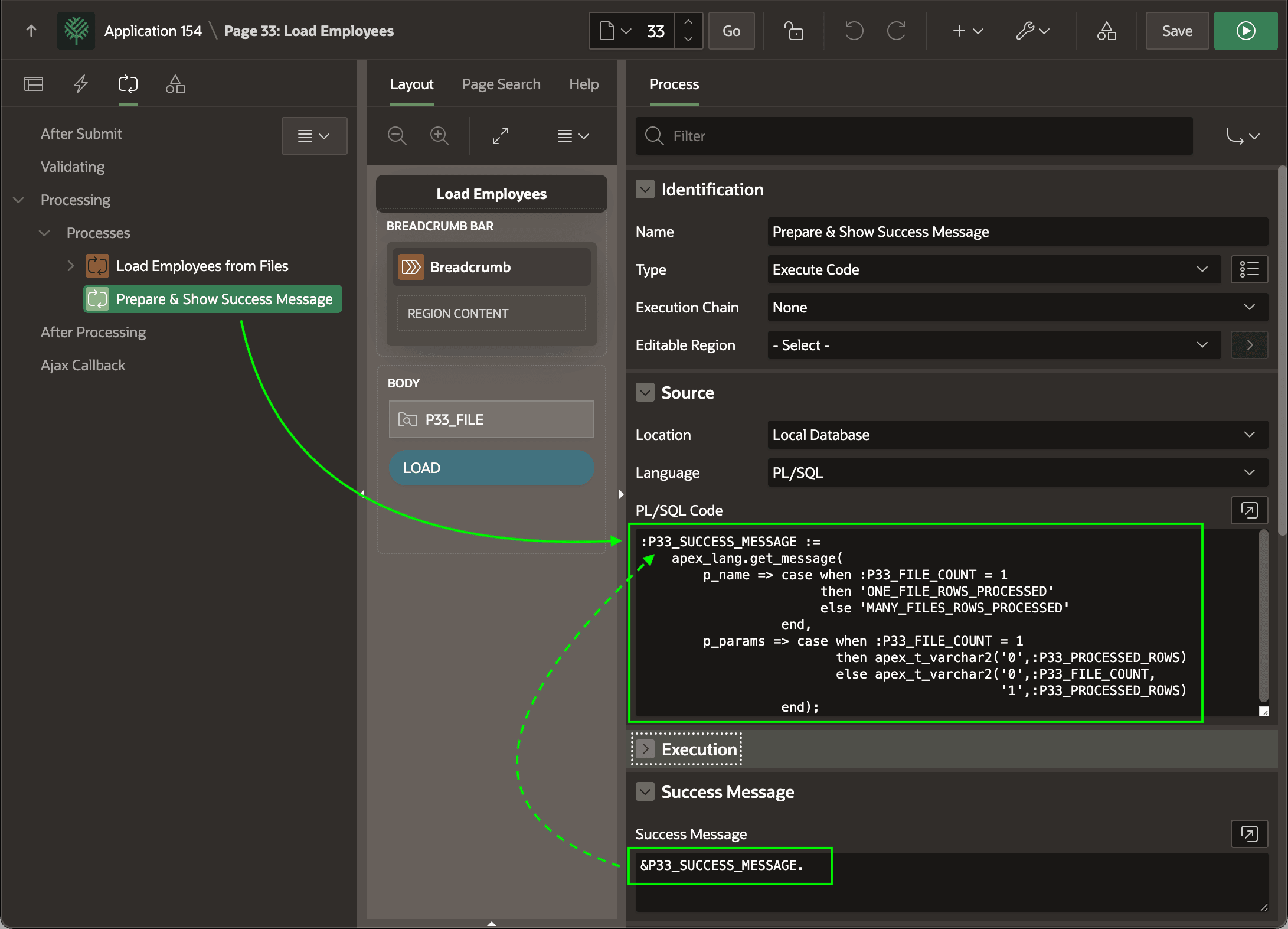
A subsequent Execute Code page process references these translatable messages to compute the value of the hidden P33_SUCCESS_MESSAGE. It uses APEX_LANG.GET_MESSAGE and CASE expressions with to supply an appropriate number of placeholder values for a conditional translatable text message key.
:P33_SUCCESS_MESSAGE :=
    apex_lang.get_message(
        p_name => case when :P33_FILE_COUNT = 1
                       then 'ONE_FILE_ROWS_PROCESSED'
                       else 'MANY_FILES_ROWS_PROCESSED'
                  end,
        p_params => case when :P33_FILE_COUNT = 1
                         then apex_t_varchar2('0',:P33_PROCESSED_ROWS)
                         else apex_t_varchar2('0',:P33_FILE_COUNT,
                                              '1',:P33_PROCESSED_ROWS)
                  end);
Figure 17-24 Computing a Custom Success Message with Conditional Text
The source for the EMPLOYEES_FOR_FILES procedure appears below. It loops over the uploaded files in temporary storage from the File Upload item passed in, and calls the DATA_LOAD_FOR_FILE helper procedure to perform the data load on the current file.
-- In package eba_demo_woodshr_load
procedure employees_from_files(
    p_file_names      in varchar2,
    p_file_count     out number,
    p_processed_rows out number,
    p_error_rows     out number)
is
begin
    p_file_count     := 0;
    p_processed_rows := 0;
    p_error_rows     := 0;

    -- Loop over uploaded files in temp storage from File Upload item
    for j in (select blob_content, filename, mime_type
                from apex_application_temp_files
               where name in (select column_value
                                from apex_string.split(p_file_names,':')))
    loop
        -- Load the employees from the current file
        data_load_for_file(
            p_content        => j.blob_content,
            p_filename       => j.filename,
            p_mime_type      => j.mime_type,
            p_file_count     => p_file_count,
            p_processed_rows => p_processed_rows,
            p_error_rows     => p_error_rows);
    end loop;
end employees_from_files;
The DATA_LOAD_FOR_FILE procedure looks at the extension of the passed-in file name as well as the MIME Type of the file if supplied to decide the suffix of the Data Load Definition to use. Depending on the match, the l_data_load_def_suffix ends up being csv, json, xml, excel, or zip. If nothing matches, it will be null.
If we're processing a ZIP file, then it calls the DATA_LOAD_FROM_ZIP helper procedure to process the contents of the zip file. Otherwise, if the data load suffix is not null, it appends the suffix to "load_employees_from_" to produce the static ID of the Data Load Definition to use. Finally, it passes this data load definition static id to APEX_DATA_LOADING.LOAD_DATA to perform the data load based on the file profile it specifies.
It keeps a running total of the number of files loaded and employees processed using the processed_rows field value from the t_data_load_result return value.
-- In package eba_demo_woodshr_load
----------------------------------------------
-- Load the employees data using the filename
-- extension or the mime type to determine
-- whether we're processing a zip file, or
-- a CSV, JSON, XML, or Excel file to data load
----------------------------------------------
procedure data_load_for_file(
    p_content        in blob,
    p_filename       in varchar2,
    p_mime_type      in varchar2,
    p_file_count     in out number,
    p_processed_rows in out number,
    p_error_rows     in out number)
is
    c_extension            constant varchar2(255)  := extension_of(p_filename);
    l_data_load_def_suffix          varchar2(255);
    l_result                        apex_data_loading.t_data_load_result;
begin
    l_data_load_def_suffix :=
        case
            when    c_extension in ('txt','csv')
                 or p_mime_type in ('text/plain','text/csv')
            then
                'csv'
            when    c_extension = 'json'
                 or p_mime_type = 'application/json'
            then
                'json'
            when    c_extension = 'xml'
                 or p_mime_type = 'text/xml'
            then
                'xml'
            when    c_extension in ('xls','xlsx')
                 or p_mime_type in ('application/vnd.ms-excel',
                                    'application/vnd.openxmlformats-officedocument.spreadsheetml.sheet')
            then
                'excel'
            when    c_extension = 'zip'
                 or p_mime_type = 'application/zip'
            then
                'zip'
        end;
    if l_data_load_def_suffix = 'zip' then
        data_load_from_zip(
            p_zip_content    => p_content,
            p_file_count     => p_file_count,
            p_processed_rows => p_processed_rows,
            p_error_rows     => p_error_rows);
    elsif l_data_load_def_suffix is not null then
        l_result := apex_data_loading.load_data(
                        p_static_id => 'load_employees_from_'||l_data_load_def_suffix,
                        p_data_to_load => p_content);
        p_file_count     := p_file_count + 1;
        p_processed_rows := p_processed_rows + l_result.processed_rows;
        p_error_rows     := p_error_rows + l_result.error_rows;
    end if;
end data_load_for_file;
The DATA_LOAD_FROM_ZIP uses APEX_ZIP.GET_FILES and a FOR loop to process the list of files contained in the zip file. It calls DATA_LOAD_FOR_FILE to get the job done.
-- In package eba_demo_woodshr_load
----------------------------------------------
-- Load the employees data files contained in
-- the supplied zip file blob
----------------------------------------------
procedure data_load_from_zip(
    p_zip_content    in blob,
    p_file_count     in out number,
    p_processed_rows in out number,
    p_error_rows     in out number)
is
    l_files        apex_zip.t_files;
    l_file_content blob;
begin
    -- Get list of files from the zip
    l_files := apex_zip.get_files(p_zip_content);

    -- Process the individual files inside the zip
    for j in 1..l_files.count loop

        -- Get the contents of the current file in the zip file
        l_file_content := apex_zip.get_file_content(p_zip_content,l_files(j));

        -- Load employees from the current file
        data_load_for_file(
            p_content        => l_file_content,
            p_filename       => l_files(j),
            p_mime_type      => null,
            p_file_count     => p_file_count,
            p_processed_rows => p_processed_rows,
            p_error_rows     => p_error_rows);
    end loop;
Parent topic: Loading Multiple Files Including ZIPs