17.6.2 Setting File Upload to Handle Multiple Files
Configure a File Upload item for multiple files and track processing results in hidden page items.
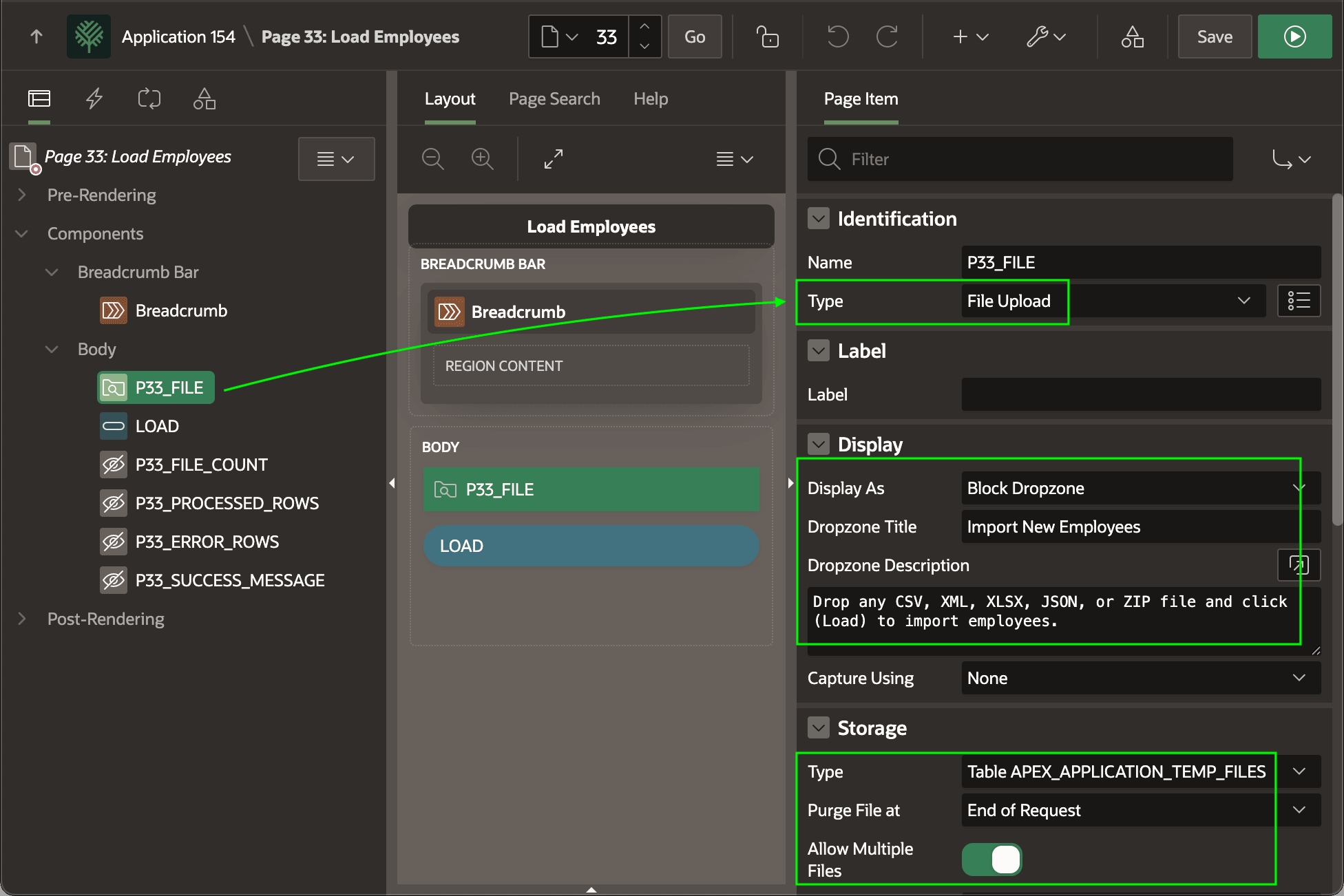
The page's
P33_FILE
File Upload page item has Allow Multiple Files enabled. It displays as a
Block Dropzone with a custom title and description. Uploaded files are stored
only for the duration of the request in the
APEX_APPLICATION_TEMP_FILES table.
Tip:
In this context, request means the HTTP POST sent to the
APEX server when the user submits the page. Setting Purge File
at to End of Request tells APEX to delete the uploaded file from temporary storage after it finishes
processing that submit.
Four hidden page items act like local page variables to hold the values of:
- Number of files processed –
P33_FILE_COUNT - Number of employee rows processed –
P33_PROCESSED_ROWS - Number of error rows –
P33_ERROR_ROWS - Custom success message –
P33_SUCCESS_MESSAGE
Figure 17-22 Configuring File Upload Item to Allow Multiple Files
Parent topic: Loading Multiple Files Including ZIPs