3.6.3 The Role HTML and CSS Play to Format Data
While Universal Theme lets you deliver great results without being an expert in web technologies, understanding the role HTML and CSS play is useful when customizing data formatting.
Since APEX apps are web-based, they use standard tags to annotate or mark up data with details to help clearly present the information to users. The Hypertext Markup Language (HTML) uses tags like <ul> to indicate an unordered list of elements, <li> for each element in a list, <strong> to strongly emphasize some content, and many others. These tags introduce a logical presentation structure around the data to format. These tags can contain additional attributes like class whose value contains additional logical information about an element. For example, a tag like <li class="is-selected"> might distinguish a list element the user has selected among other elements in the list. Tags and attributes work in concert with Cascading Style Sheets (CSS) rules that define how different structural elements on the page should appear.
Consider the simple example below showing the HTML markup for a list of four departments, with the RESEARCH department annotated as being selected.
<ul>
  <li><strong>ACCOUNTING</strong> → NEW YORK</li>
  <li><strong>OPERATIONS</strong> → BOSTON</li>
  <li class="is-selected"><strong>RESEARCH</strong> → DALLAS</li>
  <li><strong>SALES</strong> → CHICAGO</li>
</ul>
Your browser receives this markup to display along with CSS styling rules like the following. These two simple rules declaratively specify the background and foreground color of a selected list item and the relative font size of list item content with a strong emphasis.
/* Color selected list items differently */
li.is-selected {
    background-color: lightblue;
    color: midnightblue;
}
/* Increase font size of strong elements in list items by 20% */
li strong {
    font-size: 120%;
}
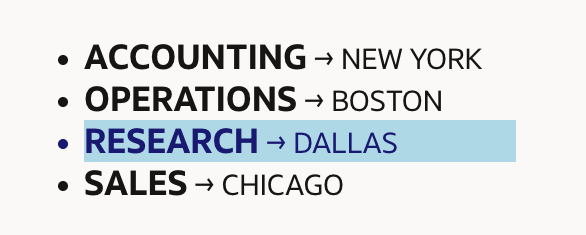
The combination of this HTML markup and CSS style rule produces a result like you see below. It shows the four department names in a bold, larger font in a bulleted list. The selected RESEARCH department appears with a light blue background.
Figure 3-30 Browser Display of Simple HTML and CSS Example
Parent topic: Universal Theme Design System