8.4.1 Understanding AJAX and Redirect
In addition to the page render and submit interactions with the APEX engine, your page can also run business logic on the server and refresh regions to show the latest data without re-rendering the entire page.
This involves a web application technique called an "AJAX" request, where your page quietly talks to the server in the background to get or send information without refreshing the whole page. APEX makes the process a no code experience. When appropriate, your page can also navigate to another page without submitting user changes to the server. This is known as redirecting to another page, instead of submitting and branching to another page.
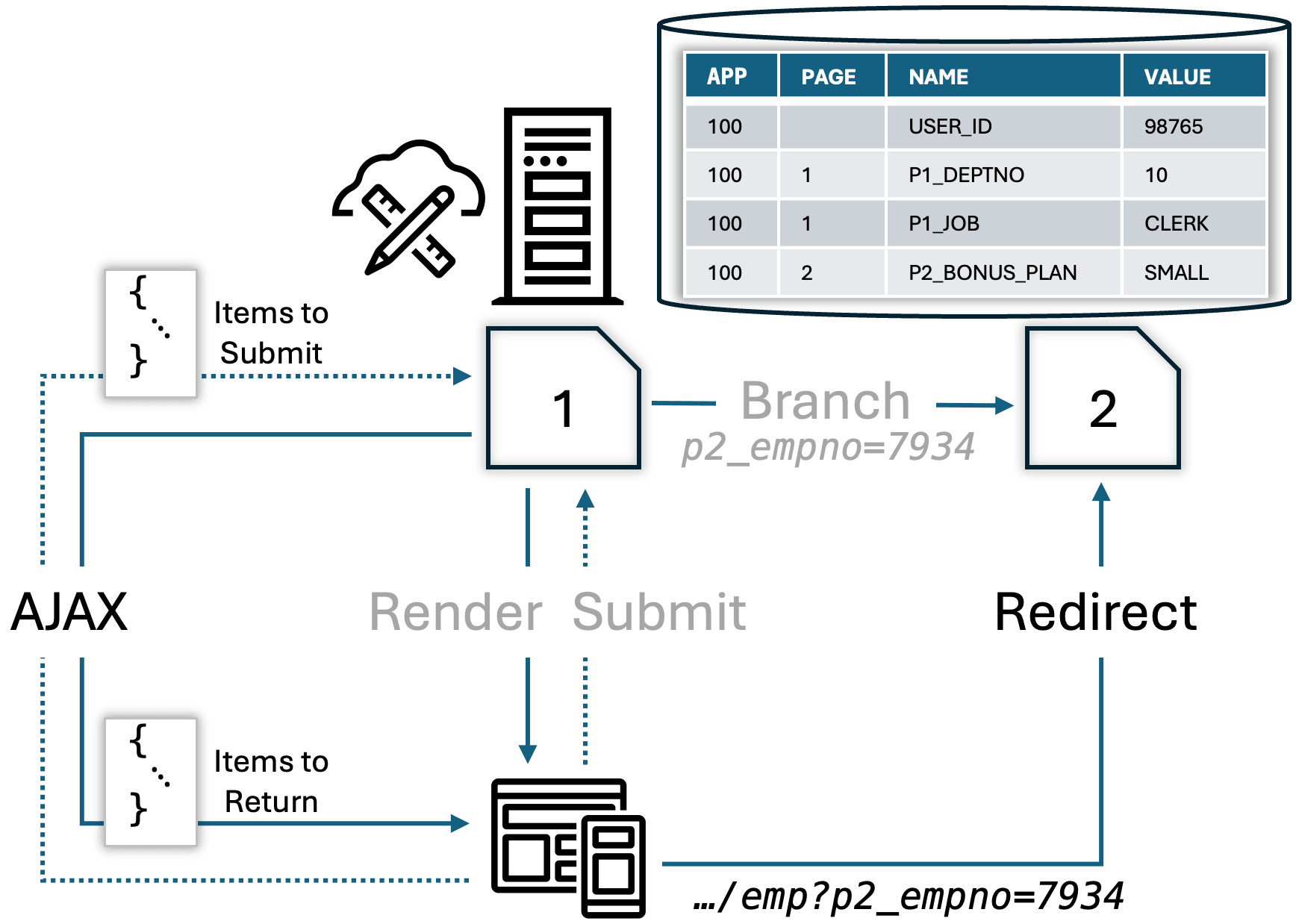
As shown below, during an AJAX request APEX sends data from the page to the server and it receives a response containing data to update the page. Two common features that use AJAX requests are executing server-side business logic and refreshing a region. APEX handles the lower-level communications with the server while you focus on what your application needs to accomplish.
The Execute Server-side Code dynamic action lets you invoke server-side PL/SQL or JavaScript. You configure the Items to Submit and Items to Return properties that inform APEX what to include in the data sent to the server and what to return back to the page. You author only the application-specific logic that only you could write.
When you use a Refresh dynamic action to make a region show the latest data, APEX performs an AJAX request to do the job. In this case, the region's Page Items to Submit property determines the data to send. The response includes the HTML markup and data for the partial page update that APEX applies automatically to refresh just that area of the page.
When one of your pages redirects to another, it can pass along parameter values like a branch does. The key difference is that any end user data changes on the current page are not submitted to the server, so they do not update user session state values. By default, if there are unsaved changes on a page, the user sees a warning before your app redirects to another page. You can control this warning using the Warn on Unsaved Changes property at page level and on individual page items as needed. For example, if a page item is used as a query-by-example filter and you've configured it to have session state storage of Per Request (Memory Only), then the fact that the end user changed the filter value does not matter. The diagram below illustrates the difference between the default render, submit, and branch lifecycle and the AJAX and Redirect mechanisms. The database table in the figure shows the session state values the APEX engine manages automatically.
Figure 8-13 AJAX Requests and Redirects Complement Render, Submit, and Branch
Parent topic: Additional Page Flow Features