25.1.9.1.5 Understanding Task States
Understand task states and the actions that move a task through its lifecycle.
Every task instance has a state. It reflects the status of the task as it progresses
through its lifecycle from creation to closure. Each state has a corresponding state
code. The state is a mixed-case string like Information Requested, while
the state code is uppercase and contains no spaces like INFO_REQUESTED.
With the exception of this example, all other state codes are the uppercase version of
the corresponding state name.
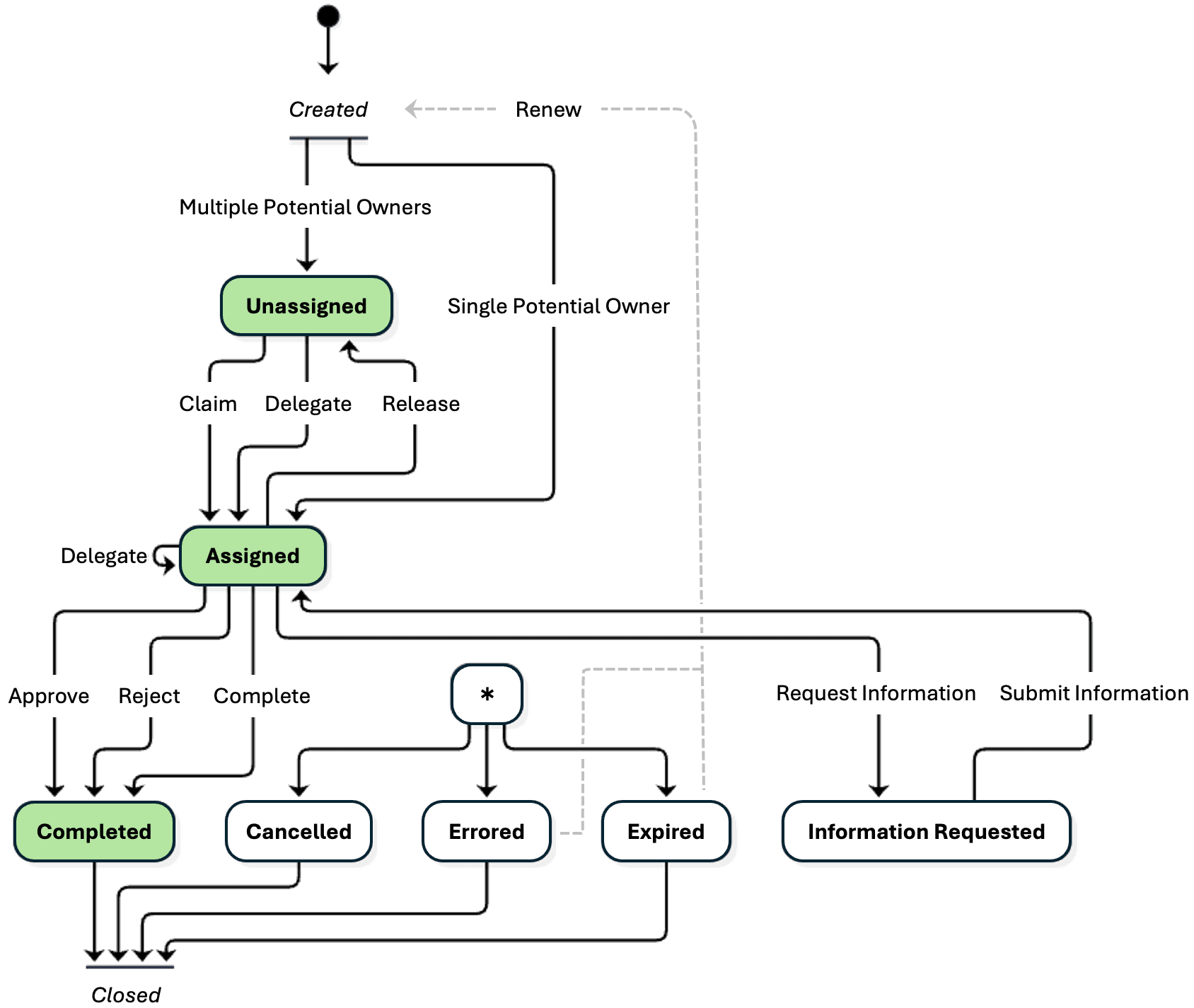
When you create a task, as shown in the diagram below, it starts in the Unassigned state when it has multiple potential owners, or the Assigned state when there is just one. The arrows in the diagram indicate the action that changes the state of a task instance. Once a task is Assigned, if it's an action task, the actual owner can complete it. For an approval task, they can approve or reject it.
Before they take action on the task, the actual owner can request additional information from the initiator of the task, which makes it appear in the initiator's task list until they supply the requested information. Users can comment on a task at any time, which doesn't change its state. That's why the Comment action is not reflected in the diagram.
A task's business administrator can cancel it at any time, add a new participant, and delegate it to a different actual owner. They can also renew a task that has expired or encountered an error in order to retry the lifecycle.
The flow diagram depicts the states of the task lifecycle and the actions that change state. It starts with Unassigned, progresses to Assigned, and continues to Completed. Optionally, the task can be Cancelled, Errored, Expired, or have additional Information Requested.
Figure 25-27 Task Instance Lifecycle: States and Actions that Change State
Parent topic: Assigning Work to a User's Task Inbox