20.2.4 Using Email Template and Placeholders
When a native Send E-Mail action, process, or activity uses the email template, as shown below, you set placeholder values for the current message to send using substitution syntax. You can reference the value of columns, page items, workflow variables, application items, or other system substitutions, depending on the context.
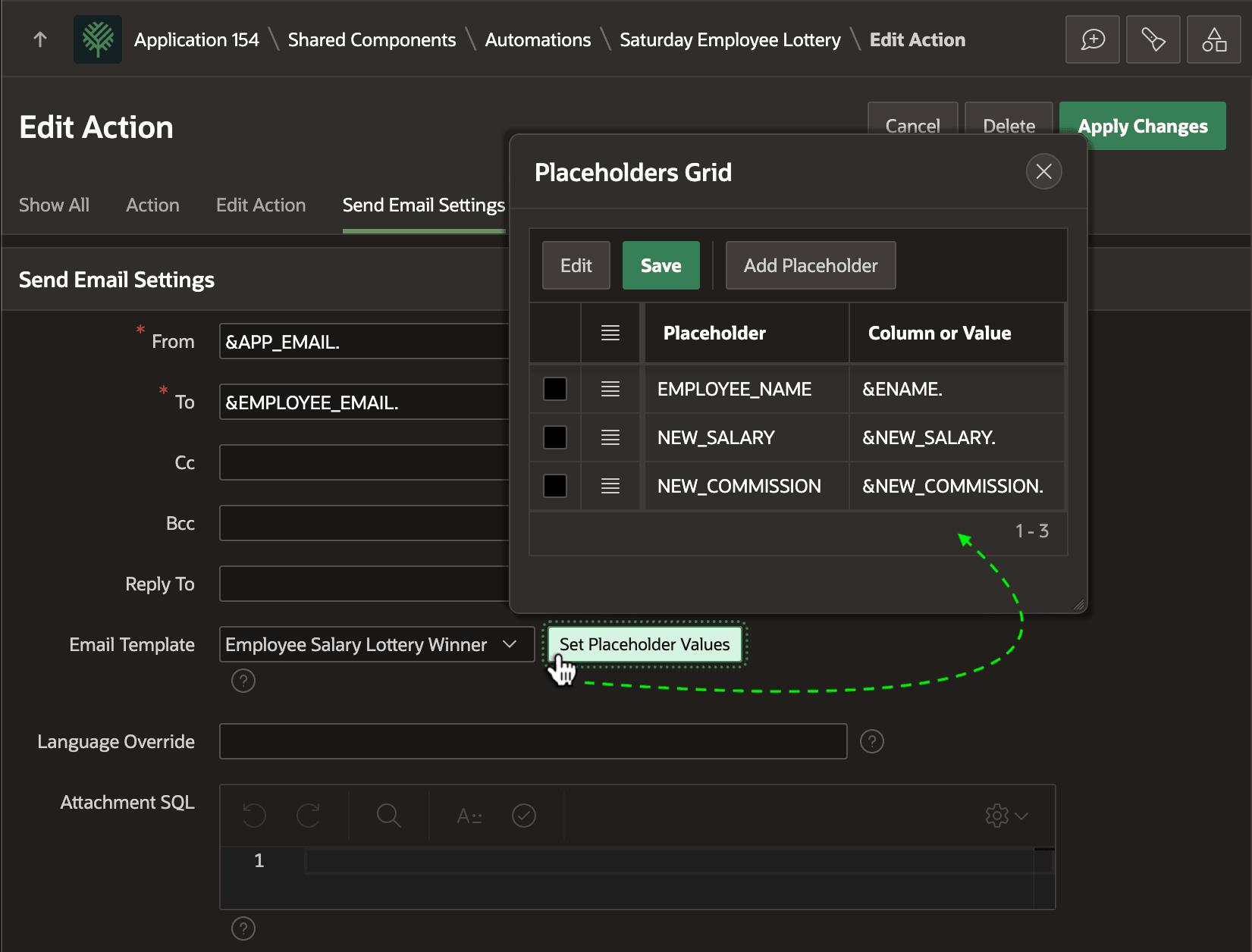
The figure shows the Placeholders Grid dialog, opened by clicking the (Set Placeholder Values) button in the Edit Action page of an automation definition in App Builder. The automation's Send Email action uses the Employee Salary Lottery Winner email template. Its three placeholder names appear in the grid. Each's value is configured to use the column value of the current automation row being processed using substitution notation:
EMPLOYEE_NAME→&ENAME.NEW_SALARY→&NEW_SALARY.NEW_COMMISSION→&NEW_COMMISSION.
Figure 20-29 Configuring Email Template and Placeholder Values for Send-Email Action
Parent topic: Sending Emails with Templates