19.2.5.2 Using More Complex Schedule Expressions
Use Database Scheduler syntax for advanced automation schedules and test future run dates with PL/SQL.
The automation's Schedule Expression supports any Database Scheduler syntax.
These are the same ones the
DBMS_SCHEDULER package accepts to create
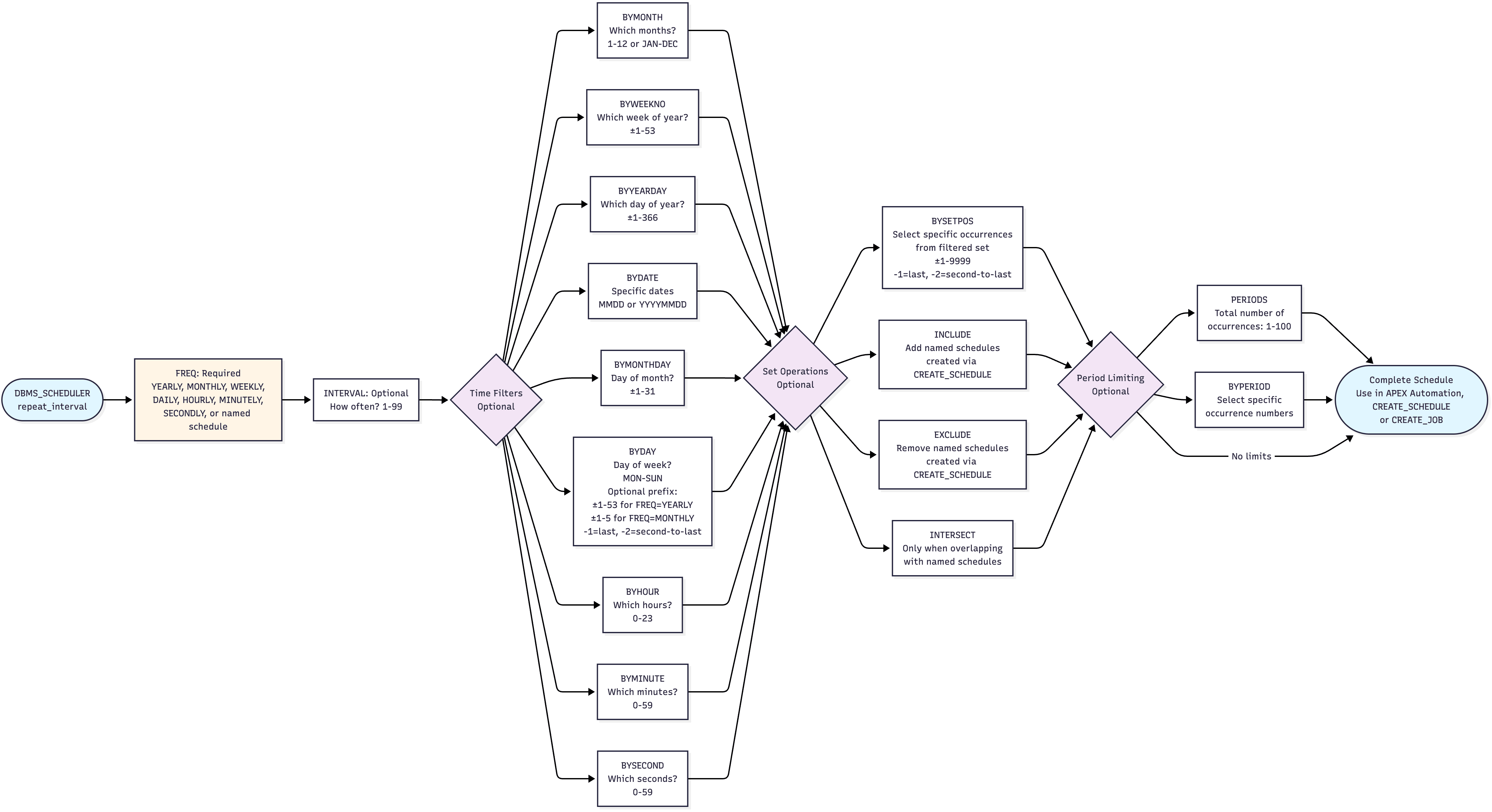
named schedules and create scheduled jobs. The diagram below summarizes the options you
can use. You specify an expression using semicolon-separated list of one or more
KEYWORD=VALUE elements. Supported keywords
include:
FREQ– Frequency of repetition (required)INTERVAL– Repetition counter (n= repeat everynth frequency unit)- <Time Filter> – Identifies specific time elements to fine-tune exactly when it repeats
- <Set Operations> – Combine with a named schedule, or pick occurrences within a cycle
- <Period Limiting> – Limit the total number of cycles, or pick specific cycle occurrences.
Figure 19-7 Syntax for DBMS_SCHEDULER Calendar Expressions
Use the following PL/SQL block in the SQL Commands page to test your scheduler expression. It helps you validate that your candidate syntax gives the expected results. Call next_five_dates with any expression you want to experiment with.
declare
    procedure next_five_dates(
        p_calendar_string in varchar2)
    is
        l_next_date timestamp with time zone;
        l_return_date_after timestamp with time zone := systimestamp;
        l_start_date timestamp with time zone := systimestamp;
    begin
        dbms_output.put_line(p_calendar_string);
        for i in 1..5 loop
            dbms_scheduler.evaluate_calendar_string(
                calendar_string   => p_calendar_string,
                start_date        => l_start_date,
                return_date_after => l_return_date_after,
                next_run_date     => l_next_date);
            dbms_output.put_line('Next ' || i || ': ' ||
                                to_char(l_next_date,
                                        'DY DD-MON-YYYY HH24:MI:SS TZR'));
            l_return_date_after := l_next_date;
        end loop;
    end;
begin
    -- "Every week on Saturday at 20:50"
    next_five_dates('FREQ=WEEKLY;INTERVAL=1;BYDAY=SAT;BYHOUR=20;BYMINUTE=50');
    -- "Last Saturday of the month at 20:50"
    next_five_dates('FREQ=MONTHLY;INTERVAL=1;BYDAY=-1 SAT;BYHOUR=20;BYMINUTE=50');
end;
Running the example above produces output like the following:
FREQ=WEEKLY;INTERVAL=1;BYDAY=SAT;BYHOUR=20;BYMINUTE=50
Next 1: SAT 04-OCT-2025 20:50:16 +00:00
Next 2: SAT 11-OCT-2025 20:50:16 +00:00
Next 3: SAT 18-OCT-2025 20:50:16 +00:00
Next 4: SAT 25-OCT-2025 20:50:16 +00:00
Next 5: SAT 01-NOV-2025 20:50:16 +00:00
FREQ=MONTHLY;INTERVAL=1;BYDAY=-1 SAT;BYHOUR=20;BYMINUTE=50
Next 1: SAT 25-OCT-2025 20:50:16 +00:00
Next 2: SAT 29-NOV-2025 20:50:16 +00:00
Next 3: SAT 27-DEC-2025 20:50:16 +00:00
Next 4: SAT 31-JAN-2026 20:50:16 +00:00
Next 5: SAT 28-FEB-2026 20:50:16 +00:00
Parent topic: Establishing an Automation's Schedule