17.4.3.2 Validating the Uploaded File Type
Understand how the generated Data Loading page validates the uploaded file before loading it.
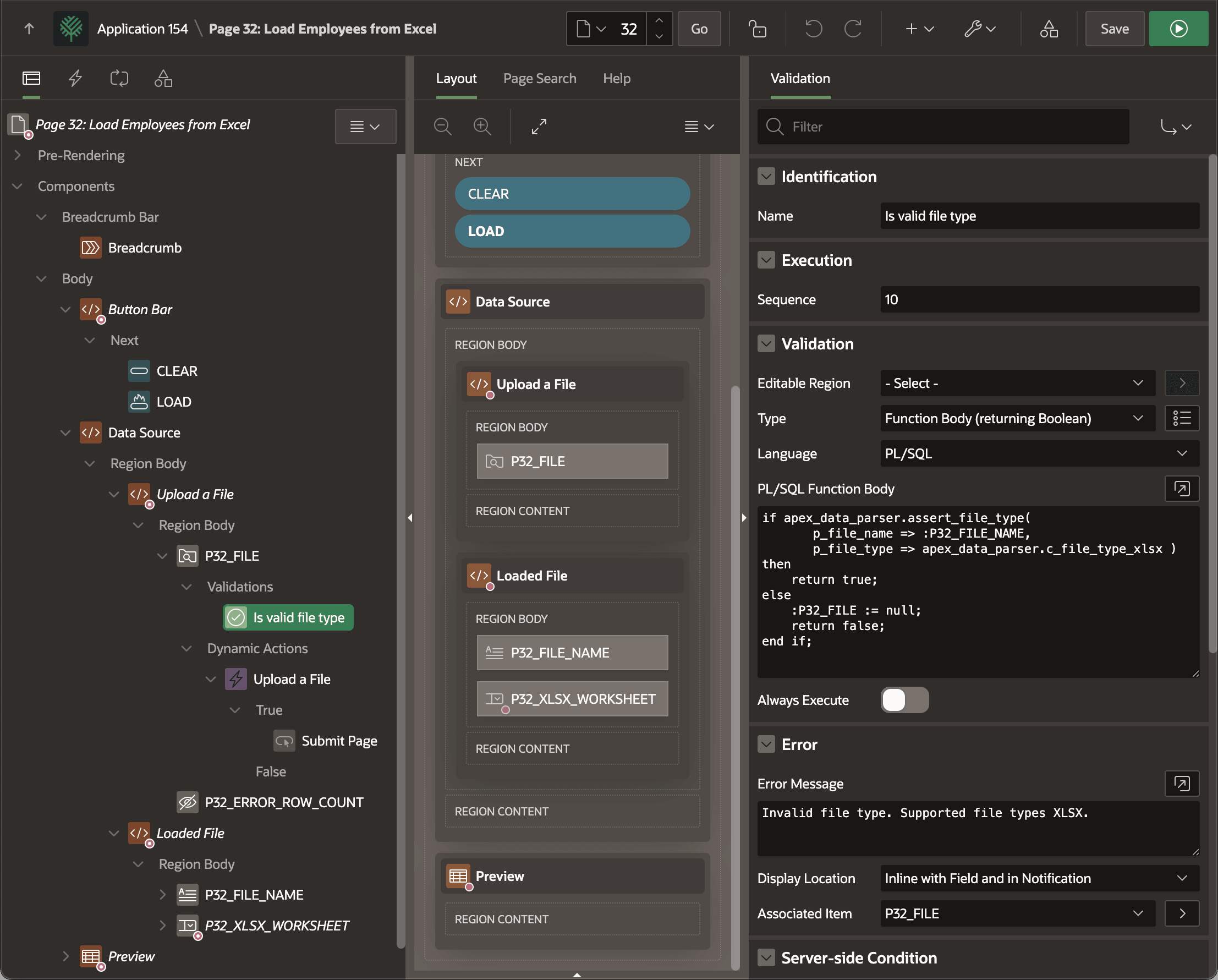
A validation on the P32_FILE
File Upload page item ensures only the expected file type is submitted. As shown
below, it uses the following PL/SQL code that calls ASSERT_FILE_TYPE in
the APEX_DATA_PARSER package to test if the submitted file is an Excel
spreadsheet. It passes in the value of P32_FILE_NAME, the File
Upload item. It contains the unique uploaded file name that identifies the file
in the APEX_APPLICATION_TEMP_FILES table. Notice it references the
C_FILE_TYPE_XLSX constant in the same package to indicate the type
of file to check. If true, the validation succeeds. If false, it clears the
File Upload item by assigning null to it and returns false
to signal the validation failed.
if apex_data_parser.assert_file_type(
       p_file_name => :P32_FILE_NAME,
       p_file_type => apex_data_parser.c_file_type_xlsx )
then
    return true;
else
    :P32_FILE := null;
    return false;
end if;
Figure 17-16 Validating Allowed File Types on Submit
Parent topic: Understanding Data Loading Pages