8.9.6.3 Customizing an Interactive Report Search Bar
Customize or remove an interactive report search bar.
- Interactive Report Search Bar
Learn about the interactive report search bar. - Customizing the Search Bar
Customize an interactive report search bar. - Removing the Interactive Report Search Bar
Disable an interactive report search bar.
Parent topic: Managing Interactive Report Attributes
8.9.6.3.1 Interactive Report Search Bar
Learn about the interactive report search bar.
All interactive reports include a search bar at the top of the page which includes the following controls: a Select columns search menu, Search area, and Actions menu.
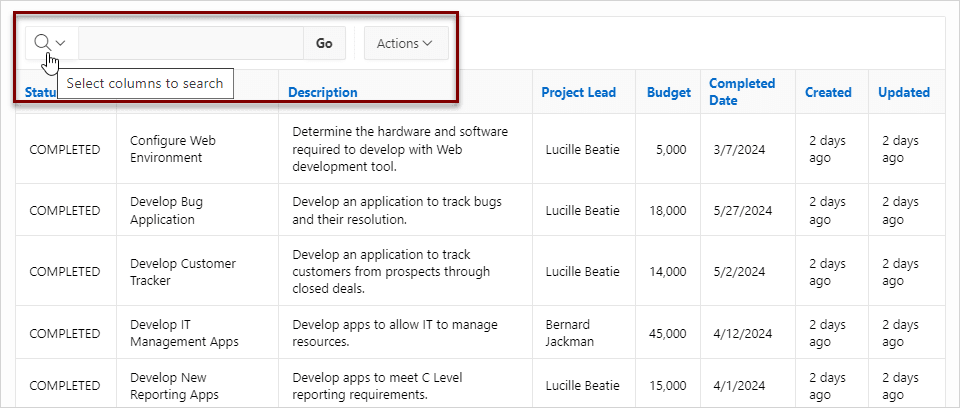
If users have saved reports, a saved report select list displays between the Search field and the Actions menu. Users can use this list to select a specific saved report. If multiple views are configured, a view selection button group also displays which enables the end user to switch views. You can remove or customize the search bar in Page Designer by configuring report attributes in the Property Editor.
Parent topic: Customizing an Interactive Report Search Bar
8.9.6.3.2 Customizing the Search Bar
Customize an interactive report search bar.
To customize the search bar:
Related Topics
Parent topic: Customizing an Interactive Report Search Bar
8.9.6.3.3 Removing the Interactive Report Search Bar
Disable an interactive report search bar.
To remove the search bar from an interactive report:
Parent topic: Customizing an Interactive Report Search Bar