5.11 Using JSON Application Blueprints
Each iteration of the Create Application Wizard saves a JSON application blueprint which you can use to start adding pages to an application, or edit the application definition as a JSON document.
- What is a JSON Application Blueprint?
View or load a JSON application blueprint by running the Create Application Wizard. - Loading a JSON Application Blueprint
Load a JSON application blueprint by running the Create Application Wizard and clicking the Load Blueprint link at the top of the Create Application Wizard. - Viewing a JSON Application Blueprint
View a JSON application blueprint by running the Create Application Wizard and clicking the View Blueprint link at the top of the Create Application Wizard.
See Also:
To learn more about JSON, see https://www.json.org/
Parent topic: Creating Applications
5.11.1 What is a JSON Application Blueprint?
View or load a JSON application blueprint by running the Create Application Wizard.
You can view the JSON application blueprint by running the Create Application Wizard and clicking the View Blueprint link at the top of the Create Application Wizard. The Application Blueprint window transforms and displays the current application definition as a JSON document. Edit the document to update application properties and then click Apply Blueprint to change the current application details.
If you need to create a large number of similar pages you can copy the relevant JSON code for one page, paste it numerous times, and then make small adjustments to the JSON. This approach can be significantly quicker than manually clicking the Add Page button for each page in the wizard.
You can also replace the JSON blueprint with the definition from a previously generated application. Click Load a Previous Blueprint to replace the blueprint with the definition from a previously generated application. This approach is a simple way to iterate the application design by adding additional pages, changing the features, or tweaking the settings before generating the application again.
Parent topic: Using JSON Application Blueprints
5.11.2 Loading a JSON Application Blueprint
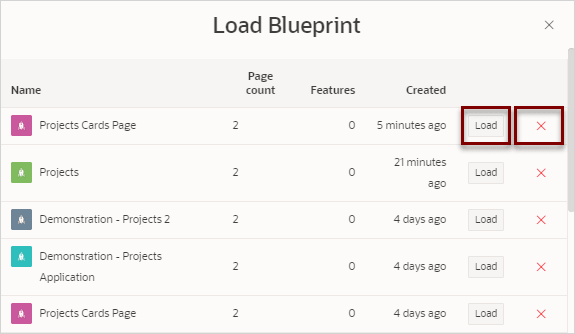
Load a JSON application blueprint by running the Create Application Wizard and clicking the Load Blueprint link at the top of the Create Application Wizard.
To load a JSON application blueprint:
- At the top of the page, click the Load Blueprint link.
Parent topic: Using JSON Application Blueprints
5.11.3 Viewing a JSON Application Blueprint
View a JSON application blueprint by running the Create Application Wizard and clicking the View Blueprint link at the top of the Create Application Wizard.
To view an application blueprint:
- At the top of the page, click View Blueprint.
The Application Blueprint window appears displaying the application definition in JSON format.
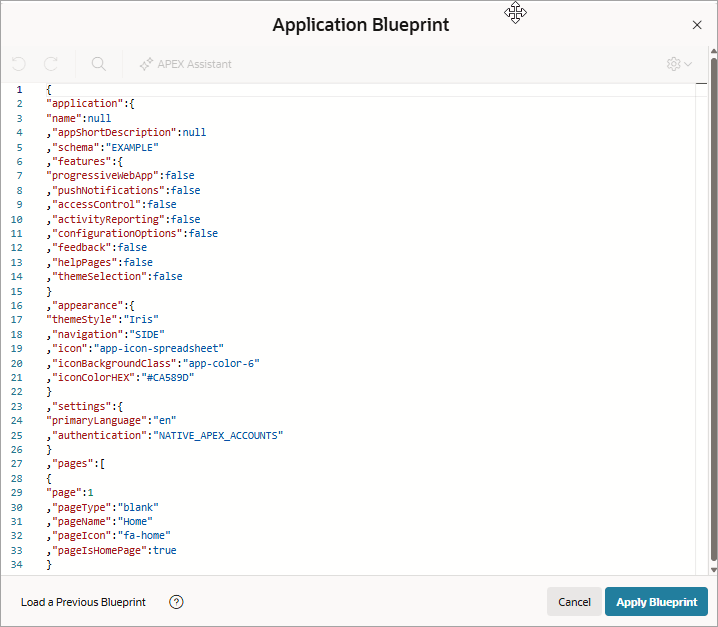
Description of the illustration app_blueprint.png
Parent topic: Using JSON Application Blueprints