16.3 Using Shared Component Subscriptions
Use subscriptions to reuse shared components across several applications in a workspace.
- About Shared Component Subscriptions
Learn about shared component subscriptions. - About the Logic Resolving Dependencies
Learn about logic resolving dependencies. - Subscribing to a Shared Component
Learn about subscribing to a shared component. - About Subscribed Component Subscription Status
Learn about viewing the Subscription Status of subscribed shared components. - Refreshing a Subscribed Shared Component
Access changes in a master shared component by refreshing the subscribed shared component. - Publishing a Master Shared Component
Publish a master shared component to push changes to all subscribing components. - Unsubscribing to a Shared Component
Unsubscribe to a shared component on the shared component edit page.
Parent topic: Managing Shared Components
16.3.1 About Shared Component Subscriptions
Learn about shared component subscriptions.
Shared components can display or be applied on any page within an application and are accessible from the Shared Components page in App Builder. Shared component subscriptions enable developers to reuse shared components across several applications in a workspace.
This following shared components support subscriptions:
- Application Access Control (Roles)
- Application Computations
- Application Items
- Application Processes
- Application Settings
- Authentication Schemes
- Authorization Schemes
- Build Options
- Component Groups
- Data Load Definitions
- Email Templates
- Lists
- Lists of Values
- Map Backgrounds
- Plug-ins
- REST Data Source
- Report Layouts
- Search Configuration
- Shortcuts
- Text Messages
Subscribing to a shared component causes the following to happen:
- All the data from the master component and any dependent shared components are copied over to the subscribing shared component.
- The subscribing shared component becomes read-only.
- Only the master shared component can be edited.
- To make modifications, make changes to the master shared components. You can then push the changes to subscribed components by publishing them. Alternatively, you can also refresh individual subscribed shared components using the provided Refresh option.
Parent topic: Using Shared Component Subscriptions
16.3.2 About the Logic Resolving Dependencies
Learn about logic resolving dependencies.
Shared components that refer other shared components are called dependent shared components.
About the Logic Resolving Dependencies
Shared component dependencies are automatically resolved when:
- Copying a shared component from one application to another application.
- Subscribing to a shared component.
- Refreshing a subscribed shared component.
- Publishing a master shared component.
The logic used to resolve dependencies is as follows:
- In the destination or subscribing application, APEX engine checks if the dependent shared component exists with the same Static ID. If no component with a matching Static ID is found, APEX attempts to find a component with the same name for component types where name is considered unique and safe to use for identification. If a match is found, then APEX re-uses the dependent shared component.
- If the dependent shared component does not exist with the same Static ID or name
(where applicable):
- APEX copies the dependent shared component to the destination or subscribing application.
- While copying, if the Subscribe flag is set to On then the subscription data is also copied.
- While subscribing, refreshing, publishing, the dependent shared component subscription data is also copied."
Parent topic: Using Shared Component Subscriptions
16.3.3 Subscribing to a Shared Component
Learn about subscribing to a shared component.
You can subscribe to a shared component during the copy process or for selective shared components on the shared component edit page.
Tip:
To learn more about subscribing to a shared component during the copy process, see the copy discussion for the respective shared component.To subscribe to a shared component:
Parent topic: Using Shared Component Subscriptions
16.3.4 About Subscribed Component Subscription Status
Learn about viewing the Subscription Status of subscribed shared components.
Each subscribed shared component has a Subscription Status of either:
-
Up to date- Indicates the subscribed shared component is the same as master shared component. -
Needs refresh- Indicates the subscribed component is not same as master and needs to be refreshed.
Tip:
Shared component pages can display either in icon or report view. To view a Subscription Status for all shared components, access table view. On the toolbar, click View Table.In report view, each shared component page includes the following columns: Subscribed From, Subscription Status, and Subscribers.
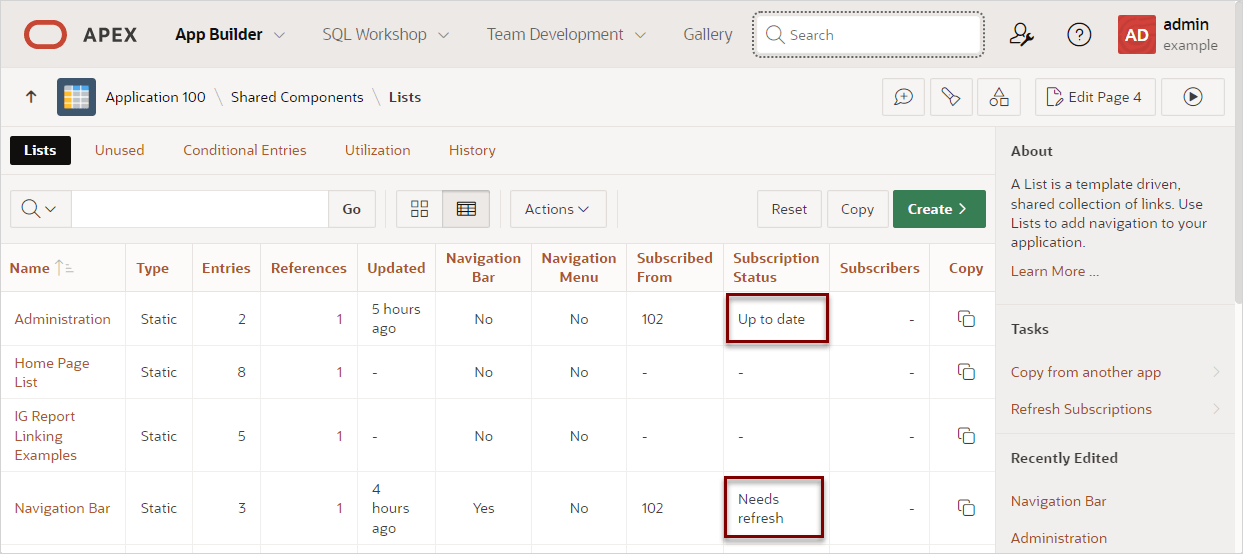
In the previous example, the Administration list is
subscribed from application 123 and has a Subscription Status of Needs
Refresh. The Navigation Bar is also subscribed from
application 123 but has a Subscription Status of Up to date.
Tip:
The subscription status also displays on the shared component edit page in the Subscription region.Parent topic: Using Shared Component Subscriptions
16.3.5 Refreshing a Subscribed Shared Component
Access changes in a master shared component by refreshing the subscribed shared component.
If a master shared component has changed, the subscribed shared
component has a Subscription Status of Needs refresh and a Refresh
button appears on the shared component edit page. The Refresh button does not
appear if the subscription status is Up to date.
Note:
The static_id logic has been harmonized across all shared components, including Search Configs, Email Templates, REST Data Sources, and Data Load Definitions. When thestatic_id changes in the master component, this change will
be reflected in the subscribing component after refresh.
To refresh a subscribed shared component:
- Navigate to the Shared Components page:
- To perform a bulk subscription refresh for a specific shared components:
- Select the shared component type to be refreshed (or example Lists).
- On the components page, find the Tasks region on the side bar.
- Under Tasks, click Refresh Subscriptions.
- On Refresh Subscriptions, select Refresh All to perform a bulk refresh of all shared components
- To refresh a specific shared component subscription:
Parent topic: Using Shared Component Subscriptions
16.3.6 Publishing a Master Shared Component
Publish a master shared component to push changes to all subscribing components.
Note:
The Static ID logic has been harmonized for all shared components. When a master component is published, thestatic_id is updated for Email Templates, REST Data Sources,
Data Load Definitions, and Search Configurations.
To publish a master shared component:
Parent topic: Using Shared Component Subscriptions
16.3.7 Unsubscribing to a Shared Component
Unsubscribe to a shared component on the shared component edit page.
To unsubscribe to a shared component:
- Navigate to the shared component edit page:
- On the shared component edit page, find the Subscription region and click Unsubscribe.
Parent topic: Using Shared Component Subscriptions