Page Designer Code Editor
Learn about using the Code Editor in Page Designer.
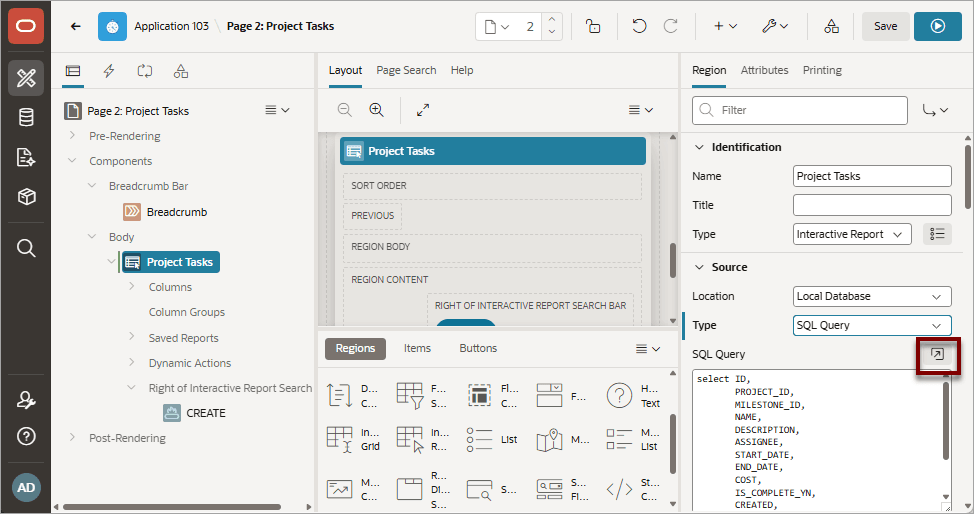
For attributes requiring large amounts of code (for example, a region Source), you can enter text directly into the field or access a full-featured Code Editor.
Description of the illustration pd_prop_editor3.png
See Also: Accessing Property Editor
You access Code Editor by clicking the Code Editor:SQL Query button, which resembles an arrow within a square.
Code Editor Key Features
Note: If you have configured Generative AI for your workspace, APEX includes integrated AI Chat capability (called APEX Assistant) in all all Code Editors. To learn more, see Managing Generative AI in APEX.
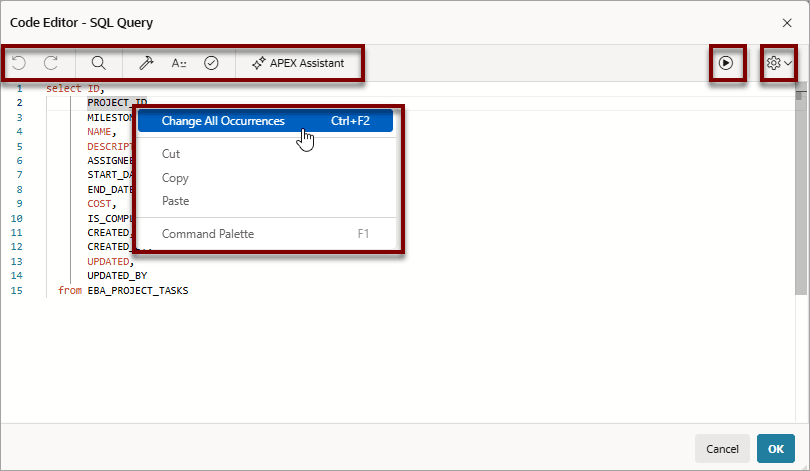
The Code Editor displays as a modal dialog and provides an enhanced code editor to edit PL/SQL, SQL, HTML, CSS, and JavaScript component properties. The code highlighting is determined by the input required for the specific property.
Description of the illustration pd_code_editor.png
Code Editor controls include:
-

Undo - Ctrl+Z
-

Redo - Ctrl+Shift+Z
-

Find - Ctrl+F
-

Auto Complete - Ctrl+Space
-

Validate - Ctrl+Alt+V
-
Context Menu - Right-click and select one of the following:
-
Change All Occurrences (Ctrl+F2) - Right click and select Change All Occurrences from the context menu.
-
Cut
-
Copy
-
Command Palette (F1) - Displays the Command Palette. See Also: Accessing Oracle APEX Using a Keyboard in Oracle APEX Accessibility Guide
-
Command Palette
Right-click to display a context menu and select Command Palette. The Command Palette includes over 80 commands including:
-
Replace (Ctrl+H)
-
Replace with Next Value (Ctrl+Shift+.)
-
Replace with Previous Value (Ctrl+Shift+,)
Multi Cursor Selection
-
Add cursors at arbitrary positions - Select a position with your mouse and press Shift+Alt+click (Shift+Option+click on macOS).
-
Set cursors above the current position - Select a position with your mouse and press Ctrl+Alt+Up (Option+Command+Up on macOS).
-
Set cursors below the current position - Select a position with your mouse and press Ctrl+Alt+Down (Option+Command+Down on macOS).
Save and Run Page 
Click Save and Run Page to save and view a rendered version of the current page without having to close the Code Editor dialog.
Settings Menu 
The Settings menu displays on the right side and includes the following options:
-
Indentation - Options include: Tab Inserts Spaces, Tab Size, and Indent Size
-
Themes - Options include: Automatic, Light, Dark, and High Contrast Dark
-
Show Ruler