39 Create a Vector Collection
A vector collection is just an Oracle Backend with Firebase APIs collection with one or more columns marked as vector columns. There are two ways to create one, and the right choice depends on where you want embedding generation to happen.
-
If you want the database to generate embeddings for you, configure the collection in the Console first. You define the column with a model and a source, and from then on your application code just inserts documents like normal. The database creates the vector for you.
-
If your application is already generating embeddings (because you're calling an LLM, running a local model, or pulling vectors from another pipeline), skip the Console and use the SDK directly. Pass the embedding to
addDocorsetDocand the SDK creates the collection the first time you do.Pick the one that matches where embedding generation lives in your stack.
Before You Begin
If you're using AUTO_TRIGGER or
AUTO_SCHEDULER, the model has to
exist in the database before you create the
vector column. The Console references it by name —
it doesn't load it for you. Which prep work you need
depends on the provider:
-
ONNX — load your ONNX model into the database using
DBMS_VECTOR.LOAD_ONNX_MODEL. The model file needs tokenization and post-processing baked in; Oracle's documentation walks through how to prepare and load one.See Also:
For more information about ONNX Pipeline Models, see:
Import Pretrained Models in ONNX Format for Vector Generation Within the Database
-
OCIGENAI — you need an OCI tenancy with access to Generative AI, plus a database credential the database uses to call the service on your behalf. Set up both before configuring the column.
See Also:
-
For more information about OCI service onboarding, see:
-
For more information about database-side credential, see:
-
If you're using BYOV, none of this applies. Your application owns embedding generation, the database just stores what you give it.
Parent topic: Vectors
39.1 Create a Vector Collection Using the Console
The Console is the right tool when you want the database to handle embedding generation for you. Once you've configured the column properties here, you don't need to think about embeddings in your application code at all. Just insert documents like normal and the embeddings appear.
- Vector Column Configuration
- AUTO_TRIGGER Behavior
- AUTO_SCHEDULER Behavior
- Load AI Models to Create Collections for AUTO_TRIGGER and AUTO_SCHEDULER
- Embedding Generation from URL Sources
- Console Steps: Creating Collections with Vectors
Parent topic: Create a Vector Collection
39.1.1 Vector Column Configuration
You can create any number of vector columns. Each column can be configured with the following attributes:
Table 39-1 Vector Column Configurations
| Property | What It Does | Allowed Values |
|---|---|---|
|
|
The column name |
Any valid column name |
|
|
Whether the vector is dense or sparse |
|
|
|
Who generates the embedding |
|
|
|
How long the vector is |
|
|
|
The numeric format |
|
|
|
Which embedding model to use |
Required when |
|
|
What part of the document to embed |
Required when |
Note:
Sparse vectors only support BYOV. If type is sparse, the only valid
generation_mode is BYOV.
Model (Required When generation_mode is not
BYOV)
provider—ONNXorOCIGENAIname— the name of the modelcredential_name— for credential-backed providers likeOCIGENAI, the name of the credential the database should useurl— the endpoint to hit when calling the model (only relevant for hosted providers)
Source (Required When generation_mode Is Not
BYOV)
type — DOCUMENT (embed the whole document) or
FIELDPATH (embed a specific field)
fieldpath — when type is FIELDPATH, the
dot-separated path to the field, for example,
metadata.description.
Parent topic: Create a Vector Collection Using the Console
39.1.2 AUTO_TRIGGER Behavior
AUTO_TRIGGER generates the embedding synchronously, in the same
transaction as your insert. Your addDoc or setDoc call
doesn't return until the embedding is in the column.
That means errors surface immediately. If the model is unavailable, the
credentials are wrong, or the model name is invalid, you'll get an error back from your
insert call. That makes AUTO_TRIGGER a good fit for testing and small
workloads where you want to know immediately if something is broken.
Note:
If the embedding source is missing (say, you set the source to
FIELDPATH: metadata.description but the
document doesn't have that field), the insert succeeds and the vector column is left
empty. No error is raised. The document goes in without an embedding. Be sure to
check that you have a valid path to the source you are trying to embed.
Parent topic: Create a Vector Collection Using the Console
39.1.3 AUTO_SCHEDULER Behavior
AUTO_SCHEDULER generates embeddings in the background. Inserts return as
soon as the document is written, and embeddings show up later. This is the right choice
for high-volume workloads where you don't want every insert blocked on a model call.
The queue works in the following way:
- Each insert puts a row in a pending queue.
- A scheduler job kicks off whenever a table has 10 or more pending rows.
- For low-volume tables that don't hit 10, a global fallback sweeper runs periodically. If the oldest pending row in any table is older than 10 seconds, the sweeper triggers a batch embedding for that table anyway.
So, even if you're inserting a row infrequently, the embeddings are guaranteed to get generated within roughly 10 seconds. You don't have to wait for the queue to fill up.
Because generation happens after the insert, errors don't surface to your session. If a model goes down, the affected rows stay pending until it comes back.
Parent topic: Create a Vector Collection Using the Console
39.1.4 Load AI Models to Create Collections for AUTO_TRIGGER and AUTO_SCHEDULER
When a vector collection is configured with the generation_mode set to
AUTO_TRIGGER or AUTO_SCHEDULER, the database performs
embedding generation itself. The embedding model must exist in the project schema (for
example, DEMO_USER) before you reference it in a vector column.
This is a one-time setup. Repeat it only if you change models or rotate credentials. It
requires database administrator privileges — CREATE MINING MODEL,
CREATE CREDENTIAL, and the ability to manage network ACLs.
Choose the loading path that best fits your deployment model:
Use a local ONNX file when the model is already available on a filesystem the database can read. This is the simplest option for air-gapped or single-tenant deployments because it does not require outbound network calls.
Use ONNX from OCI Object Storage when the model should be stored centrally in an OCI bucket and reused across multiple Oracle Backend with Firebase APIs environments. This option requires an OCI credential and outbound network access.
Use the OCI Generative AI hosted service when you do not want to manage a model file. In this mode, the database calls the hosted OCI Generative AI service for each embedding request, which requires an OCI credential, outbound network access, and ongoing service consumption.
All three paths end with a Console-side step that registers the model on a vector column.
Prerequisites
Before you start, make sure you have the following.
Note:
The following is required for all options:
-
Project schema name
Example:
BAAS_USER -
Database user privileges
The database user must have:
CREATE MINING MODELCREATE CREDENTIALEXECUTE ON DBMS_VECTOR- Permission to run
SYS.DBMS_NETWORK_ACL_ADMIN
Alternatively, the ACL block can be run as SYS.
Additional requirements by option:
-
Local ONNX file
Use this option if the model file is stored on a filesystem the database can read.
You need:
-
A directory object the database can read, or permission to create one using CREATE ANY DIRECTORY
-
A prepared ONNX model file with tokenization and post-processing included
-
-
ONNX from OCI Object Storage
Use this option if the model is stored in an OCI Object Storage bucket.
You need:
-
OCI tenancy and user
-
User OCID
-
Tenancy OCID
-
Compartment OCID
-
Fingerprint
-
PEM private key
-
ONNX model file uploaded to an OCI Object Storage bucket
-
-
OCI Generative AI
Use this option if the database will call the hosted OCI Generative AI service.
You need:
-
OCI tenancy with access to the Generative AI service
-
User OCID
-
Tenancy OCID
-
Compartment OCID
-
Fingerprint
-
PEM private key
-
Loading a Local ONNX Model
-- DBA Users or users with CREATE MINING MODEL privileges can load an ONNX model for the Project Schema (e.g.: BAAS_USER)
var PROJECT_SCHEMA varchar2(128);

CREATE OR REPLACE DIRECTORY TKBS_ONNX_DIR AS 'path/to/folder';

DECLARE
  c_model_name constant varchar2(128) := 'BAAS_TKBS_ONNX_EMB';
  c_model_file constant varchar2(128) := 'all-MiniLM-L6-v2.onnx';
  c_model_dir  constant varchar2(128) := 'TKBS_ONNX_DIR';
  l_cnt        number;
  l_bfile      bfile;
BEGIN
  :PROJECT_SCHEMA := 'BAAS_USER';
  l_bfile := bfilename(c_model_dir, c_model_file);
  if(dbms_lob.fileexists(l_bfile) = 0) then
    raise_application_error(
      -20150,
      'Missing ONNX file in ' || c_model_dir || ': ' || c_model_file
    );
  end if;

  -- drop if model exists with same name
  begin
    dbms_vector.drop_onnx_model(:PROJECT_SCHEMA || '.' || c_model_name, TRUE);
  exception
    when others then
      null;
  end;

  --
  dbms_vector.load_onnx_model(
    c_model_dir,
    c_model_file,
    :PROJECT_SCHEMA || '.' || c_model_name,
    json('{"function":"embedding","input": {"input": ["DATA"]}}')
  );

  select count(*) into l_cnt from dba_mining_models where model_name = c_model_name and owner = :PROJECT_SCHEMA;
  dbms_output.put_line('onnx_model_loaded=' || l_cnt);
END;
/
Loading an ONNX Model from the OCI Objectstore Bucket
Note:
Three steps: create an OCI credential, allow the database to reach Object Storage, then load the model.
-
Create OCI Credential to access the object storage.
-- Must have the CREATE CREDENTIAL privilege DECLARE oci_cred JSON_OBJECT_T; BEGIN oci_cred := JSON_OBJECT_T('{ "user_ocid":"ocid1.user.oc1.xxxxxxxxxxx", "tenancy_ocid":"ocid1.tenancy.oc1.xxxxxxxx", "compartment_ocid":"ocid1.compartment.oc1.xxxxxxxxx", "fingerprint":"xxxxxxxxxx" }'); oci_cred.put('private_key', 'MII--REACTED--aebC'); DBMS_VECTOR.CREATE_CREDENTIAL( credential_name => 'myCredential', params => JSON(oci_cred.to_clob) ); END; / -
Add the objectstorage URL to the network ACL.
begin sys.dbms_network_acl_admin.append_host_ace( host => 'objectstorage.us-phoenix-1.oraclecloud.com', -- objectstorage URL domain lower_port => 443, upper_port => 443, ace => sys.xs$ace_type( privilege_list => sys.xs$name_list('connect'), principal_name => SYS_CONTEXT('USERENV', 'CURRENT_USER'), principal_type => sys.xs_acl.ptype_db ) ); end; / -
Load the ONNX Model from the OCI ObjectStore.
-- DBA Users or users with CREATE MINING MODEL privileges can load an ONNX model for the Project Schema (e.g.: BAAS_USER) var PROJECT_SCHEMA varchar2(128); DECLARE c_model_name constant varchar2(128) := 'BAAS_OBJS_ONNX_EMB'; l_model BLOB; BEGIN :PROJECT_SCHEMA := 'BAAS_USER'; DBMS_CLOUD.GET_OBJECT( credential_name => 'myCredential', object_uri => 'https://objectstorage.us-phoenix-1.oraclecloud.com/' || 'n/namespace-string/b/bucketname/o/myONNXmodel.onnx'); -- drop if model exists with same name begin dbms_vector.drop_onnx_model(:PROJECT_SCHEMA || '.' || c_model_name, TRUE); exception when others then null; end; DBMS_DATA_MINING.IMPORT_ONNX_MODEL( :PROJECT_SCHEMA || '.' || c_model_name, model_source, json('{"function":"embedding","input": {"input": ["DATA"]}}') ); select count(*) into l_cnt from dba_mining_models where model_name = c_model_name and owner = :PROJECT_SCHEMA; dbms_output.put_line('onnx_model_loaded=' || l_cnt); END; / -
Mention the Model Name in the Console UI for the ONNX provider.
Loading an OCIGENAI Model
Note:
The database calls Oracle's hosted Generative AI service per embedding request. No model file is loaded, only a credential and a network ACL.
-
Access the OCI Credential object.
var PROJECT_SCHEMA VARCHAR2(128); -- Must have the CREATE CREDENTIAL privilege. You need to create credential for the Project Schema user. DECLARE oci_cred JSON_OBJECT_T; BEGIN :PROJECT_SCHEMA := 'BAAS_USER'; oci_cred := JSON_OBJECT_T('{ "user_ocid":"ocid1.user.oc1.xxxxxxxxxxx", "tenancy_ocid":"ocid1.tenancy.oc1.xxxxxxxx", "compartment_ocid":"ocid1.compartment.oc1.xxxxxxxxx", "fingerprint":"xxxxxxxxxx" }'); oci_cred.put('private_key', 'MII--REACTED--aebC'); DBMS_VECTOR.CREATE_CREDENTIAL( credential_name => :PROJECT_SCHEMA || '.' || 'myCredential', params => JSON(oci_cred.to_clob) ); END; / -
Have OCI genAI URL added to the schema's Network ACL.
-- Assume the OCI GenAI URL: https://inference.generativeai.us-chicago-1.oci.oraclecloud.com/20231130/actions/embedText begin sys.dbms_network_acl_admin.append_host_ace( host => 'inference.generativeai.us-chicago-1.oci.oraclecloud.com', -- oci genai URL domain lower_port => 443, upper_port => 443, ace => sys.xs$ace_type( privilege_list => sys.xs$name_list('connect'), principal_name => :PROJECT_SCHEMA, -- project schema should be able to connect to the URL principal_type => sys.xs_acl.ptype_db ) ); end; / -
Mention the Credential Name, the Model name as per OCI GenAI provider and the URL in Console UI.
Parent topic: Create a Vector Collection Using the Console
39.1.5 Embedding Generation from URL Sources
If the configured fieldpath contains a URL that points to a DBFS or
an OCI Bucket object, the service attempts to fetch the object and generate an embedding
for it.
Note:
DBFS or OCI Bucket must be registered with the Oracle Backend with Firebase APIs Project.
Parent topic: Create a Vector Collection Using the Console
39.1.6 Console Steps: Creating Collections with Vectors
-
Sign in to the Console and open your project.
-
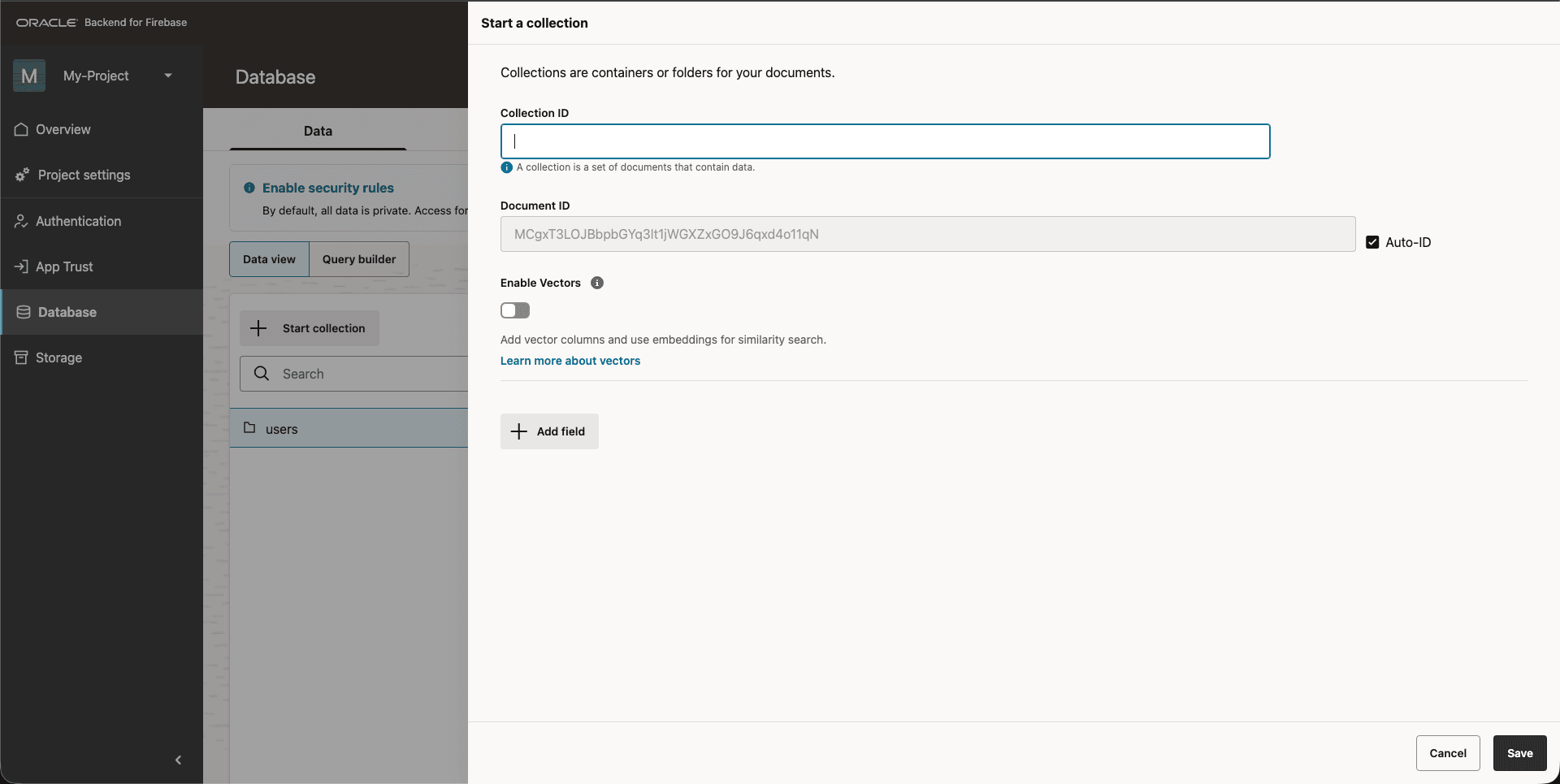
Go to Collections and click Create Collection.
Figure 39-1 Console: Create Collection
-
Give your collection a name.
-
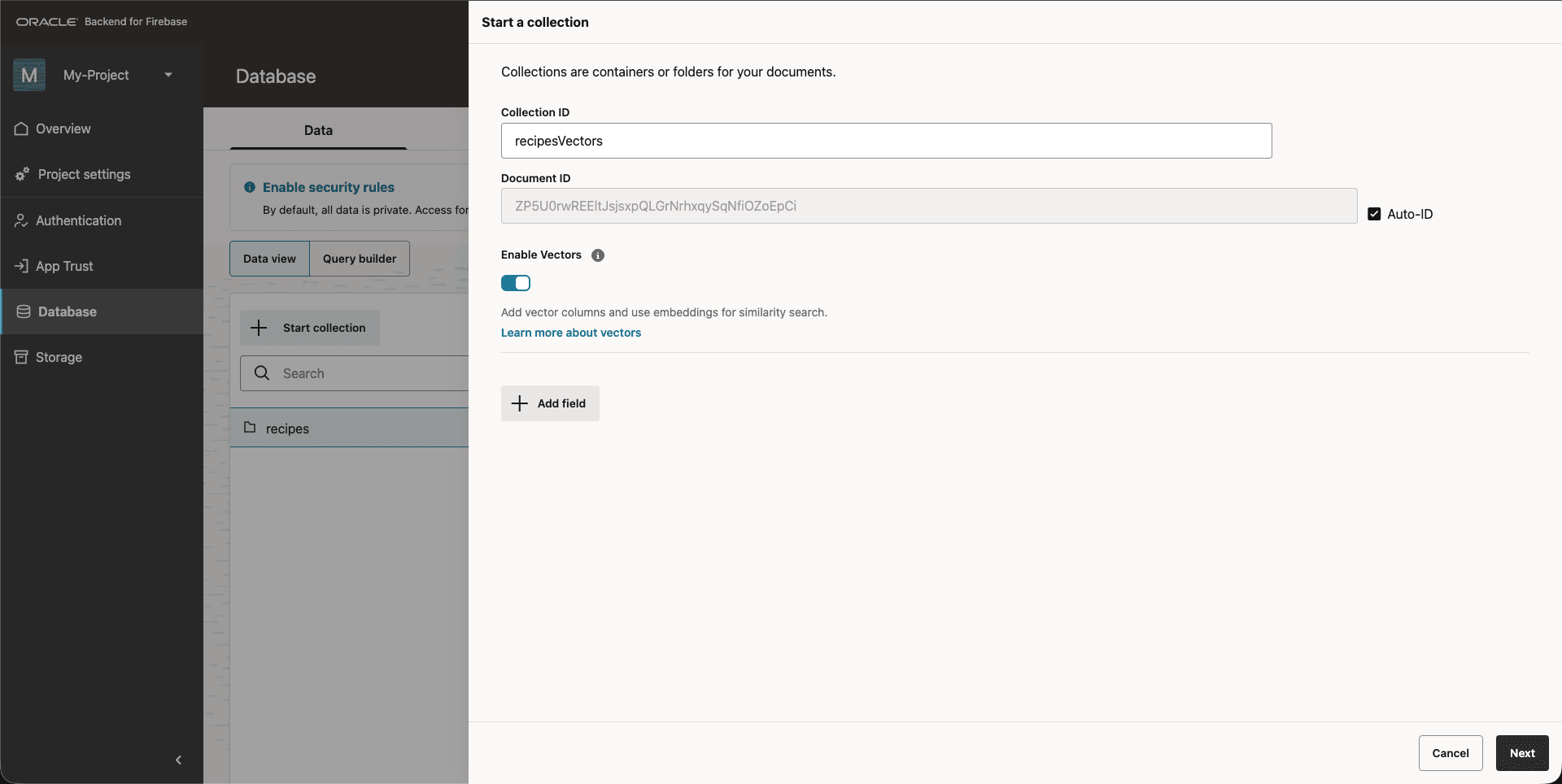
Turn on the
Enable Vectorstoggle.Figure 39-2 Console: Enable Vectors
-
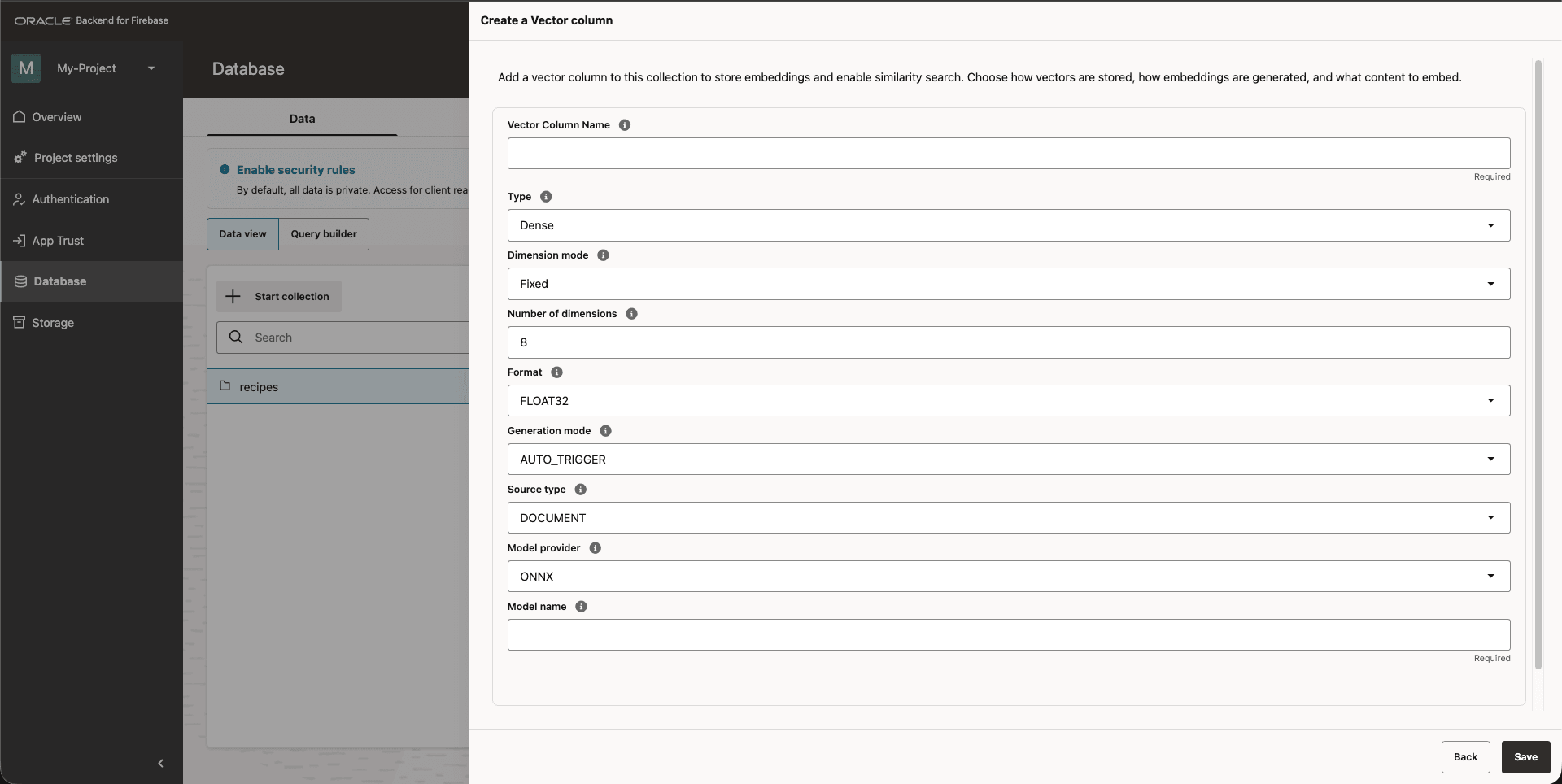
Fill in the column properties using the table in Vector Column Configuration as your guide.
Figure 39-3 Console: Create a Vector Column
-
If you picked
AUTO_TRIGGERorAUTO_SCHEDULER, fill in the Model and Source sections that appear. -
Click Save to save the column. Repeat for any additional vector columns you want to create.
Your collection is now ready for vectors.
Parent topic: Create a Vector Collection Using the Console
39.2 Create a Vector Collection Using SDK APIs
- When your application is already generating embeddings, for example,
calling an LLM API, running a local model, pulling vectors from a pipeline, and so
on, you can skip the Console entirely and create the collection straight from your
code. Pass an embedding to
addDocorsetDocand the SDK creates the vector collection the first time. From then on, you keep passing embeddings and the database keeps storing them. - This pattern is called BYOV ("Bring Your Own Vector") because you own the generation step, not the database. It's the right fit when embedding generation already lives (or belongs) in your application. You keep full control over the model, the input, and the exact value that gets stored.
Parent topic: Create a Vector Collection