2 Fundamentals
The Fundamentals chapter introduces the essential concepts and components that form the backbone of Oracle Backend with Firebase APIs. It provides developers with a clear understanding of the platform’s architecture, supported services, and tools, ensuring a solid foundation before diving into advanced usage.
- Key Terms and Definitions
- Architecture Overview
- Backend Overview
- Supported Platforms
- SDK Overview
- Console Overview
- CLI Overview
Parent topic: Introduction
2.1 Key Terms and Definitions
This section provides a quick reference to important concepts used throughout Oracle Backend with Firebase APIs. To make it easier for developers, the terms are divided into two categories: Generic Terms, which are common across backend development, and Oracle‑Specific Terms, which are unique to Oracle and Oracle Backend with Firebase APIs.
Parent topic: Fundamentals
2.1.1 Generic Terms
These are foundational concepts and technologies (in an alphabetical order) that are commonly used across Oracle Backend with Firebase APIs platform, not exclusive to Oracle.
Access Control
A mechanism to restrict access to resources based on user roles or permissions.
Access Token
An access token is a credential (usually a JWT) issued after authentication (OAuth). Access tokens are included in API requests to ascertain the user’s identity and enforce permissions.
Aggregation Queries
Queries that perform calculations on multiple rows, such as sum, average, and count.
API
APIs (Application Programming Interfaces) are defined methods that allow applications to interact with backend services.
API Key
An API key is a unique identifier used to authenticate requests that are made by applications for accessing backend services.
Authentication
Process of verifying the identity of a user or system.
Authorization Token
A credential used to verify access rights, typically passed in request headers.
Batch Writes
A set of write operations executed together to improve performance and consistency.
Bucket
A bucket is a logical space for organizing and storing files in a file storage service.
Collection / Table
A collection or table is a logical grouping of documents or data records. For a NoSQL database type, a collection represents a group of related JSON documents. For a SQL database type, a table is a structured set of rows and columns.
Compound Queries
Queries that combine multiple conditions or filters.
CRUD Operations
Standard database operations: Create, Read, Update, and Delete.
Database Instance
A database instance is an isolated deployment of the database service that stores structured or unstructured data or information at a specific point in time.
Document / Record
A document is an individual data entry within a collection that contains key-value pairs, often in JSON format. A record is an individual data entry within a row of a table.
Endpoint
An endpoint is a specific URL or function exposed by the ORDS API. Endpoints are used to interact with the services. For example, for fetching data, uploading files, or creating users.
Environment
Environment is a runtime configuration for your project to help isolate resources and ensure stable deployment across different stages of application lifecycle.
Explicit Order
A query parameter that defines the sorting order of results.
Joins
Database operations that combine rows from two or more tables based on related columns.
JWT
JWT (JSON Web Token) is a compact, URL‑safe way of securely transmitting information between parties as a JSON object. It’s most commonly used for authentication: after a user logs in, the server issues a JWT that contains claims like the user’s ID and permissions, digitally signed to ensure integrity. JWTs are structured in three parts (header, payload, and signature) and are widely used in modern web and mobile applications to manage sessions and authorize access.
LDAP
LDAP, or Lightweight Directory Access Protocol, is a way for applications to talk to a central directory that stores information about users, groups, and resources. It’s commonly used for authentication and single sign‑on, so instead of keeping separate user lists in each system, applications rely on LDAP to validate identities and manage access consistently across the network.
Object / File
An object or a file is a single stored file in a bucket. Each object has associated metadata, such as size, type, creation date and is accessible through controlled permissions stated in a policy or rule.
Offline Data
Data that can be accessed or modified without an active network connection.
Pagination
Technique to divide query results into discrete pages for easier navigation.
Query Conditions
Filters applied to database queries to narrow down results.
Realtime Update
Mechanism to push data changes to clients as they occur.
Refresh Token
A token used to obtain a new access token without re-authenticating.
Request and Resource Variables
Dynamic values used in security rules to evaluate access conditions.
Role
A role relates to a set of permissions assigned to a user or group of users. Roles help enforce access control by defining what actions a user can perform within the system. For example, an administrator role or a viewer role.
Role-Based Access
Authorization model where permissions are assigned based on user roles.
SDK
A Software Development Kit (SDK) is a set of libraries and tools that simplifies integration with the Oracle Backend with Firebase APIs services. SDKs provide relevant API access for different programming languages and frameworks.
Security Expression
Security expressions are logical conditions used to enforce access control policies.
Security Rule
A policy or security rule is a rule enforced through security expressions that determine the user password, or governs who can read, write, or modify data and files.
Service
A service is a modular component of the toolkit that provides a specific capability, such as authentication, database, or file storage. Services can be used independently or combined to build full-stack applications.
Session
A session is a temporary state created when a user logs in. Sessions are secured with tokens like JWT. A session determines how long a user remains authenticated before they are required to re-authenticate.
Subcollection
A nested collection within a document, allowing hierarchical data modeling.
Token Generation
Process of creating access and refresh tokens for authenticated sessions.
User
A user is an authenticated identity in the system that is typically managed through authentication services. Users may represent end-customers or end-users.
Parent topic: Key Terms and Definitions
2.1.2 Oracle-Specific Terms
The following terms (in an alphabetical order) are unique to Oracle Backend with Firebase APIs architecture, SDKs, and implementation.
Application
A deployable unit representing an Android, iOS, or Web application
within a project. Each application has a unique APP_ID,
APP_NAME, and APP_TYPE (For example,
WEB), and is managed through the /applications
endpoint.
Console
Oracle’s web-based interface for managing Oracle Backend with Firebase APIs projects, users, and configurations.
Collection Group Index
Oracle-specific index type that spans multiple collections with the same name.
Console Endpoints
REST APIs exposed by Oracle’s ORDS for managing Oracle Backend with Firebase APIs Console operations.
Custom Claims
User-specific metadata embedded in the authentication token, used for access control and personalization.
DBFS (Database File System)
Oracle’s on-prem object storage solution using SecureFile LOBs.
Duality View
A hierarchical representation of relational data, created by mapping tables through primary–foreign key relationships that enables document-style access to relational structures.
Hybrid Store
Oracle’s model combining relational and document stores for flexible data access.
IDCS (Identity Cloud Service)
Oracle’s cloud-based identity management system used for authentication.
Java Parser (Security Rule)
Oracle’s custom Java parser that interprets Common Expression Language (CEL) rules and expressions and converts them into SQL for enforcing security rules.
OnSnapshot
Oracle’s real-time listener implementation using Continuous Query Notification (CQN).
ORDS (Oracle REST Data Services)
Middleware that exposes REST endpoints for Oracle Backend with Firebase APIs services.
Oracle Backend with Firebase APIs SDK
Oracle’s client SDKs (JavaScript, Flutter, Java) that expose service APIs.
OID (Object Identifier)
A unique identifier assigned to each document in the database and used for referencing, updating, and deleting specific records.
Oracle RDBMS
The backend database powering Oracle Backend with Firebase APIs, supporting both relational and document models.
Project / Workspace
A project or workspace is a container for all backend resources applications, users, and services (authentication, database, storage, security rules). Each application is tied to a project.
Project Tag
Metadata used to classify Oracle Backend with Firebase APIs projects (for example, PRODUCTION or UNSPECIFIED).
Real-time Listener
An SDK feature that automatically syncs data across clients by listening to changes in documents or collections in real time.
Service Endpoints
REST APIs exposed by Oracle’s ORDS for SDK operations like CRUD and authentication.
Signed Download URL
Short-lived, secure URL generated by Oracle for downloading files from object storage.
Snapshot Mapping
Oracle’s mechanism for tracking query IDs and local cache updates in real-time SDKs.
Transaction Support (Oracle)
Oracle’s implementation of atomic operations across multiple database actions.
UID (User Identifier)
A unique identifier assigned to each authenticated user that is used in tokens and access control to associate actions and permissions with a specific user.
Parent topic: Key Terms and Definitions
2.2 Architecture Overview
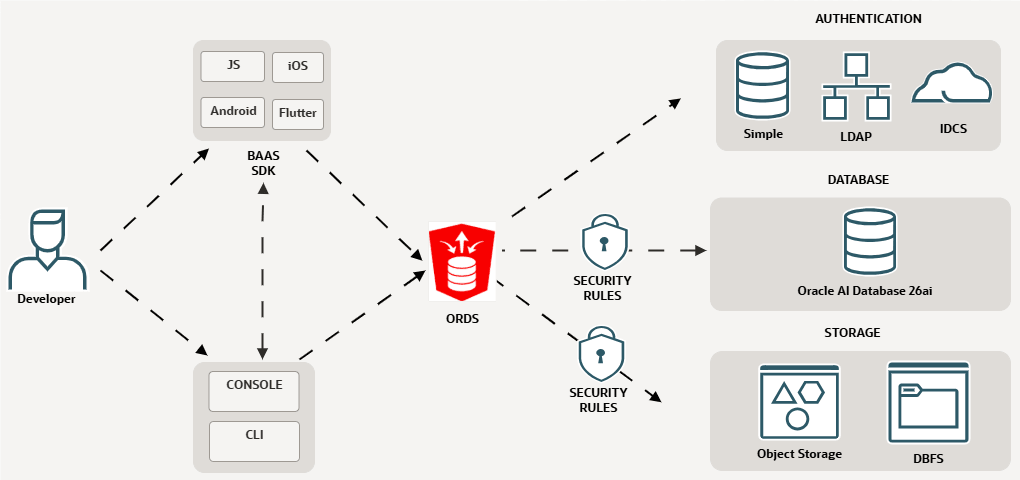
Oracle Backend with Firebase APIs is a comprehensive platform designed to simplify backend development by offering database, authentication, and object storage services through a unified interface. Its architecture is modular, secure, and scalable, enabling developers to build applications with ease while leveraging Oracle’s robust infrastructure.
Developers can connect their web, mobile, or desktop apps to the toolkit services using simple, platform-specific SDKs. These SDKs interact with the toolkit's core features like authentication, database, and object storage, using endpoints exposed by Oracle REST Data Services (ORDS). Management tasks like configuring users, data, and security rules can be handled through the web-based console or the command-line interface (CLI). Built-in security make it simple to define rules and permissions, so you have full control over who can access your app’s resources.
Figure 2-1 Oracle Backend with Firebase APIs Architecture
Parent topic: Fundamentals
2.3 Backend Overview
This section introduces the core backend services offered by Oracle Backend with Firebase APIs. Designed to streamline application development, the toolkit unifies essential capabilities, such as database management, authentication, and file storage, within a consistent framework. Whether you are building for web or mobile, you can seamlessly access and control these services through platform-specific SDKs, REST APIs, or the toolkit's management console. The following pages provide an overview of each service, explaining how they function and how they simplify backend integration for your applications.
Database
Oracle Backend with Firebase APIs supports multiple data models for your app data. If you are new to Oracle Backend with Firebase APIs, start with the Document-Collection Model. It is the core SDK experience and works well for most app backends.
- Relational Model
-
Map existing database tables into hierarchical structures using the toolkit’s console.
-
Mappings use primary-key/foreign-key rules to create directed, non-cyclic hierarchies (each node has at most one parent).
-
The toolkit automatically generates duality views for each hierarchy, making it easier to query complex relationships.
-
- Collection Model
-
Define new collections (similar to document stores like Firebase) directly from the console, each with its own schema.
-
Automatic and functional indexes are supported for efficient queries.
-
Enforce data access using security rules.
-
Run collection-style operations on joins, collection groups, and duality views.
-
Authentication
Authentication services can be configured in three modes:
-
Basic: Built-in authentication with toolkit-managed token generation, validation, and social login support.
-
LDAP: Integrate with existing LDAP directories for user profiles, while the toolkit handles social login and token management.
-
IDCS: Use Oracle Identity Cloud Service (IDCS) as the identity provider for the project.
Authentication services also:
-
Support social login through Google, Facebook, and GitHub.
-
Allow integration with OIDC and SAML providers.
-
Provide password policy enforcement, and supports SMTP setup for email verification and password reset.
Object Storage
The object storage services provide two options for storing files and binary objects:
-
DBFS: Use Oracle Database File System (DBFS) for integrated file storage in on-premises deployments.
-
OCI Object Storage: Integrate with Oracle Cloud Infrastructure Object Storage for cloud-based file handling.
Parent topic: Fundamentals
2.4 Supported Platforms
Oracle Backend with Firebase APIs provides client SDKs to help you integrate backend services like authentication, database, and file storage into your apps.
The following SDKs are supported in this version.
-
Web (JavaScript)
-
Available in both JavaScript Namespace and Modular SDKs
-
-
Android
-
Native Java APIs for authentication, database, and storage
-
-
iOS
-
Native Swift APIs for authentication, database, and storage
-
-
Flutter
-
Dart SDK for cross-platform mobile and web apps
-
Parent topic: Fundamentals
2.5 SDK Overview
Oracle Backend with Firebase APIs provides a Software Development Kit (SDK) that provides developers with a unified set of libraries and APIs to interact with Oracle Backend with Firebase APIs services directly from their applications. It abstracts away the complexity of backend integration, enabling developers to focus on building features while the SDK handles authentication, database operations, storage, and security.
Oracle Backend with Firebase APIs supports simple-to-use SDKs and APIs for database, user authentication, and file storage. You can maintain full control over the backend and manage your project by using a console built inside ORDS or use the CLI to interact with projects directly from the terminal.
Each SDK provides authentication APIs (Basic, LDAP, Social), Database APIs (for document-style and relational data), and Object Storage APIs (for file upload and download). Each SDK communicates with backend services through ORDS REST endpoints.
Oracle Backend with Firebase APIs consists of the following core components to support the services offered in its initial version. The components are packaged into a single easy-to-use installable unit requiring minimum end-user intervention.
Key SDK Capabilities
-
Authentication
User Authentication SDK offers secure identity management with support for Basic Authentication, including OAuth2 Social Logins, Oracle LDAP, and Oracle IDCS
-
Register, sign in, and manage users.
-
Support for Email/Password, Social Providers (Google, Facebook, GitHub), LDAP, IDCS, SAML, and OIDC.
-
Token and Session management.
-
-
Database
Database SDK offers high-performance data storage supporting both structured and unstructured models with full CRUD and query capabilities
-
Create collections and manage data models.
-
Perform CRUD operations (
create,read,update,delete). -
Apply indexing and security rules.
-
-
Object Storage
Object Storage SDK offers scalable storage for media and documents with support for Securefile LOB and DBFS providing object-store-like access
-
Upload, download, and manage files.
-
Configure storage rules for access control.
-
Parent topic: Fundamentals
2.6 Console Overview
The Oracle Backend with Firebase APIs Console is the primary web interface for developers to manage and configure their backend services. It provides an environment to set up and configure a project and its services, such as authentication, databases, and storage. You can use the Console to manage settings and define security rules for how your app can access the backend resources.
Key Capabilities
-
Project Management
-
Create, configure, and delete projects.
-
Link apps (web, iOS, Android) to a project.
-
-
Authentication Setup
-
Enable login methods (Email/Password, Social Providers, LDAP, IDCS).
-
Manage users and authentication settings.
-
Enable email verification and password policies.
-
-
Data Management
-
Define collections and data models.
-
Add, edit, and delete records directly from the Console.
-
View and manage indexing and security rules.
-
-
Object Storage
-
Store and manage files (images, videos, documents).
-
Configure storage security rules.
-
-
Security Rules and Access Control
-
Define rules for authentication and authorization.
-
Apply role‑based access control across services.
-
-
Service Configuration
-
Enable, configure, and connect Oracle Backend with Firebase APIs services.
-
Parent topic: Fundamentals
2.7 CLI Overview
The Command Line Interface (CLI) in Oracle Backend with Firebase APIs is a developer tool that provides direct, scriptable access to Oracle Backend with Firebase APIs services. It is designed for developers who prefer command‑line tools over UI for automation and terminal workflows.
The CLI is important for the following reasons:
-
Offers a command‑driven alternative to the Console for managing Oracle Backend with Firebase APIs projects.
-
Enables automation and scripting of repetitive tasks.
-
Provides fine‑grained control over backend services without relying on a graphical interface.
Key Capabilities
-
Project Management
-
Create, list, and delete Oracle Backend with Firebase APIs projects.
-
Manage applications within projects, including creating, listing, retrieving, and deleting apps.
-
-
Authentication
-
Register, list, and manage users.
-
Configure login methods for Email/Password and social providers (Google, Facebook, GitHub), as well as LDAP and IDCS.
-
-
Database Operations
-
List collections and manage document paths.
-
Insert, update, query, and delete records directly from the CLI.
-
Create, list, and drop indexes.
-
-
Object Storage
-
List directories, and download, delete, and move files.
-
-
Initialization and Configuration
-
Log in and initialize the CLI with your credentials.
-
Set or switch the active project for CLI operations.
-
Configure authentication and storage services using configuration files or prompts.
-
Parent topic: Fundamentals