Using App Trust in Your Application
This chapter walks through enabling App Trust in the Oracle Backend with Firebase APIs console, configuring an attestation provider, and initializing the client SDK to ensure that App Trust tokens are automatically attached to requests and validated by your protected backend services.
Set Up App Trust
The Oracle Backend with Firebase APIs Console allows you to enable App Trust for a specific application using any allowed provider.
-
Each application lists the attestation providers available for that application, based on the platform type.
-
Each provider requires its own configuration.
Before you begin: You need an account with the provider you’re using and a site/secret key pair from them. Each provider has its own sign-up flow:
Table 44-1 Web Provider Configuration
| Attestation Providers | Required Fields |
|---|---|
| hCaptcha - hcaptcha.com |
|
| reCAPTCHA v3 - Google reCAPTCHA Admin Console |
|
| reCAPTCHA Enterprise - Google Cloud reCAPTCHA Enterprise |
|
| Cloudflare Turnstile - Cloudflare Turnstile |
|
About TTL
The TTL controls how long an App Trust token stays valid before the SDK has to fetch a new one. Longer TTLs mean fewer attestation calls but slower revocation if you need to roll the secret. One hour is a reasonable default.
About Score Thresholds
reCAPTCHA v3 and Enterprise return a score between 0.0 and 1.0 indicating how confident they are that the request is from a human. The threshold sets the minimum score that counts as “passing.” 0.5 is reCAPTCHA’s recommended starting point.
Console Steps for Setting Up App Trust
-
First, register an app.
See Also: Adding Oracle Backend with Firebase APIs to Your Apps for more information about registering your app
-
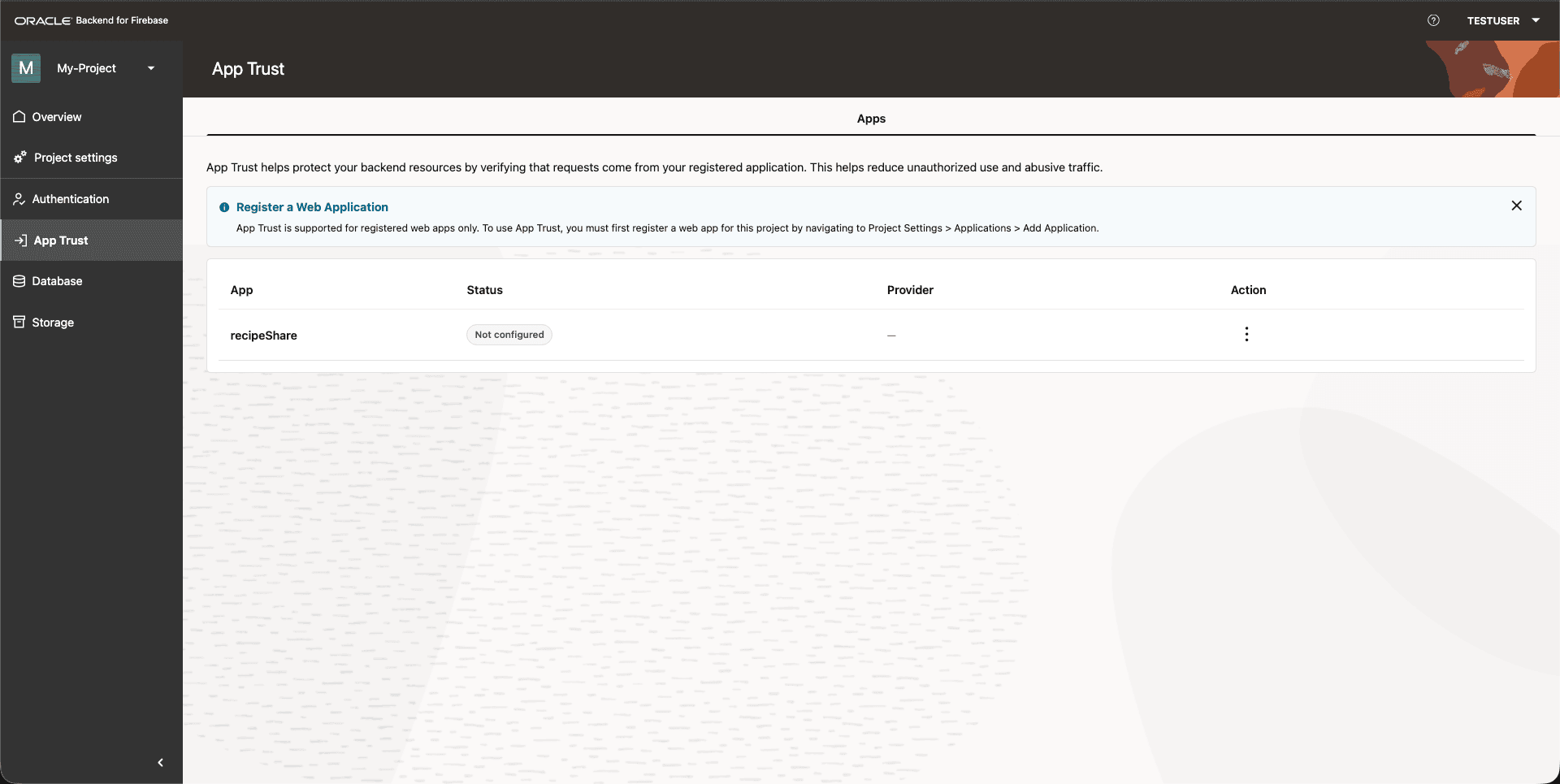
Open the App Trust tab.
Figure 44-1 Console: App Trust Tab
-
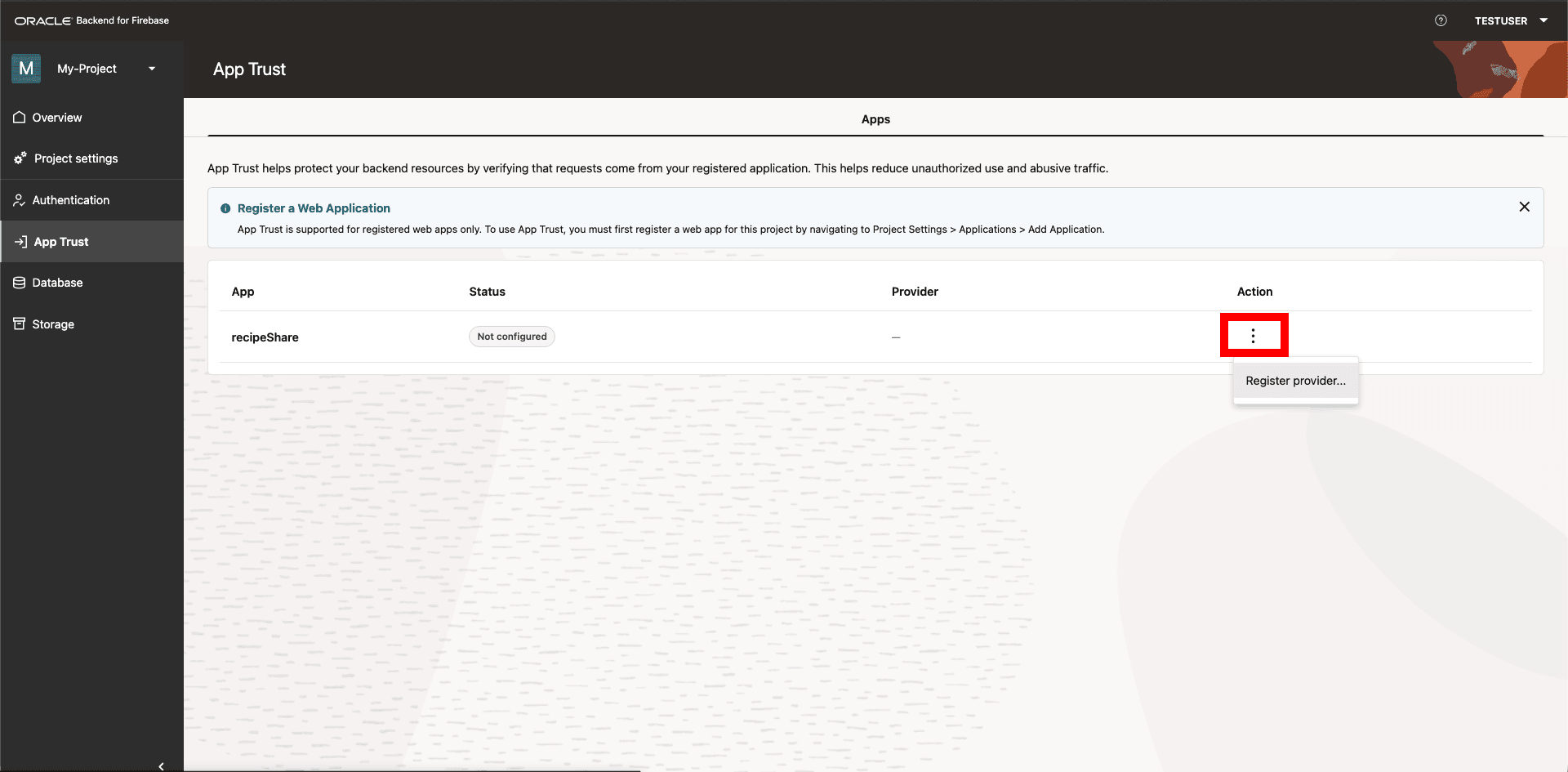
Click the 3 dots under the action column and click Register Provider.
Figure 44-2 Console: Register App Trust Provider
-
Pick the attestation provider you want to set up, fill in the details, and then click Save.
Figure 44-3 Console: Update Provider Details
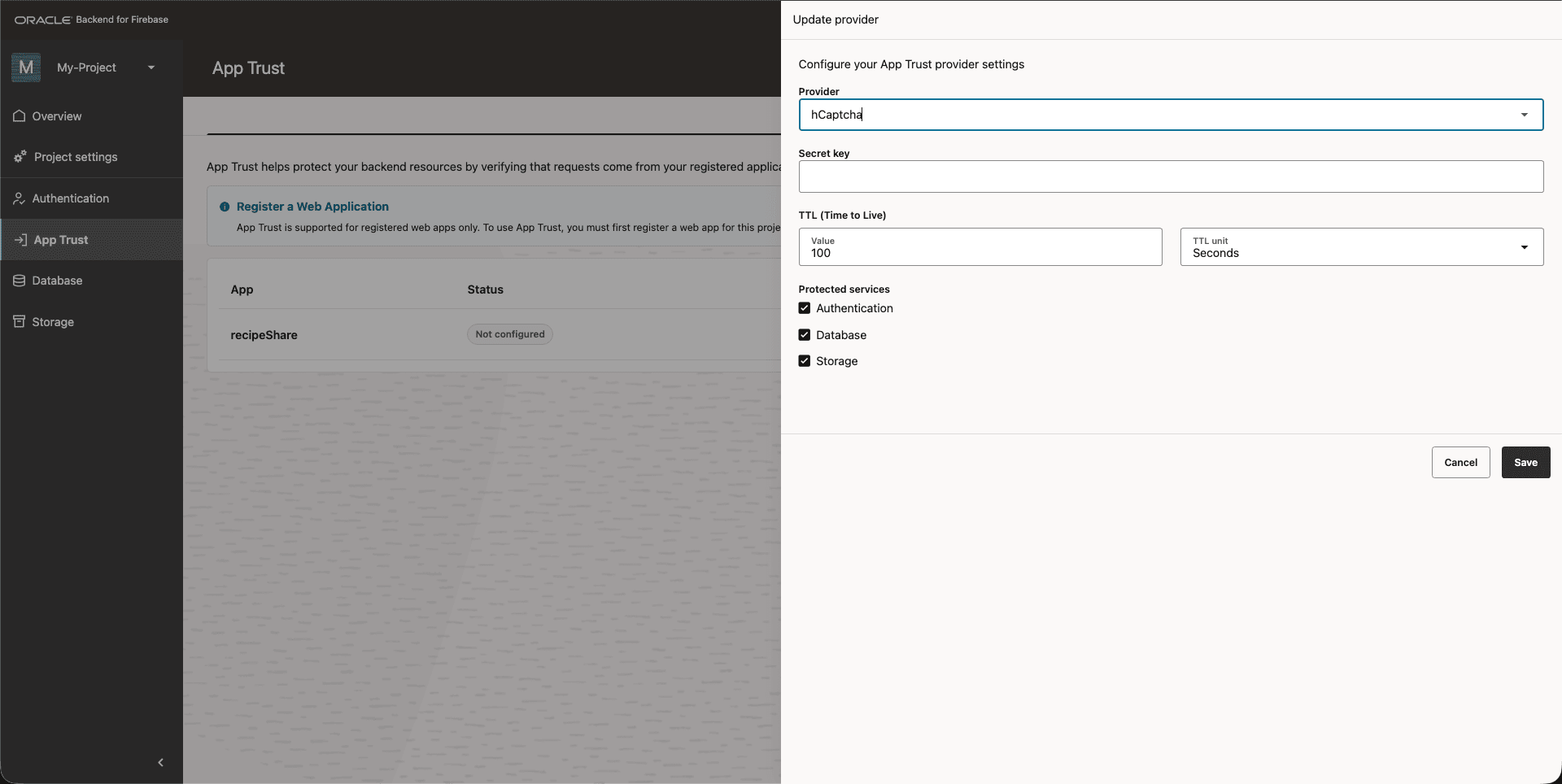
App Trust is now active on this app.
Initialize App Trust
Once App Trust is enabled for the app in the Console, you have to initialize it in your client code. If you don’t, no token gets attached to your requests and the backend rejects all of them.
Initialize App Trust right after you initialize the app, passing the site key from your attestation provider (not the secret key - that lives only on the backend).
import { initializeApp } from "fusabase/app";
import { initializeAppTrust, getToken, ReCaptchaV3Provider } from "fusabase/app-trust";

// Initialize Fusabase
const app = initializeApp({
  // your app config here
});

// Initialize App Trust
const appTrust = initializeAppTrust(app, {
  provider: new ReCaptchaV3Provider("YOUR_RECAPTCHA_SITE_KEY"),
});

// Optional: obtain an App Trust token directly
const tokenResult = await getToken(appTrust);
console.log(tokenResult.token);
import fusabase from 'fusabase-ns';
import {
initializeAppTrust,
getToken,
ReCaptchaV3Provider, // or TurnstileProvider / HCaptchaProvider / ReCaptchaEnterpriseProvider
} from 'fusabase-ns/app-trust';
// Initialize Fusabase
const app = fusabase.initializeApp({
--
});
// Initialize App Trust with a provider
const appTrust = initializeAppTrust(app, {
provider: new ReCaptchaV3Provider('YOUR_RECAPTCHA_V3_SITE_KEY'),
});
// Optional: Obtain an App Trust token
const { token } = await getToken(appTrust);
console.log('App Trust token:', token);Use Cases
1. Prevent Billing Fraud and Resource Abuse
Malicious actors often attempt to scrape data or overload backends by calling APIs directly using scripts or tools like Postman.
-
Scenario: You have a function that performs heavy computation or calls a paid third-party API.
-
Benefit: App Check ensures only requests from your real mobile or web app are executed, helping prevent botting that could spike your Oracle Backend with Firebase APIs bill or exhaust API quotas.
2. Protect Against Game Integrity Threats
In mobile gaming, attackers may use modified APIs (Android) or cracked apps (iOS) to bypass purchases or gain unfair advantages.
-
Scenario: A user modifies your game to grant unlimited “gems” by calling your Oracle Backend with Firebase APIs Oracledb APIs directly.
-
Benefit: Using Play Integrity (Android) or App Attest (iOS), App Check can detect tampering or rooted/compromised devices and block those requests before they reach your data.
3. Prevent Data Scraping and Phishing Using App Spoofing
Attackers may spoof your app’s identity to steal user data or inject fake data.
-
Scenario: An attacker distributes a fake version of your app to capture credentials, then uses your real backend to create fake accounts.
-
Benefit: The spoofed app lacks the correct signing certificate or Apple/Google attestation, so App Check rejects its requests.
4. Mitigate Application-Layer DDoS Attacks
-
Scenario: An attacker sends 50,000 requests per second to your Oracle Backend with Firebase APIs Oracledb database. Even empty/invalid requests still consume resources to process and check permissions.
-
Benefit: App Check acts as a pre-filter. Oracle Backend with Firebase APIs infrastructure verifies the App Check token before the database processes the request. Script-based traffic typically has no token and is rejected.
-
Result: Backend resources do not “see” the attack, reducing cost impact and preserving responsiveness for legitimate users.
5. Prevent Copycat Apps
Sometimes the threat is a copycat developer rather than a traditional attacker.
-
Scenario: You build a “Daily Quotes” app backed by Oracle Backend with Firebase APIs Oracledb. Another developer decompiles your app, extracts Oracle Backend with Firebase APIs API keys (public by design), and builds a new app using your database as the source.
-
Benefit: Although they have your API keys, their app is signed with a different certificate (different fingerprint).
-
Result: Oracle Backend with Firebase APIs App Check detects an unauthorized app signature and blocks the requests. Only the app version you published (for example, in the App Store) can access the data.