Events Monitor
This topic describes monitoring data changes in DB tables in Events Monitor window.
The Database Events (DB Events) window displays details of database events that are triggered on Oracle database connections when some changes are made to the data in a DB table. To open the Events Monitor window for a database connection, from the Main menu of Oracle Database Navigator toolbar, select DB Navigator > Events Monitor. The DB Events window is displayed listing all the connections on the left pane.
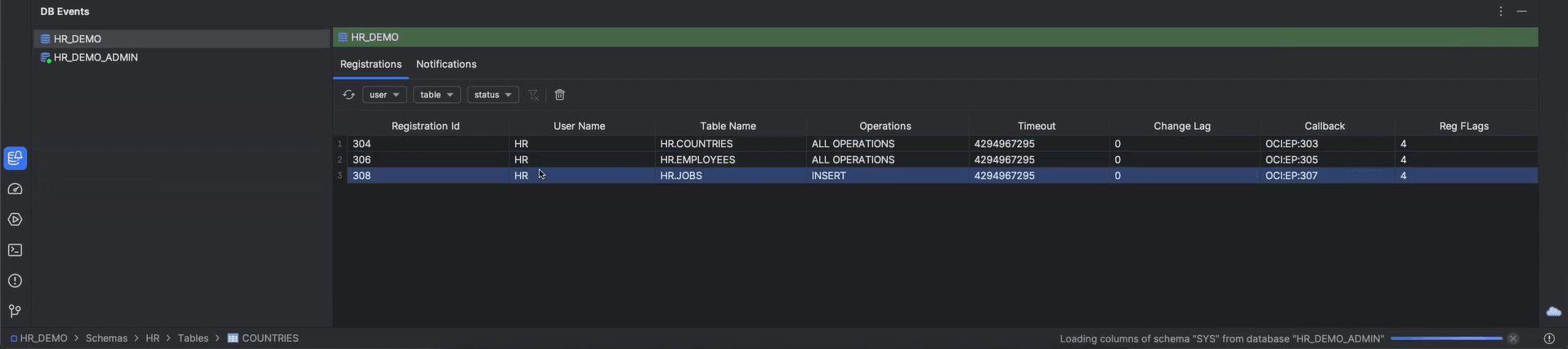
If you enable the option to Notify Data Changes (from the context menu of the table in DB Browser window) for any database table, an "event listener" must be registered. While registering the listener, you have the option to select the operations for which you want to be notified, such as, Insert, Update, and Delete. The real-time notification received are part of Oracle's Continuous Query Notification feature. For more information on the notification mechanism, see Continuous Query Notification.
Note:
Oracle® Database Navigator currently supports monitoring data changes in database Tables and not modifications in SQL queries. Also, only one table can be monitored at a time for a given listener registration.- Registration ID - Registration number for the listener registration you created in order to enable notifications for data changes.
- User Name - The username for which the registration is being created.
- Table Name - The name of the database table for which the registration is created to enable notifications on data changes.
- Operations - The type of operations (Insert, Update, Delete or All Operations) that caused the change event.
- Timeout - Time duration in seconds after which the registration is automatically expunged and the notification is timed out.
- Change Log - Any changes captured in the listener registration.
- Callback - If the notification type is using the Oracle Call Interface (OCI), the notification handler is a client-side C callback procedure. Displays the name of the PL/SQL procedure to be executed when a notification is generated (a notification handler). You must specify the name in the form
schema_name.procedure_name, for example,hr.dcn_callback. - Red Flags - Displays one or more quality-of-service flags, which are constants in the
DBMS_CQ_NOTIFICATIONpackage.

- User (name of the user that created the registration)
- Table (table name corresponding to the listener registration)
- Status (current status of the registration - Listening or Not Listening)
- Table Name - The name of the database table in which the data has changed.
- Operation - The type of operations (Insert, Update, Delete or All Operations) that will be tracked for receiving notifications.
- Timestamp - The date and time when the data was changed.
- Row ID - The database table row identifier in which the data has been changed.
- Source Registration ID - The registration number for the listener registration created to track the data changes and receive notifications.
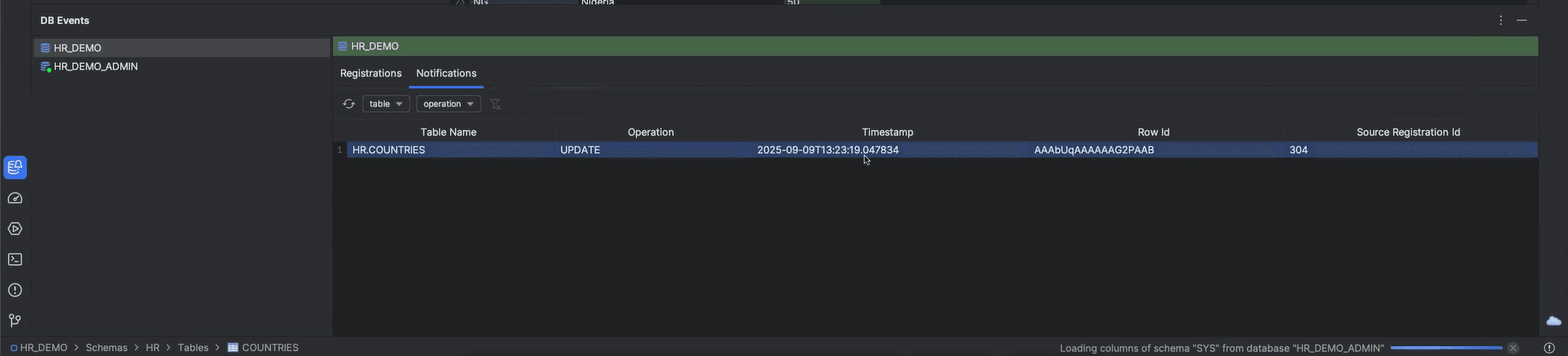
- Table (table name in which the data has changed triggering the notification)
- Operation (database operation that triggers the event including insert, update, or delete)
- Enabling Notification for Data Change
This topic describes the procedure for enabling/disabling notifications for data change operations that occur in database tables.
Parent topic: Database Browser