The Collection Process
Learn how the Oracle Audit Vault collection process works.
Flow of Collection: User
When you develop a collection plug-in for Oracle Database Security Central, your process of development and deployment has a consistent flow.
Collection plug-ins proceed through this lifecycle:
Flow of Development
-
You, the developer, create a collection plug-in and provide it to the user.
-
Your user deploys the plug-in into the Oracle Audit Vault Server. The act of deploying a plug-in into the server creates a new version of the Oracle Audit Vault Agent. This new agent contains collector code from the collection plug-in.
-
Your user then deploys the new Agent onto the host where it needs to run.
From then on, the user can start collecting audit trails supported by the collector code.
-
Your User starts collecting audit trails supported by the collector code.
Flow of Collection
After the user starts collection, the flow of collection proceeds as shown in this diagram.
Figure 1: Flow of Collection for Oracle Audit Vault Collection Agents
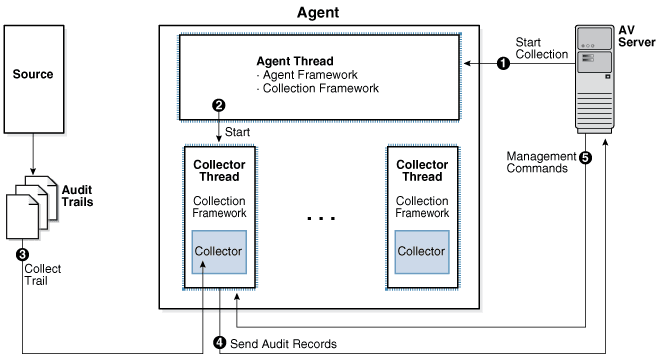
Description of the illustration sigdv103.png
Flow of Control Inside the Audit Collection Plug-in
After you develop a collection plug-in for Oracle Database Security Central, the collection plug-in follow this flow as it collects audit trails.
A collection plug-in accesses an audit trail, and extracts an audit record and its related fields from the audit trail. Next, it maps the audit record to an Oracle Audit Vault event, and all the fields to Oracle Audit Vault fields. The collection plug-in then passes the Oracle Audit Vault event and fields to the Audit Vault Agent, which sends the information to the Oracle Audit Vault Server.
Flow of Collection
-
The Oracle Audit Vault Server commands the Agent Framework to create a thread to collect a specific audit trail.
-
The new thread created by the agent collects a specific audit trail, and then turns over control of the thread to the Collection Framework.
-
Within the thread, the Collection Framework connects to the Oracle Audit Vault Server, and queries for configuration information for the audit trail being collected. Additionally, it requests information for the last checkpoint set for that trail. The checkpoint is stored in the Oracle Audit Vault Server in a checkpoint table.
-
With the information it now has, the Collection Framework refers to the plug-in manifest file for the correct Java class to start within the correct collection plug-in. It passes the configuration information to this class, and submits a request to initialize itself.
-
After the the collector has initialized itself, the Collection Framework loops repeatedly. Within each loop, the Collection Framework does the following:
-
Asks the collector for any additional audit records in the audit trail.
The collector transforms (by mapping) any further audit records into the form of audit records as specified in the mapper file, and hands them to the Collection Framework through the Collection API.
-
The Agent sends the checkpoint information and other metric data received from the collection plug-in to the Audit Vault Server. The Audit Vault Server stores this information in a checkpoint table.
-
-
If the Audit Vault Server sends commands to the Collection Framework, such as a shutdown command, the Collection Framework passes them to the collector to act on. If the Collection Framework receives a
STOPcommand from the Oracle Audit Vault Server, it notifies the collector to stop sending records. It then exits the collection thread, and shuts itself down.
Collection Concepts
To use Oracle Audit Vault, review basic Oracle Audit Valut basic concepts.
Collection Thread
Learn about how Oracle Audit Vault collection threads are run.
The Agent starts collection threads. Within each thread, the Audit Vault Collection Framework executes code provided by the collection plug-in. The collection Framework is the run time infrastructure that exposes the collection API with which the collection plug-in interfaces. The collection plug-in also uses utility APIs if required.
Collection Phase
The collection phase is the phase in which Audit Vault collects audit trail records.
During the collection phase, the collection plug-in accesses the audit trail to extract new records. The exact mechanism of how audit trails are accessed depends on the audit trail. After a target audit record is retrieved from the trail, the collection plug-in transforms (maps) it into an audit record that can be sent to the Audit Vault Server.
The collection plug-in must also acquire information about the character set of the target records, the encoding used, and issues related to the time stamps. This is done to make these things coordinate with Audit Vault Server requirements.
Related Topics
Mapping
The mappings required from targets to Audit Vault Server depends on the fields in the target records.
These types of mapping are required for the Audit Vault Server:
-
Event Mapping: Maps a target specific event to an Audit Vault Server event.
-
Field Mapping: Maps the various field of the target records to Audit Vault Server fields.
-
Value Mapping: Maps various field values collected into a set of normalized values for each field (for example,
0and1may be mapped toFALSEandTRUEfor a specific field). -
Complex Mapping: Complex mappings are used when there are no simple mappings from one target field to an Audit Vault Server field, or one target audit event to one Audit Vault Server event.
Complex mappings can require additional data from the target, or require additional programming code in the collection plug-in.
See Also: Configuring Quick JSON Target Type to Collect Audit Data from MongoDB
Checkpoint of a Trail
A Checkpoint, or a checkpoint of a trail, is the point up to which audit records were committed to the Oracle Audit Vault Server.
The collection plug-in sets a checkpoint periodically so that it can resume from the last checkpoint when restarted.
Recovery Phase Of Data Collection
Learn how Oracle DBSecCentral manages recovery of audit records through checkpoints and recovery mechanisms.
Recovery happens when the Agent stops in the middle of collection and has to be restarted. At this point, the recovery process ensures there are no duplicate records in the Audit Vault Server.
Audit Vault Server ensures that every audit record is archived once and only once. For this purpose, Audit Vault Server implements a checkpoint and recovery mechanism.
In the recovery phase of data collection, a collection plug-in has stopped and restarted, resuming collection. The collection plug-in resumes collection from the checkpoint at which it previously stopped
If the collection plug-in has not collected any records from the audit trail, then the checkpoint occurs before the first record. If the collection plug-in has started collecting records and then stopped, then the checkpoint occurs immediately after the last record that it collected.
Resuming collection immediately after the checkpoint ensures that the collection plug-in does not miss any records. To avoid collecting duplicate records during recovery, the collection plug-in checks the Marker field of each record.
The collection plug-in should not collect and pass on to the agent any records that occurred before the last checkpoint. However, the Agent automatically filters out records committed after the last checkpoint, and recollected when the collection plug-in restarts. Collection plug-ins built using Oracle Database Security Central SDK write the EventTimeUTC field into a file with the extension .atc. A script can subsequently read this file, and delete audit records as appropriate.
Related Topics
Audit Trail Clean Up
Audit Vault Server collection plug-ins can clean up archived audit trail data for targets.
Audit trail clean up is a feature that some targets provide to clean up audit records after they have been archived. If this type of feature exists in the target, an Audit Vault Server collection plug-in can integrate with it, to tell the target to what extent the audit trail has been archived. Identifying which portion of the audit trail is archived enables the target to clean up the audit trail (remove the original audit data) to that point, because cleaning up data that has been archived results in no loss of data. The collection plug-in gives the clean up utility information about the checkpoint, the point up to which data has been collected.
The collection plug-in can notify the clean-up feature of the target system by invoking the appropriate interface of the feature. For instance, the system may read a timestamp from a file in the file system and clean up the audit trail up to that timestamp. If that is the case, the plug-in can write that file periodically.
For example, Oracle Database targets provides this type of utility in the DMBS_AUDIT_MGMT package, and the Oracle Database prepackaged collection plug-ins integrate with it.