About Oracle Data Window
In the Oracle Data Window, you can view and edit column data for all simple Oracle data types and the following complex Oracle data types: RAW, LONG RAW, and XMLType.
The column data for User-Defined Types (UDTs), BFILE, LONG, LONG RAW, BLOB, and CLOB data is read-only and can only be modified to the default column value or NULL.
This section covers the following topics:
Opening Oracle Data Window
To open Oracle Data Window, do one of the following:
-
Right-click the node representing the table or view whose data you want to view or modify, and from the menu, select Retrieve Data.
-
Double-click the node that represents the table or view whose data you want to view or modify.
Oracle Data Window appears similar to the following:
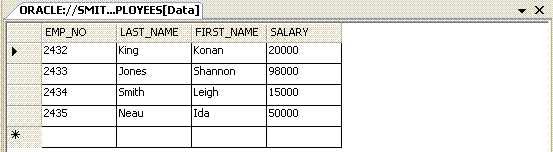
Description of the illustration data_window2.gif
Using Oracle Data Window
When using Oracle Data Window:
-
To edit data, select the cell you want and modify it as needed. You can insert
NULLinto the column by selecting the blank option from the drop-down list, or entering blank into the cell. For new rows, you can insert the default value into the column by selectingDEFAULTfrom the drop down list. -
To add a row to a table, enter data in the empty last row.
-
To remove a row, select the entire row by clicking on the row header at the left-hand side of the row and press Delete.
-
Your changes are automatically committed to the database when you select a different row. To explicitly commit your changes to the database, click the Save button.
-
The Oracle Data window does not allow you insert, update, or delete the data of views that have
INSTEADOFtriggers. -
If the
INSTEADOFtrigger is created on the view after you launched the data window, an error message appears, informing you that changes were not saved to the database. -
For UDT column data, the actual data is represented in XML format and includes only the level of nested structure.
Menu Options
Oracle Data Window provides the following menu items in the row header for each row of data:
| Menu Option | Description |
|---|---|
| Design | Displays the Table Designer for tables or the View Designer for views. |
| Moves cursor to the row of data. | |
| Last | Moves cursor to the last row of data. |
| Row | Prompts you for the row of data to move the cursor, then moves the cursor to the data row number that you specify. |
| Refresh | Updates the table or view data displayed in the data window. |
| Cut | Applies only for a new row or when data is selected in a cell on any row. It copies the contents of the cell to the clipboard and clear the contents of the cell. |
| Copy | Applies only for a new row or when data is selected in a cell on any row. It copies the contents of the cell to the clipboard. |
| Paste | Applies only for a new row or when data is selected in a cell on any row. It copies the contents of the clipboard to the cell. |
| Delete | Deletes the current row of data. |
See Also About Server Explorer | Table Designer |View Designer