Download Credentials Files Dialog
The Download Credentials Files Dialog downloads credentials files. Credentials files include wallet files, TNSNAMES.ORA alias file and SQLNET.ORA files, among others. If there are existing file conflicts when the credentials files are attempted to be copied, the Copy Credentials Files Dialog will open to assist in resolving the conflict.
Opening the Download Credentials Files Dialog
You can open the Download Credentials Files Dialog from an Transaction Processing/Lakehouse/JSON Nodes, Download Credentials Files menu item.
Using the Download Credentials Files Dialog
The Download Credentials Files Dialog appears as follows:
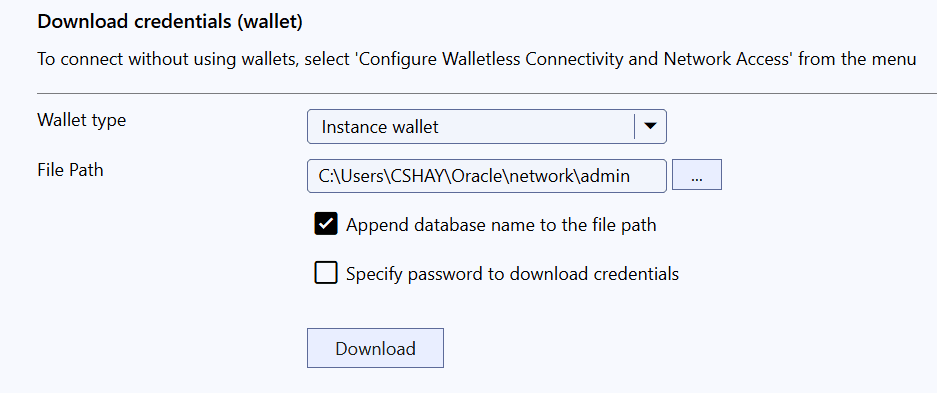
The Download Credentials Files Dialog has the following controls:
| Control | Description |
|---|---|
| Wallet Type | Choose the wallet type. An Instance wallet is used to generate a wallet for the current database only. A Regional wallet is used to generate and download the wallet for all databases in the region. |
| File Path | The location where the credentials files can be downloaded to |
| Append database name to the file path | If checked, a directory with the name of the database instance will be created in the File Path directory and the credentials files will be extracted into new directory. If unchecked, the credentials files will be extracted directly in the File Path directory. |
| Specify a password to download credentials | Check this box if you wish to secure the credentials with a password |
| Password | Enter the credentials files password |
| Confirm Password | Confirm the credentials files password |
| Download | Downloads the credentials files. If there are conflicts when downloading credentials files, the Copy Credentials Files Dialog will open to assist in resolving the conflict. |