Varray Designer
The VARRAY Designer lets you create or modify varrays. This section covers the following topics:
Creating VARRAYs in Oracle Developer Tools
Use the VARRAY Designer to create VARRAY types.
Starting the VARRAY Designer
Start the VARRAY Designer from the Server Explorer by right-clicking the User-Defined Categories node, and selecting the New Varray. The VARRAY Type Designer, similar to the following appears.
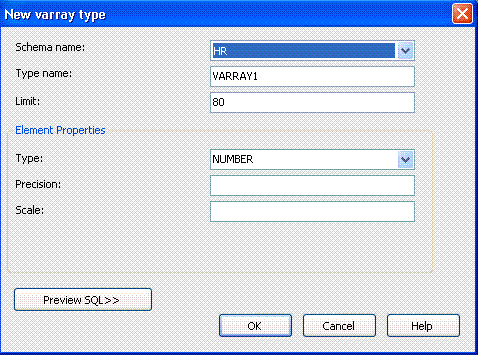
Description of the illustration varray_designer.gif
Using the VARRAY Designer
The VARRAY Designer creates new VARRAY types.
The controls in the VARRAY Designer are as follows:
| Control | Description |
|---|---|
| Schema name | Select the schema for the new type. The list contains all the schemas that are available to you as defined in the Filters Tab on the Connection Dialog. By default, the schema for the new VARRAY type is the one you have logged in with. If that schema was not defined in the filter tab, then the default schema is the first schema in the sorted list of available schemas. |
| Type name | Displays the name of the new VARRAY type. By default, the name is generated in the format VARRAYX where X can be any number. |
| Limit | The maximum size of the VARRAY type. Default is 80. |
| Element Properties | This section enables you to specify properties for the element of the
|
| Preview SQL | Launches the preview SQL Dialog box which displays the CREATE statement that creates the VARRAY type in the database. |
| Cancel | Closes the dialog box without creating the VARRAY type in database. |
| Help | Launches the help page for New Varray dialog. |
| Ok | Creates the The newly created |