XML Schema Designer
The XML Schema Designer lets you create XML schemas. For more information on XML schemas, see Oracle XML DB Developer’s Guide.
This section covers the following topics:
Starting the XML Schema Designer
In Server Explorer, right-click the XML Schemas node and from the menu, select New XML Schema.
The XML Schema Designer appears as follows:
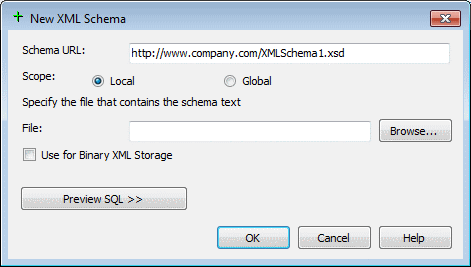
Description of the illustration schema_designer.gif
Using the XML Schema Designer
In general, to use the XML Schema Designer, you specify the schema’s URL, its scope, and the file containing the schema’s text.
The XML Schema Designer has the following controls:
| Control | Description |
|---|---|
| Schema URL | Enter the name of the schema in standard URL format, for example:
|
| Scope | Select from the following:
|
| Specify the file that contains the schema text | In the File box, specify the file name or click Browse to search for the file in the local file system. |
| Use for Binary XML Storage | Registers the XML Schema to be used for binary XML storage.
|
| Preview SQL | Displays the SQL that will be executed when OK is clicked. |
| OK | Creates the XML Schema and closes the dialog. |
| Cancel | Closes the dialog without creating the XML Schema. |
| Help | Opens this help page. |
See Also XML Schemas Node